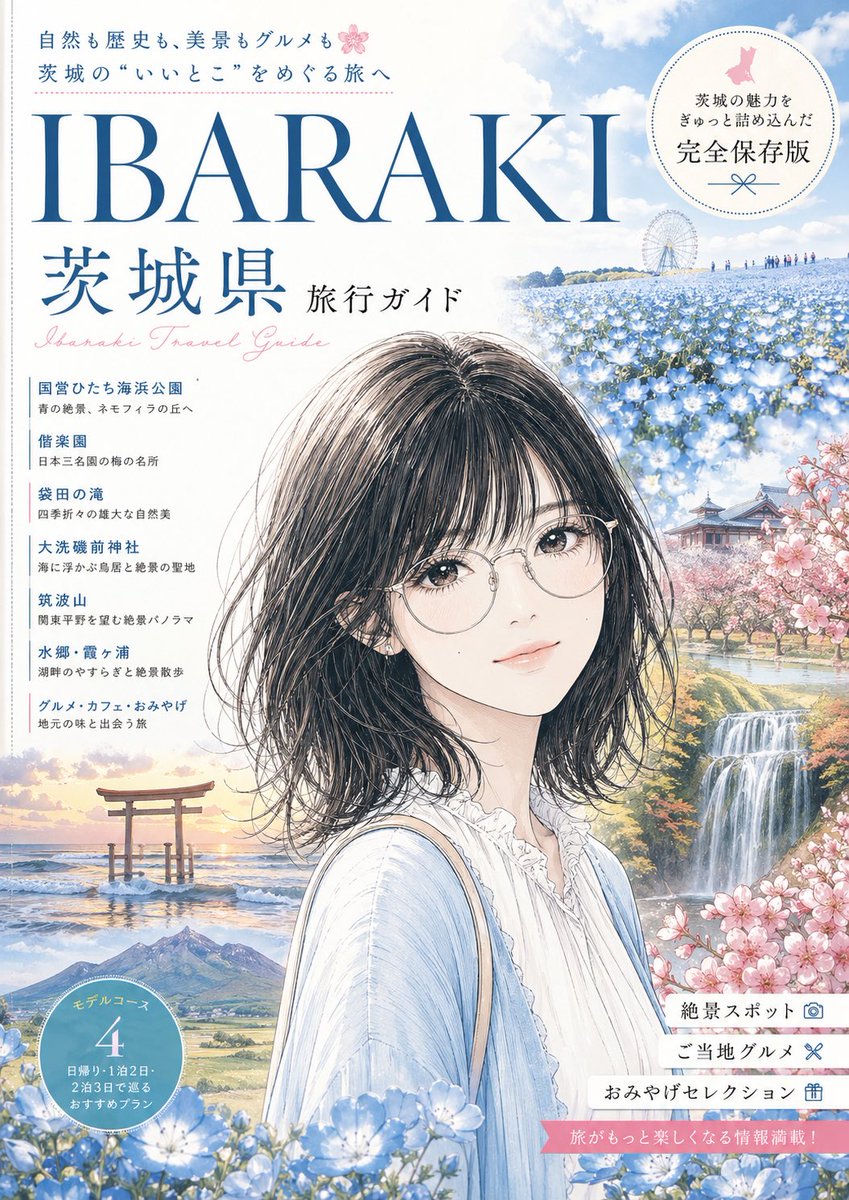
茨城旅遊指南封面
此提示可產生一張精美的茨城縣日本旅遊雜誌封面插圖,適用於旅遊海報、社論封面或地區指南插圖。
這是一個平面設計和海報設計的GPT Image 2範例。請使用下方可直接使用的提示資訊產生類似的視覺素材,並在重複使用前查看Awesome GPT Image 2 Prompts署名和商業用途授權資訊。
需要完整的提示符號集?請使用 平面設計和海報設計 主題中心提供更多相關範例,或打開 GPT Image 2 提示庫 有關完整範例索引、可重複使用結構和來源歸屬的資訊。
Free 1K preview
Generate one preview image instantly, no sign-up required.
2634/4000
提示詞
可直接複製的提示
A refined Japanese travel guide magazine cover illustration in a soft watercolor-and-ink editorial style, vertical A4 layout, airy pastel palette, elegant tourism-poster composition. The cover headline is dominated by very large serif blue text reading {argument name="main title" default="IBARAKI"}, with large Japanese title text below reading "茨城県 旅行ガイド" and a pale pink cursive English subtitle reading "Ibaraki Travel Guide". At the top left, include two lines of small Japanese copy about nature, history, scenery, and gourmet travel in Ibaraki, accented with a tiny pink cherry blossom icon. At the top right, place a large circular badge with fine dotted border containing Japanese text and the phrase "完全保存版" in the center with a small ribbon flourish underneath. The main subject is a young Japanese woman shown from the chest up, placed slightly right of center, facing left in three-quarter view. She has a chin-length wavy bob in deep dark brown to black, delicate loose strands, soft natural texture, and a calm neutral expression. She wears a light blue cardigan over a white ruffled blouse with a high gathered neckline, plus a thin beige shoulder bag strap. Show every face clearly with natural, detailed facial features. Surround her with a collage of iconic Ibaraki scenery blended seamlessly into the cover art: a vast field of blue nemophila flowers across rolling hills in the upper right with a Ferris wheel in the distance and tiny visitors along the ridge; a traditional temple or pavilion among pink cherry blossoms at mid-right; a bright waterfall and landscaped stream at lower right; a torii gate standing in shallow ocean water at sunset in the lower left; and a mountain landscape near the bottom left center. Add abundant blue flowers in the foreground along the bottom edge and soft pink cherry blossoms framing the right side. Along the left side, include exactly 7 vertically stacked destination list entries in Japanese, each with a colored heading line and smaller descriptive subtext: "国営ひたち海浜公園", "偕楽園", "袋田の滝", "大洗磯前神社", "筑波山", "水郷・霞ヶ浦", and "グルメ・カフェ・おみやげ". At the lower left, place a blue circular badge with white Japanese text reading "モデルコース 4" and smaller itinerary copy below. At the lower right, include exactly 3 horizontal white label tabs with Japanese text and small icons: "絶景スポット", "ご当地グルメ", and "おみやげセレクション". Add a pink ribbon banner near the bottom right with small Japanese promotional text. Use a clean white background for the upper left, elegant magazine typography, delicate linework, dreamy spring atmosphere, polished tourism-cover design, high detail, premium print look.提示變數
提示符號中可編輯的參數佔位符及其預設值。
多變的
main title
預設
IBARAKI
Best for
- - 平面設計和海報設計 visual exploration
- - Image generation and reference-image edits
- - Reusable briefs that keep source attribution visible
Change these parts
- - Subject, product, character, or scene
- - Aspect ratio, camera, lighting, and background
- - Brand, text, color, and output constraints
Recommended model and settings
- - Model: gpt-image-2
- - Input mode: 文生圖
- - Aspect ratio: source
- - Commercial status: review original source
How to use this prompt
- 1. Copy the prompt and preserve its structure for the first test.
- 2. Replace the subject, context, and publishing channel.
- 3. Change one camera, lighting, or style variable per iteration.
- 4. Inspect the output, source, text, and rights before reuse.
Limitations, source, and reuse cautions
- - Generated output is an editable draft, not factual, legal, or rights evidence.
- - Review the linked source, people, brands, logos, text, and third-party media before commercial use.
內容來自Awesome GPT Image 2 Prompts 。必須註明出處。商業用途狀態為allowed ;付費使用前請查看來源版權資訊。
此類案例更多
按類別、輸入模式相容性、品質和低風險進行優先排序。






重用和來源註釋
預覽案例後,請謹慎使用此提示。
- 1.複製提示或直接在 Dovoo 中使用生成按鈕開啟提示。
- 2.根據您的實際使用情況調整變數、寬高比和參考影像。
- 3.發布或付費使用前,請確認版權、署名要求以及品牌或肖像權風險。