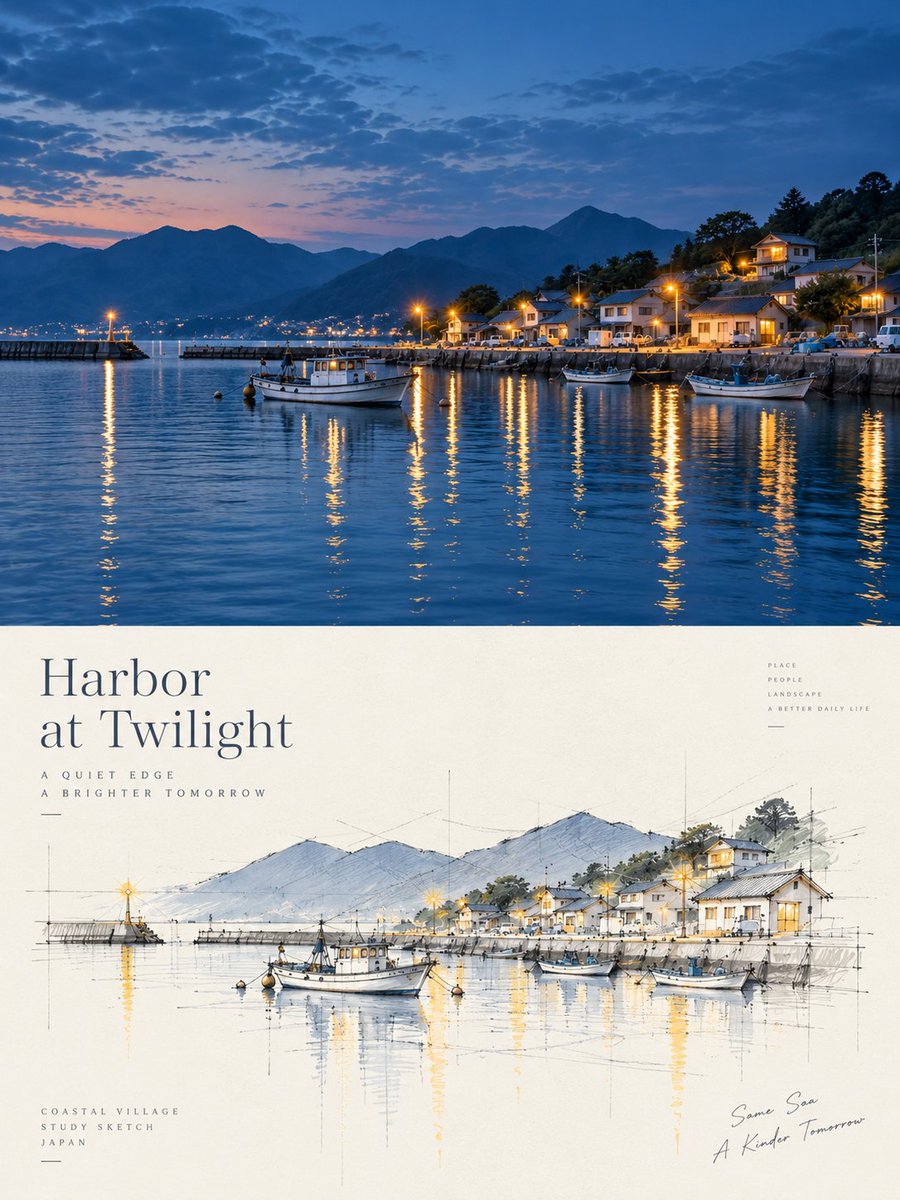
Harbor Twilight Photo Sketch Poster
Creates a split travel poster with a twilight harbor photo above and a matching architectural concept sketch below.
這是一個平面設計和海報設計的GPT Image 2範例。請使用下方可直接使用的提示資訊產生類似的視覺素材,並在重複使用前查看Awesome GPT Image 2 Prompts署名和商業用途授權資訊。
需要完整的提示符號集?請使用 平面設計和海報設計 主題中心提供更多相關範例,或打開 GPT Image 2 提示庫 有關完整範例索引、可重複使用結構和來源歸屬的資訊。
Free 1K preview
Generate one preview image instantly, no sign-up required.
3263/4000
提示詞
可直接複製的提示
Objective: Create a refined travel and architecture-themed poster, combining realistic coastal port photography with an architecturally-styled conceptual sketch of the same scene.

Canvas: Vertical 3:4 poster ratio, with elegant editorial typography. Divide the composition precisely into two parts: the upper part is a full-frame dusk port photograph; the lower part is a cream-colored paper poster area containing typography and a hand-drawn architectural perspective sketch.

Upper Photography Section: Showcase a tranquil port at the {argument name="place" default="small Japanese coastal harbor village at twilight"} blue hour. The scene includes calm, deep blue water, silhouetted mountains in the background, a small coastal village on the hillside to the right, warm yellow streetlights and lights, and long shimmering reflections on the water. Include 4 clearly visible boats: 1 main white fishing boat near the center foreground, 1 smaller boat near the right foreground, 1 darker-colored boat near the right dock, and 1 small boat near the right-center breakwater. Add a breakwater on the left with a single glowing lighthouse, town lights across the bay in the distance, layered blue mountains, scattered dusk clouds, and a soft horizon transitioning from pink-orange to blue.

Lower Poster Section: Use warm ivory paper with a subtle texture. Place a large, elegant serif title text in the upper left: "{argument name="headline text" default="Harbor\nat Twilight"}". Add two lines of small, widely-spaced uppercase sub-headline text below: “A QUIET EDGE” and “A BRIGHTER TOMORROW”. Stack small, uppercase words in the upper right: “PLACE”, “PEOPLE”, “LANDSCAPE”, “A BETTER DAILY LIFE”. Add three lines of small uppercase text in the lower left: “COASTAL VILLAGE”, “STUDY SKETCH”, “{argument name="country label" default="JAPAN"}”. Add casual handwritten-style text in the lower right: “{argument name="handwritten note" default="The Same Sea / A Brighter Tomorrow"}”.

Architectural Sketch: Draw a refined hand-drawn perspective sketch in the center of the lower half, consistent with the photo scene above. Use fine graphite construction lines, faint perspective guidelines, vertical measurement marks, ink outlines, loose watercolor washes, and pale blue mountains, soft gray roofs, soft green trees, and warm yellow highlights to represent lights and reflections. Include 4 sketch boats corresponding to the images above: the main white fishing boat in the center foreground, a small skiff on the left, a small boat near the right-center, and a larger boat on the far right. Include the breakwater, village houses, hillside trees, mountains, and lighthouse, all simplified into an architect’s conceptual sketch.

Visual Style: High-end Japanese coastal travel poster, tranquil and poetic, with realistic photography above and light architectural watercolor sketches below. Use refined typography, ample white space, fine lines, soft lighting, cinematic dusk blues, and warm golden reflections. The image should be clean and uncluttered.

Constraints: Maintain visual alignment between the upper and lower parts, and ensure the sketch clearly corresponds to the photo. Do not add extra panels, excess boats, logos, QR codes, borders, or watermarks.
提示變數
提示符號中可編輯的參數佔位符及其預設值。
多變的
place
預設
small Japanese coastal harbor village at twilight
多變的
headline text
預設
Harbor\nat Twilight
多變的
country label
預設
JAPAN
多變的
handwritten note
預設
The Same Sea / A Brighter Tomorrow
Best for
- - 平面設計和海報設計 visual exploration
- - Image generation and reference-image edits
- - Reusable briefs that keep source attribution visible
Change these parts
- - Subject, product, character, or scene
- - Aspect ratio, camera, lighting, and background
- - Brand, text, color, and output constraints
Recommended model and settings
- - Model: gpt-image-2
- - Input mode: 文生圖
- - Aspect ratio: source
- - Commercial status: review original source
How to use this prompt
- 1. Copy the prompt and preserve its structure for the first test.
- 2. Replace the subject, context, and publishing channel.
- 3. Change one camera, lighting, or style variable per iteration.
- 4. Inspect the output, source, text, and rights before reuse.
Limitations, source, and reuse cautions
- - Generated output is an editable draft, not factual, legal, or rights evidence.
- - Review the linked source, people, brands, logos, text, and third-party media before commercial use.
內容來自Awesome GPT Image 2 Prompts 。必須註明出處。商業用途狀態為allowed ;付費使用前請查看來源版權資訊。
此類案例更多
按類別、輸入模式相容性、品質和低風險進行優先排序。






重用和來源註釋
預覽案例後,請謹慎使用此提示。
- 1.複製提示或直接在 Dovoo 中使用生成按鈕開啟提示。
- 2.根據您的實際使用情況調整變數、寬高比和參考影像。
- 3.發布或付費使用前,請確認版權、署名要求以及品牌或肖像權風險。