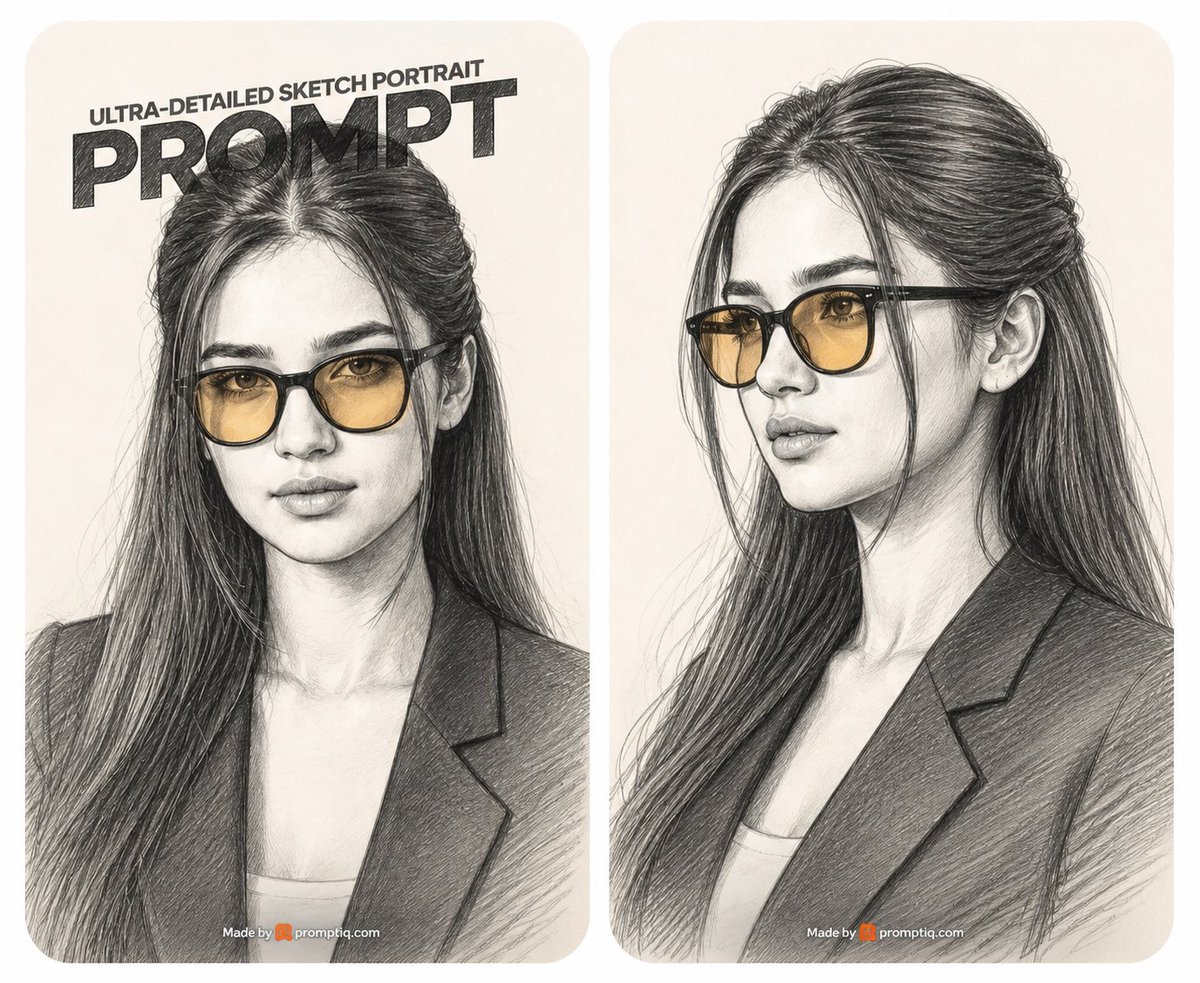
Two-Panel Graphite Portrait Poster
Generates a side-by-side graphite sketch portrait poster of a stylish woman with amber glasses, useful for showcasing AI portrait prompt results.
這是一個平面設計和海報設計的GPT Image 2範例。請使用下方可直接使用的提示資訊產生類似的視覺素材,並在重複使用前查看Awesome GPT Image 2 Prompts署名和商業用途授權資訊。
需要完整的提示符號集?請使用 平面設計和海報設計 主題中心提供更多相關範例,或打開 GPT Image 2 提示庫 有關完整範例索引、可重複使用結構和來源歸屬的資訊。
Free 1K preview
Generate one preview image instantly, no sign-up required.
2471/4000
提示詞
可直接複製的提示
Goal: Create a side-by-side promotional poster showing two ultra-detailed graphite pencil sketch portraits of the same stylish young woman, as if demonstrating a portrait prompt result.

Canvas: Wide horizontal 5:4 image on an off-white background, divided into exactly 2 tall rounded-rectangle portrait cards with a narrow white gutter between them. Both cards use warm cream paper texture, soft rounded corners, and subtle vignette shading.

Layout: Left card shows a frontal bust portrait from chest up, centered and slightly cropped by the top headline. Right card shows a three-quarter bust portrait facing left, chest up, with no headline. Place a small watermark-like credit centered near the bottom of each card reading “Made by promptiq.com” with a tiny orange icon before the site name.

Text content: On the left card only, add a bold poster headline at the top: small uppercase line “ULTRA-DETAILED SKETCH PORTRAIT” above a huge heavy black word “PROMPT”. Make the headline look hand-shaded with graphite hatching, slightly tilted or perspective-compressed, and partially overlapping the top of the woman’s hair.

Subject details: Depict {argument name="subject" default="a beautiful young woman"} with long dark hair, a center part, loose face-framing strands, and thick hair flowing over her shoulders. She wears black-framed glasses with translucent amber-tinted lenses, a dark blazer over a light top, defined brows, almond eyes visible through the lenses, a straight nose, full lips, and a calm confident expression. In the left portrait she looks directly forward; in the right portrait she looks slightly off to the viewer’s left in elegant three-quarter profile.

Visual style: Ultra-detailed graphite pencil drawing on cream sketch paper, realistic facial proportions, dense cross-hatching, visible pencil strokes, fine hairline rendering, careful shading on cheeks, nose, lips, neck, blazer lapels, and glasses. Keep the entire image monochrome graphite except for the warm amber glasses lenses and the small orange watermark icon. Use high contrast in the hair and blazer, softer shading on skin, and realistic transparent reflections on the lenses.

Constraints: Use exactly 2 portrait cards, exactly 2 drawings of the same woman, exactly 1 large headline on the left card, and exactly 2 small bottom credits. Do not add extra panels, extra people, colorful backgrounds, or photorealistic skin texture; it must remain a pencil sketch illustration.
提示變數
提示符號中可編輯的參數佔位符及其預設值。
多變的
subject
預設
a beautiful young woman
Best for
- - 平面設計和海報設計 visual exploration
- - Image generation and reference-image edits
- - Reusable briefs that keep source attribution visible
Change these parts
- - Subject, product, character, or scene
- - Aspect ratio, camera, lighting, and background
- - Brand, text, color, and output constraints
Recommended model and settings
- - Model: gpt-image-2
- - Input mode: 文生圖
- - Aspect ratio: source
- - Commercial status: review original source
How to use this prompt
- 1. Copy the prompt and preserve its structure for the first test.
- 2. Replace the subject, context, and publishing channel.
- 3. Change one camera, lighting, or style variable per iteration.
- 4. Inspect the output, source, text, and rights before reuse.
Limitations, source, and reuse cautions
- - Generated output is an editable draft, not factual, legal, or rights evidence.
- - Review the linked source, people, brands, logos, text, and third-party media before commercial use.
內容來自Awesome GPT Image 2 Prompts 。必須註明出處。商業用途狀態為allowed ;付費使用前請查看來源版權資訊。
此類案例更多
按類別、輸入模式相容性、品質和低風險進行優先排序。




重用和來源註釋
預覽案例後,請謹慎使用此提示。
- 1.複製提示或直接在 Dovoo 中使用生成按鈕開啟提示。
- 2.根據您的實際使用情況調整變數、寬高比和參考影像。
- 3.發布或付費使用前,請確認版權、署名要求以及品牌或肖像權風險。