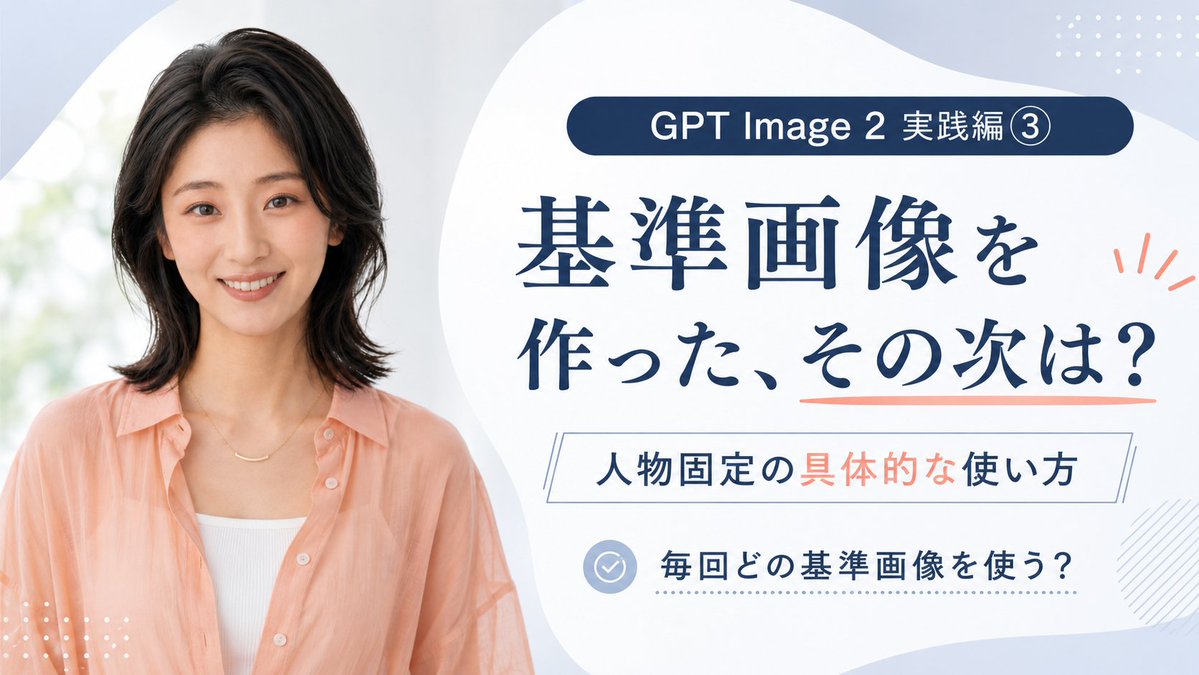
GPT Image 2 Reference Tutorial Banner
A Japanese course-style thumbnail featuring a smiling woman and text explaining how to use reference images for consistent characters in GPT Image 2.
這是一個平面設計和海報設計的GPT Image 2範例。請使用下方可直接使用的提示資訊產生類似的視覺素材,並在重複使用前查看Awesome GPT Image 2 Prompts署名和商業用途授權資訊。
需要完整的提示符號集?請使用 平面設計和海報設計 主題中心提供更多相關範例,或打開 GPT Image 2 提示庫 有關完整範例索引、可重複使用結構和來源歸屬的資訊。
Free 1K preview
Generate one preview image instantly, no sign-up required.
Free text preview doesn’t preserve reference-image consistency.
2244/4000
提示詞
可直接複製的提示
Goal: Create a clean Japanese promotional thumbnail/banner for a GPT Image 2 tutorial about using reference images to keep the same person consistent.

Canvas: 16:9 horizontal banner, 1200×675 style, soft pale blue and white background with large organic blob shapes. Use a polished educational course-thumbnail aesthetic, airy spacing, high readability, no harsh shadows.

Layout: Split composition with a realistic portrait on the left occupying about 40% of the canvas, and a text-heavy information panel on the right occupying about 60%. The right side has a large white rounded organic shape as the main text area. Add small decorative dotted grids in the top-right and bottom-left corners, a light diagonal hatch pattern near the lower-right edge, and coral accent marks beside the headline.

Subject details: On the left, show one smiling Japanese woman in her late 20s to early 30s, photographed from the waist/chest up, facing the camera. She has shoulder-length softly layered black hair, natural makeup, warm friendly expression, and wears a peach sheer button-up shirt over a white ribbed camisole with a delicate gold necklace. Background behind her is bright, soft-focus, and slightly green-white like daylight through a window.

Text content: Include exactly 4 text blocks on the right: 1) a dark navy rounded pill at the top reading 「GPT Image 2 実践編 ③」; 2) a large navy Japanese headline reading 「基準画像を\n作った、その次は?」 with a coral underline under the final phrase; 3) a thin outlined rectangle subtitle reading 「人物固定の具体的な使い方」 with 「具体的な」 highlighted in coral; 4) a bottom checklist row with a pale blue circular check icon followed by 「毎回どの基準画像を使う?」. Keep all Japanese text crisp, centered within its area, and use elegant Mincho-style serif for the main headline with modern sans-serif for smaller labels.

Color palette: Deep navy text, pale powder blue background, white panels, peach/coral accents matching the woman's shirt, and light blue-gray icon details.

Constraints: Use exactly one person, exactly four text blocks, exactly one check icon, and exactly three main decorative accent types: dotted grids, coral rays/underline, and diagonal hatching. Avoid extra logos, watermarks, English translations, or additional text.
Best for
- - 平面設計和海報設計 visual exploration
- - Image generation and reference-image edits
- - Reusable briefs that keep source attribution visible
Change these parts
- - Subject, product, character, or scene
- - Aspect ratio, camera, lighting, and background
- - Brand, text, color, and output constraints
Recommended model and settings
- - Model: gpt-image-2
- - Input mode: 圖生圖
- - Aspect ratio: source
- - Commercial status: review original source
How to use this prompt
- 1. Copy the prompt and preserve its structure for the first test.
- 2. Replace the subject, context, and publishing channel.
- 3. Change one camera, lighting, or style variable per iteration.
- 4. Inspect the output, source, text, and rights before reuse.
Limitations, source, and reuse cautions
- - Generated output is an editable draft, not factual, legal, or rights evidence.
- - Review the linked source, people, brands, logos, text, and third-party media before commercial use.
內容來自Awesome GPT Image 2 Prompts 。必須註明出處。商業用途狀態為allowed ;付費使用前請查看來源版權資訊。
此類案例更多
按類別、輸入模式相容性、品質和低風險進行優先排序。






重用和來源註釋
預覽案例後,請謹慎使用此提示。
- 1.複製提示或直接在 Dovoo 中使用生成按鈕開啟提示。
- 2.根據您的實際使用情況調整變數、寬高比和參考影像。
- 3.發布或付費使用前,請確認版權、署名要求以及品牌或肖像權風險。