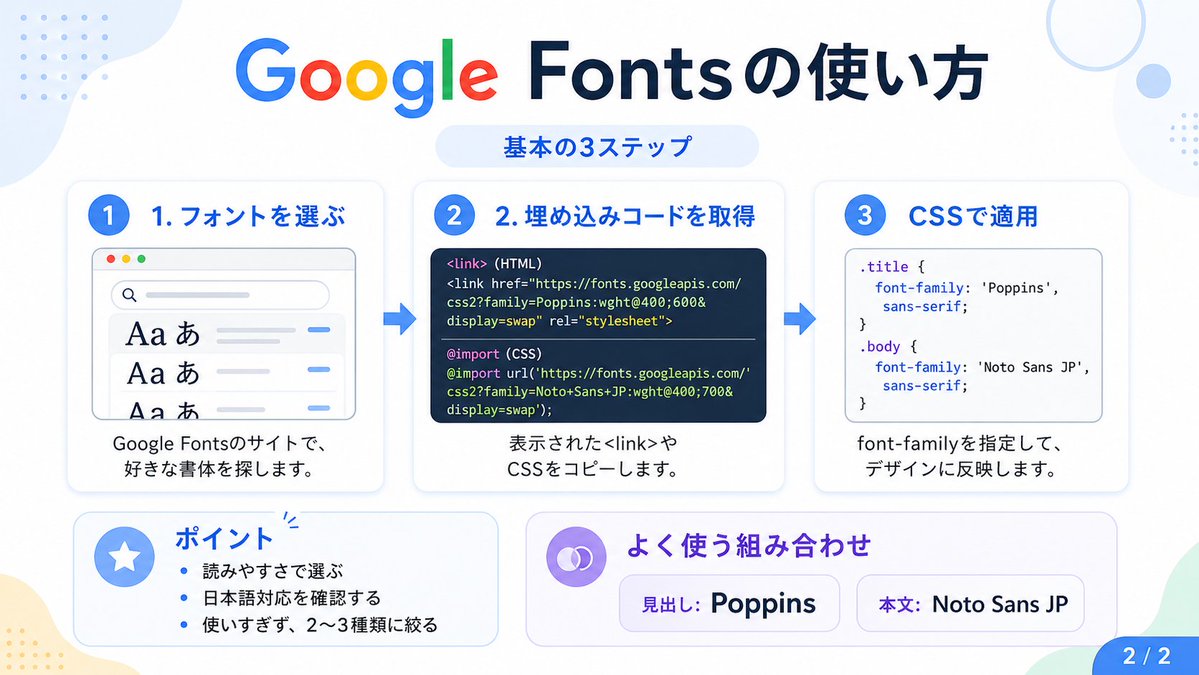
Google Fonts 日語教學資訊圖
此提示會產生一個簡潔的日文資訊圖,解釋使用 Google Fonts 的三個基本步驟,適用於社群媒體貼文、教學課程和簡報。
這是一個平面設計和海報設計的GPT Image 2範例。請使用下方可直接使用的提示資訊產生類似的視覺素材,並在重複使用前查看Awesome GPT Image 2 Prompts署名和商業用途授權資訊。
需要完整的提示符號集?請使用 平面設計和海報設計 主題中心提供更多相關範例,或打開 GPT Image 2 提示庫 有關完整範例索引、可重複使用結構和來源歸屬的資訊。
Free 1K preview
Generate one preview image instantly, no sign-up required.
3784/4000
提示詞
可直接複製的提示
{
  "type": "Japanese infographic",
  "topic": "How to use Google Fonts",
  "style": "clean modern flat design, white background, soft pastel blue and mint corner blobs, rounded cards with subtle shadows, tech tutorial aesthetic, crisp vector typography and UI illustrations",
  "canvas": {
    "aspect_ratio": "16:9"
  },
  "headline": {
    "main": "Google Fontsの使い方",
    "sub": "基本の3ステップ"
  },
  "layout": {
    "sections": [
      {
        "title": "1. フォントを選ぶ",
        "position": "left",
        "count": 1,
        "labels": [
          "1. フォントを選ぶ"
        ],
        "card_style": "rounded white panel with light blue border/shadow",
        "icon": "blue numbered circle with 1",
        "illustration": "browser window showing a font search interface, 3 visible font preview rows with large Aa あ samples, a search bar at top, small colored window buttons, light gray interface lines and blue accent dashes",
        "body_text": "Google Fontsのサイトで、好きな書体を探します。"
      },
      {
        "title": "2. 埋め込みコードを取得",
        "position": "center",
        "count": 1,
        "labels": [
          "2. 埋め込みコードを取得"
        ],
        "card_style": "rounded white panel with light blue border/shadow",
        "icon": "blue numbered circle with 2",
        "illustration": "dark code panel with two labeled code examples separated by a thin divider",
        "code_blocks": {
          "count": 2,
          "labels": [
            "<link> (HTML)",
            "@import (CSS)"
          ],
          "content": [
            "<link href=\"https://fonts.googleapis.com/css2?family=Poppins:wght@400;600&display=swap\" rel=\"stylesheet\">",
            "@import url('https://fonts.googleapis.com/css2?family=Noto+Sans+JP:wght@400;700&display=swap');"
          ]
        },
        "body_text": "表示された<link>やCSSをコピーします。"
      },
      {
        "title": "3. CSSで適用",
        "position": "right",
        "count": 1,
        "labels": [
          "3. CSSで適用"
        ],
        "card_style": "rounded white panel with light blue border/shadow",
        "icon": "blue numbered circle with 3",
        "illustration": "white code card containing CSS with two selectors and font-family rules",
        "code_blocks": {
          "count": 2,
          "labels": [
            ".title",
            "body"
          ],
          "content": [
            ".title { font-family: 'Poppins', sans-serif; }",
            "body { font-family: 'Noto Sans JP', sans-serif; }"
          ]
        },
        "body_text": "font-familyを指定して、デザインに反映します。"
      },
      {
        "title": "ポイント",
        "position": "bottom-left",
        "count": 3,
        "labels": [
          "読みやすさで選ぶ",
          "日本語対応を確認する",
          "使いすぎず、2〜3種類に絞る"
        ],
        "card_style": "rounded white panel with pale blue tint",
        "icon": "blue star in a circle",
        "body_format": "bullet list"
      },
      {
        "title": "よく使う組み合わせ",
        "position": "bottom-center-right",
        "count": 2,
        "labels": [
          "見出し: Poppins",
          "Main text: Noto Sans JP"
        ],
        "card_style": "rounded white panel with pale lavender tint",
        "icon": "purple linked-rings symbol",
        "body_format": "two pill-shaped example boxes"
      }
    ],
    "connectors": {
      "count": 2,
      "style": "large blue right-pointing arrows between the 3 top cards"
    },
    "pagination": {
      "text": "2 / 2",
      "position": "bottom-right",
      "style": "blue rounded corner tab"
    }
  },
  "text_language": "Japanese",
  "color_palette": {
    "primary_blue": "#2f80ff",
    "navy": "#0f2b5b",
    "google_colors": [
      "#4285F4",
      "#DB4437",
      "#F4B400",
      "#0F9D58"
    ],
    "lavender": "#8b6cff",
    "background": "#ffffff"
  }
}
Best for
- - 平面設計和海報設計 visual exploration
- - Image generation and reference-image edits
- - Reusable briefs that keep source attribution visible
Change these parts
- - Subject, product, character, or scene
- - Aspect ratio, camera, lighting, and background
- - Brand, text, color, and output constraints
Recommended model and settings
- - Model: gpt-image-2
- - Input mode: 文生圖
- - Aspect ratio: source
- - Commercial status: review original source
How to use this prompt
- 1. Copy the prompt and preserve its structure for the first test.
- 2. Replace the subject, context, and publishing channel.
- 3. Change one camera, lighting, or style variable per iteration.
- 4. Inspect the output, source, text, and rights before reuse.
Limitations, source, and reuse cautions
- - Generated output is an editable draft, not factual, legal, or rights evidence.
- - Review the linked source, people, brands, logos, text, and third-party media before commercial use.
內容來自Awesome GPT Image 2 Prompts 。必須註明出處。商業用途狀態為allowed ;付費使用前請查看來源版權資訊。
此類案例更多
按類別、輸入模式相容性、品質和低風險進行優先排序。


重用和來源註釋
預覽案例後,請謹慎使用此提示。
- 1.複製提示或直接在 Dovoo 中使用生成按鈕開啟提示。
- 2.根據您的實際使用情況調整變數、寬高比和參考影像。
- 3.發布或付費使用前,請確認版權、署名要求以及品牌或肖像權風險。