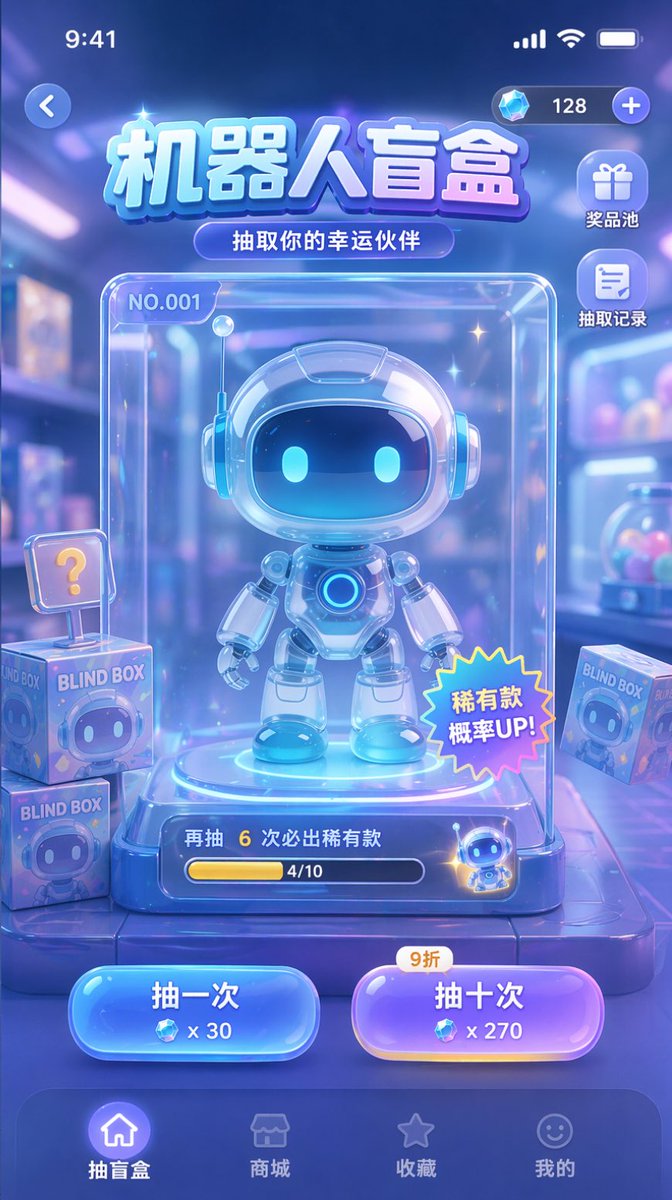
扭蛋遊戲UI模型
產生盲盒或扭蛋遊戲的行動應用 UI 模型,其中包含中心角色顯示、操作按鈕和導航元素。
這是一個動漫與遊戲的GPT Image 2範例。請使用下方可直接使用的提示資訊產生類似的視覺素材,並在重複使用前查看Awesome GPT Image 2 Prompts署名和商業用途授權資訊。
需要完整的提示符號集?請使用 動漫與遊戲 主題中心提供更多相關範例,或打開 GPT Image 2 提示庫 有關完整範例索引、可重複使用結構和來源歸屬的資訊。
Free 1K preview
Generate one preview image instantly, no sign-up required.
1887/4000
提示詞
可直接複製的提示
{
  "type": "手機遊戲 UI 模型",
  "theme": "科幻、可愛、玻璃形態、霓虹藍紫色配色方案",
  "header": {
    "status_bar": "頂部標準 iOS 狀態欄",
    "top_controls": "左側返回按鈕,右側帶有鑽石圖標和 '128' 的貨幣顯示",
    "title": "{argument name=\"main title\" default=\"機器人盲盒\"}",
    "subtitle": "{argument name=\"subtitle\" default=\"抽到你的幸運夥伴\"}"
  },
  "layout": {
    "side_menu": {
      "position": "右上角,在貨幣下方",
      "count": 2,
      "items": [
        {
          "icon": "gift",
          "label": "獎品池"
        },
        {
          "icon": "document",
          "label": "抽獎歷史"
        }
      ]
    },
    "centerpiece": {
      "description": "一個清晰的玻璃展示櫃,包含主要獎品",
      "subject": "{argument name=\"robot character description\" default=\"可愛的機器人角色,帶有發光的藍色眼睛和白色光澤盔甲\"}",
      "case_details": [
        "左上角標籤 'NO.001'",
        "右下角星形貼紙,寫有“稀有物品掉落率提升!”",
        "底部進度條,文字顯示“再抽 6 次保證稀有物品”和“4/10”"
      ]
    },
    "background_elements": {
      "description": "模糊的玩具店背景",
      "floating_items": {
        "count": 3,
        "description": "標有 'BLIND BOX' 和機器人臉的方形盒子,其中一個帶有 '?' 符號"
      }
    },
    "action_buttons": {
      "position": "底部中心,在導航欄上方",
      "count": 2,
      "buttons": [
        {
          "color": "blue",
          "text": "{argument name=\"left button text\" default=\"單抽\"}",
          "cost": "x 30"
        },
        {
          "color": "purple",
          "text": "{argument name=\"right button text\" default=\"十連抽\"}",
          "cost": "x 270",
          "tag": "90% 折扣"
        }
      ]
    },
    "bottom_navigation": {
      "count": 4,
      "items": [
        {
          "icon": "home",
          "label": "盲盒",
          "state": "active"
        },
        {
          "icon": "store",
          "label": "商城"
        },
        {
          "icon": "star",
          "label": "收藏"
        },
        {
          "icon": "smiley",
          "label": "我的"
        }
      ]
    }
  }
}
提示變數
提示符號中可編輯的參數佔位符及其預設值。
多變的
main title
預設
Robot Blind Box
多變的
subtitle
預設
Draw your lucky partner
多變的
robot character description
預設
cute chibi-style robot with glowing blue eyes and white glossy armor
多變的
left button text
預設
Draw once
多變的
right button text
預設
Draw ten times
Best for
- - 動漫與遊戲 visual exploration
- - Image generation and reference-image edits
- - Reusable briefs that keep source attribution visible
Change these parts
- - Subject, product, character, or scene
- - Aspect ratio, camera, lighting, and background
- - Brand, text, color, and output constraints
Recommended model and settings
- - Model: gpt-image-2
- - Input mode: 文生圖
- - Aspect ratio: source
- - Commercial status: review original source
How to use this prompt
- 1. Copy the prompt and preserve its structure for the first test.
- 2. Replace the subject, context, and publishing channel.
- 3. Change one camera, lighting, or style variable per iteration.
- 4. Inspect the output, source, text, and rights before reuse.
Limitations, source, and reuse cautions
- - Generated output is an editable draft, not factual, legal, or rights evidence.
- - Review the linked source, people, brands, logos, text, and third-party media before commercial use.
內容來自Awesome GPT Image 2 Prompts 。必須註明出處。商業用途狀態為allowed ;付費使用前請查看來源版權資訊。
此類案例更多
按類別、輸入模式相容性、品質和低風險進行優先排序。






重用和來源註釋
預覽案例後,請謹慎使用此提示。
- 1.複製提示或直接在 Dovoo 中使用生成按鈕開啟提示。
- 2.根據您的實際使用情況調整變數、寬高比和參考影像。
- 3.發布或付費使用前,請確認版權、署名要求以及品牌或肖像權風險。