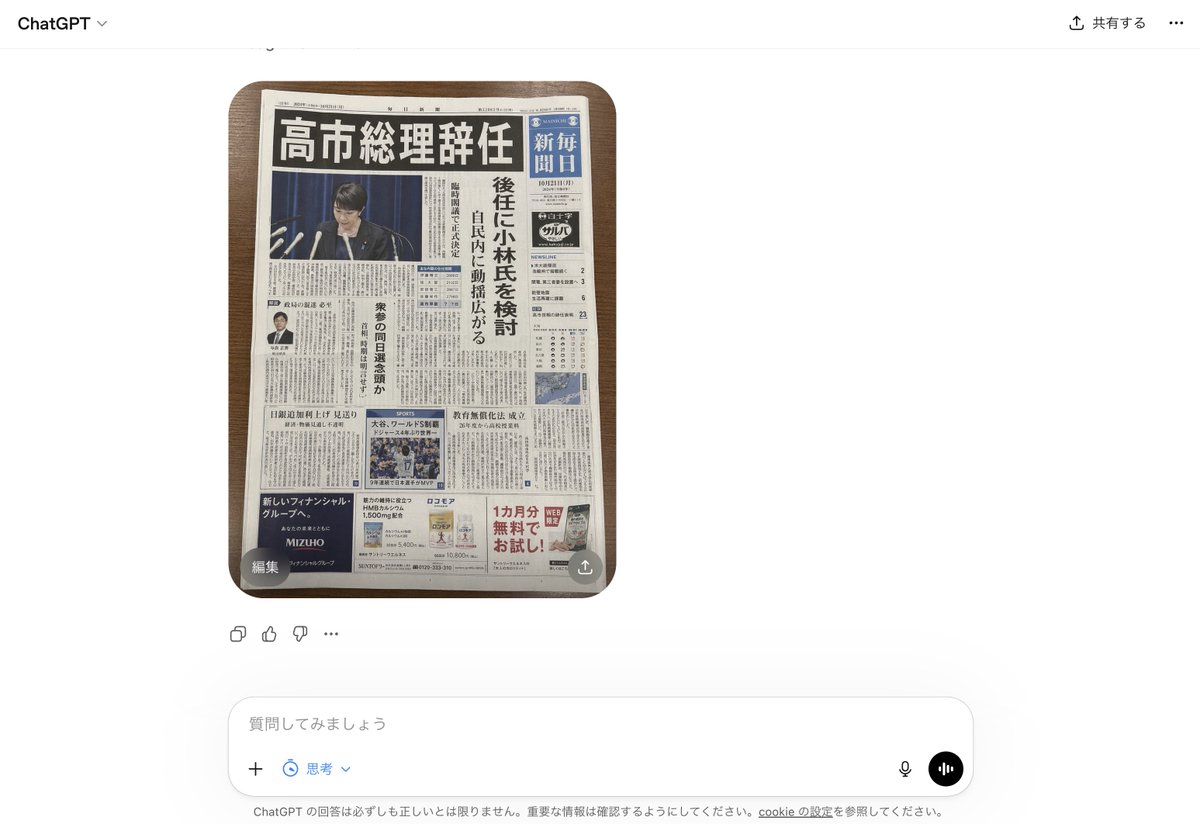
ChatGPT UI 中的假日本報紙
這將產生 ChatGPT 介面的逼真截圖,顯示一個偽造但令人信服的日本報紙頭版,可用於模擬 AI 生成的虛假新聞。
這是一個產品與商業的GPT Image 2範例。請使用下方可直接使用的提示資訊產生類似的視覺素材,並在重複使用前查看Awesome GPT Image 2 Prompts署名和商業用途授權資訊。
需要完整的提示符號集?請使用 產品與商業 主題中心提供更多相關範例,或打開 GPT Image 2 提示庫 有關完整範例索引、可重複使用結構和來源歸屬的資訊。
Free 1K preview
Generate one preview image instantly, no sign-up required.
2020/4000
提示詞
可直接複製的提示
A realistic smartphone screenshot of the ChatGPT web interface in Japanese, shown on a clean white background. Centered in the chat is a single generated image: a top-down photo of 1 Japanese newspaper placed neatly on a medium-dark wooden tabletop with rounded table corners visible. The newspaper dominates the image and looks highly believable, like a fake but convincing breaking-news front page. The masthead area is dense and traditional, with a huge bold black Japanese headline across the top reading 「高市総理辞任」. Beneath it is a large main photo of 1 politician at a press conference podium with multiple microphones, Show every face clearly with natural, detailed facial features, in front of a dark blue curtain. Along the right side is 1 vertical blue newspaper nameplate area with white Japanese text resembling a major national daily. A tall vertical subheadline column in Japanese runs beside the main image, suggesting discussion of a successor candidate. The front page includes exactly 4 visible advertisement blocks near the bottom and lower side areas, 1 small portrait photo of a suited man in a left-side article, 1 sports photo block in the lower middle, 1 weather or data box on the right, and many tightly packed columns of Japanese body text throughout. The newspaper should feel authentic, serious, and editorial, with realistic print texture, slight page curl, subtle shadows, and credible Japanese typography. Around the image, include the visible ChatGPT UI chrome: top-left “ChatGPT”, top-right Japanese sharing controls, a small circular overlay button labeled 「編集」 at the lower-left corner of the image, a small share-style overlay icon at the lower-right corner of the image, reaction/action icons beneath the image, and a bottom input bar with Japanese placeholder text 「質問してみましょう」 plus microphone and voice buttons. Overall style: photorealistic screenshot, modern web app interface, fake-news newspaper front page, crisp legible layout, natural lighting, minimal perspective distortion.
Best for
- - 產品與商業 visual exploration
- - Image generation and reference-image edits
- - Reusable briefs that keep source attribution visible
Change these parts
- - Subject, product, character, or scene
- - Aspect ratio, camera, lighting, and background
- - Brand, text, color, and output constraints
Recommended model and settings
- - Model: gpt-image-2
- - Input mode: 文生圖
- - Aspect ratio: source
- - Commercial status: review original source
How to use this prompt
- 1. Copy the prompt and preserve its structure for the first test.
- 2. Replace the subject, context, and publishing channel.
- 3. Change one camera, lighting, or style variable per iteration.
- 4. Inspect the output, source, text, and rights before reuse.
Limitations, source, and reuse cautions
- - Generated output is an editable draft, not factual, legal, or rights evidence.
- - Review the linked source, people, brands, logos, text, and third-party media before commercial use.
內容來自Awesome GPT Image 2 Prompts 。必須註明出處。商業用途狀態為allowed ;付費使用前請查看來源版權資訊。
此類案例更多
按類別、輸入模式相容性、品質和低風險進行優先排序。






重用和來源註釋
預覽案例後,請謹慎使用此提示。
- 1.複製提示或直接在 Dovoo 中使用生成按鈕開啟提示。
- 2.根據您的實際使用情況調整變數、寬高比和參考影像。
- 3.發布或付費使用前,請確認版權、署名要求以及品牌或肖像權風險。