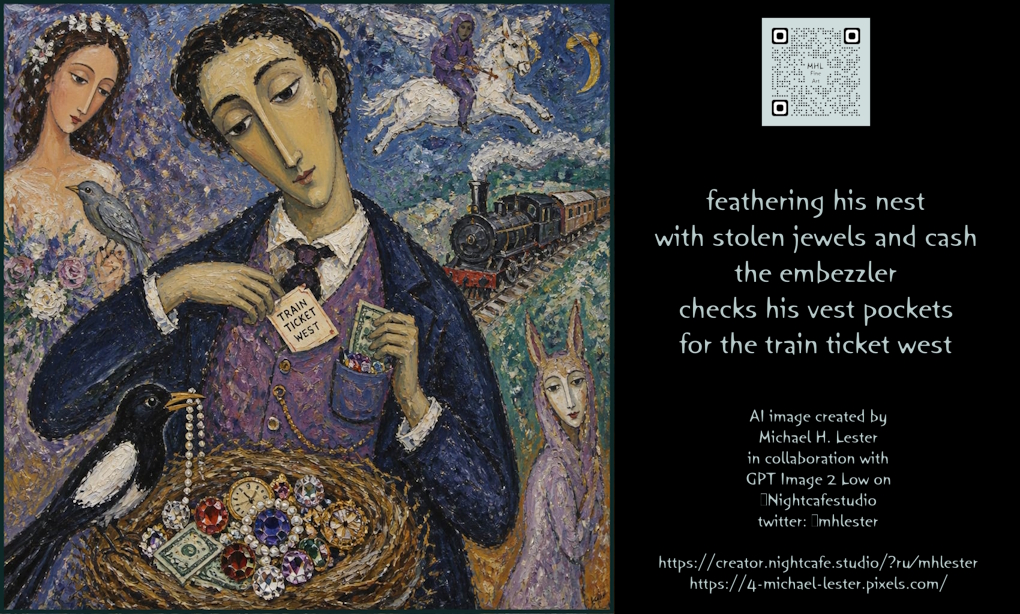
Embezzler Train Ticket Poetry Poster
A surreal expressionist illustrated poster pairs a jewel-stealing embezzler scene with a haiku-style text panel for literary art or social media sharing.
這是一個平面設計和海報設計的GPT Image 2範例。請使用下方可直接使用的提示資訊產生類似的視覺素材,並在重複使用前查看Awesome GPT Image 2 Prompts署名和商業用途授權資訊。
需要完整的提示符號集?請使用 平面設計和海報設計 主題中心提供更多相關範例,或打開 GPT Image 2 提示庫 有關完整範例索引、可重複使用結構和來源歸屬的資訊。
Free 1K preview
Generate one preview image instantly, no sign-up required.
3121/4000
提示詞
可直接複製的提示
Goal: Create a wide illustrated poetry poster combining a surreal expressionist painting on the left with a black text panel on the right, inspired by Marc Chagall and early modernist folk art.

Canvas: Horizontal 16:9 composition, approximately 1024×576. Left two-thirds is a richly textured oil-painting scene with a thin dark border; right one-third is a matte black panel containing a QR code and centered poem text.

Left illustration: Paint a dreamlike night scene in thick impasto brushstrokes, muted jewel tones, and slightly distorted elongated faces. The central subject is 1 slim, pale, melancholy male embezzler with a long narrow face, dark curly hair, heavy-lidded eyes, wearing a dark navy coat over a purple vest, white shirt, and tie. He is looking downward while checking his vest pocket. In his left hand he holds a paper ticket labeled “TRAIN TICKET WEST”; in his right hand he holds cash near a vest pocket stuffed with tiny colorful jewels. In the lower foreground, show 1 large straw bird nest filled with stolen valuables: exactly 1 visible dollar bill, 1 gold pocket watch, 1 pearl necklace strand, and 8 large faceted jewels in red, purple, clear, yellow, and blue tones. Perched on the nest is 1 black-and-white magpie holding a string of pearls in its beak.

Additional painted figures and symbols: Include exactly 5 background/story elements in the painted panel: 1 solemn bride-like woman at upper left with flowers and a small gray bird at her chest; 1 steam locomotive traveling through a blue-green landscape at mid-right; 1 white horse with 1 purple rider floating in the sky near the top; 1 yellow crescent moon at the upper right; and 1 masked purple theatrical figure near the lower right edge. Keep all figures painterly, symbolic, and slightly dreamlike rather than realistic.

Right text panel: Use a solid black background. At the top center place 1 white square QR-code graphic. Beneath it, center a haiku-like poem in pale blue-gray hand-lettered text with gentle irregular letterforms. The poem must read exactly:
“{argument name="poem text" default="feathering his nest\nwith stolen jewels and cash\nthe embezzler\nchecks his vest pockets\nfor the train ticket west"}”
Make the phrase “train ticket west” slightly bolder than the surrounding text. Below the poem, add a small centered credit block in the same hand-lettered style reading:
“AI image created by\n{argument name="artist name" default="Michael H. Lester"}\nin collaboration with\n{argument name="model credit" default="GPT Image 2 Low on"}\n{argument name="platform handle" default="Nightcafestudio"}\ntwitter: @mhlester”
At the bottom, add two centered URL lines: “https://creator.nightcafe.studio/?ru/mhlester” and “https://4-michael-lester.pixels.com/”.

Style constraints: No photorealism. Use expressive brush texture, flattened perspective, blue-violet night palette, gold and gem accents, poetic melancholy mood, and handmade lettering. Preserve the exact count of characters, animals, valuables, and background symbols; do not add extra objects, logos, or decorative borders beyond the visible dark frame.
提示變數
提示符號中可編輯的參數佔位符及其預設值。
多變的
poem text
預設
feathering his nest\nwith stolen jewels and cash\nthe embezzler\nchecks his vest pockets\nfor the train ticket west
多變的
artist name
預設
Michael H. Lester
多變的
model credit
預設
GPT Image 2 Low on
多變的
platform handle
預設
Nightcafestudio
Best for
- - 平面設計和海報設計 visual exploration
- - Image generation and reference-image edits
- - Reusable briefs that keep source attribution visible
Change these parts
- - Subject, product, character, or scene
- - Aspect ratio, camera, lighting, and background
- - Brand, text, color, and output constraints
Recommended model and settings
- - Model: gpt-image-2
- - Input mode: 文生圖
- - Aspect ratio: source
- - Commercial status: review original source
How to use this prompt
- 1. Copy the prompt and preserve its structure for the first test.
- 2. Replace the subject, context, and publishing channel.
- 3. Change one camera, lighting, or style variable per iteration.
- 4. Inspect the output, source, text, and rights before reuse.
Limitations, source, and reuse cautions
- - Generated output is an editable draft, not factual, legal, or rights evidence.
- - Review the linked source, people, brands, logos, text, and third-party media before commercial use.
內容來自Awesome GPT Image 2 Prompts 。必須註明出處。商業用途狀態為allowed ;付費使用前請查看來源版權資訊。
此類案例更多
按類別、輸入模式相容性、品質和低風險進行優先排序。






重用和來源註釋
預覽案例後,請謹慎使用此提示。
- 1.複製提示或直接在 Dovoo 中使用生成按鈕開啟提示。
- 2.根據您的實際使用情況調整變數、寬高比和參考影像。
- 3.發布或付費使用前,請確認版權、署名要求以及品牌或肖像權風險。