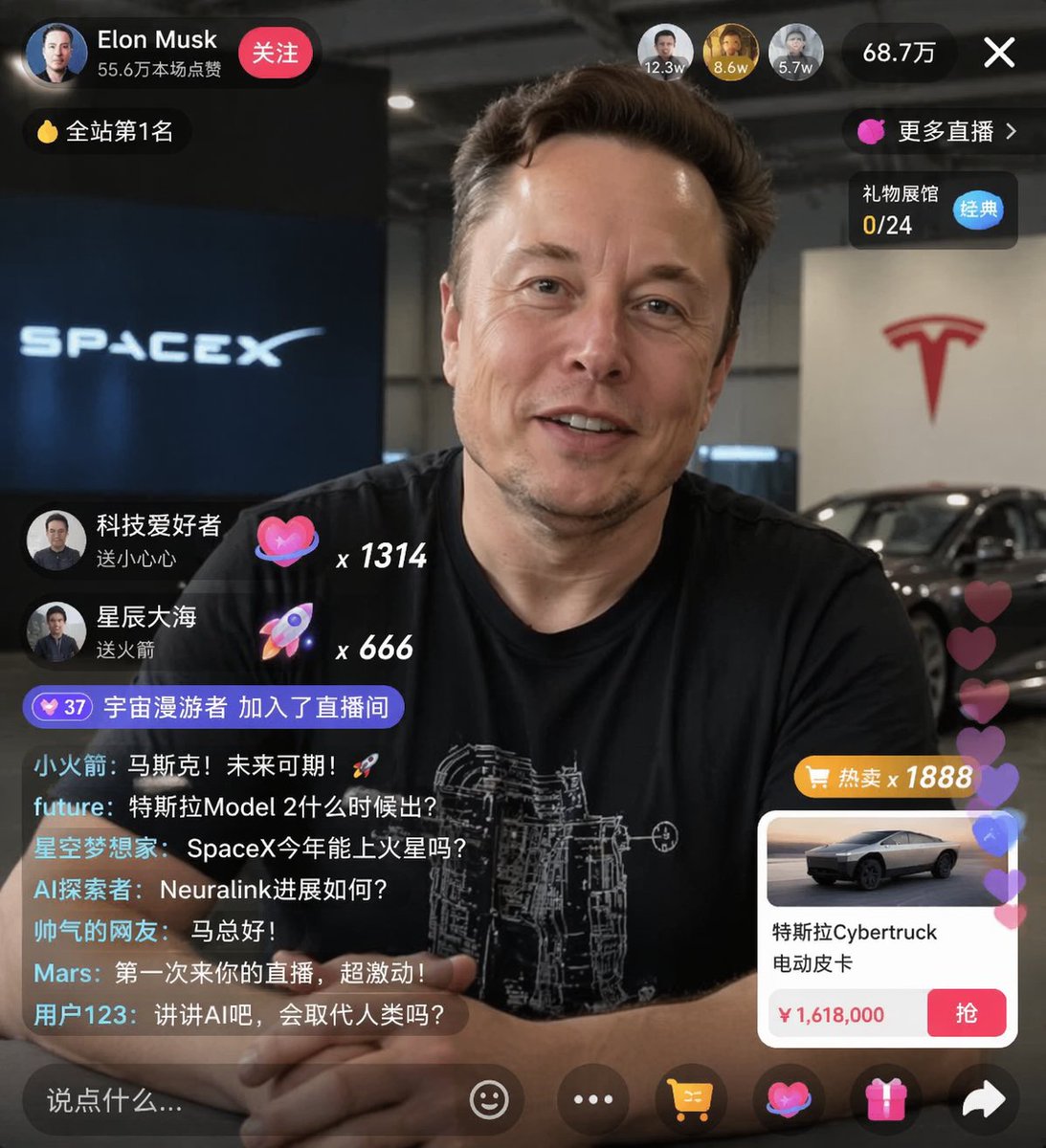
電子商務直播使用者介面模型
在肖像上疊加逼真的社交媒體直播介面,包含可自訂的聊天訊息、禮物彈出視窗和產品購買卡。
這是一個平面設計和海報設計的GPT Image 2範例。請使用下方可直接使用的提示資訊產生類似的視覺素材,並在重複使用前查看Awesome GPT Image 2 Prompts署名和商業用途授權資訊。
需要完整的提示符號集?請使用 平面設計和海報設計 主題中心提供更多相關範例,或打開 GPT Image 2 提示庫 有關完整範例索引、可重複使用結構和來源歸屬的資訊。
Free 1K preview
Generate one preview image instantly, no sign-up required.
2308/4000
提示詞
可直接複製的提示
{
  "type": "live stream UI mockup",
  "subject": {
    "description": "portrait of {argument name=\"host name\" default=\"Elon Musk\"}, smiling, wearing a black t-shirt with a white technical schematic graphic",
    "background": "left side shows a screen with '{argument name=\"left background logo\" default=\"SPACEX\"}' text, right side shows a red '{argument name=\"right background logo\" default=\"Tesla T logo\"}' and a dark car"
  },
  "ui_overlay": {
    "top_header": {
      "host_info": "Avatar, name '{argument name=\"host name\" default=\"Elon Musk\"}', subtitle '556k likes in this session', red 'Follow' button",
      "rank_badge": "Gold coin icon with 'Ranked #1'",
      "viewer_stats": "3 top viewer avatars displaying '123k', '86k', '57k', total '687k', 'X' close button",
      "right_links": "'More Live Streams >', 'Gift Shop 0/24' (with a blue 'Classic' tag)"
    },
    "mid_left_gifts": {
      "count": 2,
      "items": [
        "Avatar 'Tech Enthusiast', 'Sending a Little Heart', Heart Icon x 1314",
        "Avatar 'Stars and Sea', 'Sending a Rocket', Rocket Icon x 666"
      ]
    },
    "bottom_left_chat": {
      "system_message": "Level 37 Badge 'Cosmic Wanderer Joined the Livestream'",
      "message_count": 7,
      "messages": [
        "Little Rocket: Musk! The future is promising! 🚀",
        "future: When will the Tesla Model 2 be released?",
        "Starry Dreamer: Can SpaceX reach Mars this year?",
        "AI Explorer: How is Neuralink progressing?",
        "Handsome Netizen: Hello, Mr. Ma!",
        "Mars: First time watching your livestream, so excited!",
        "User123: Talk about AI, will it replace humans?"
      ]
    },
    "bottom_right_product_card": {
      "hot_tag": "Orange 'Hot Sale x 1888'",
      "image": "Tesla Cybertruck",
      "title": "{argument name=\"product name\" default=\"Tesla Cybertruck electric pickup truck\"}",
      "price": "{argument name=\"product price\" default=\"¥ 1,618,000\"}",
      "button": "Red 'Grab' button",
      "floating_animation": "translucent hearts floating up the right edge"
    },
    "bottom_bar": {
      "input_field": "'Say something...'",
      "icons": [
        "smiley face",
        "three dots",
        "shopping cart",
        "gift box",
        "share"
      ]
    }
  }
}
提示變數
提示符號中可編輯的參數佔位符及其預設值。
多變的
host name
預設
Elon Musk
多變的
left background logo
預設
SPACEX
多變的
right background logo
預設
Tesla T logo
多變的
product name
預設
Tesla Cybertruck electric pickup truck
多變的
product price
預設
¥ 1,618,000
Best for
- - 平面設計和海報設計 visual exploration
- - Image generation and reference-image edits
- - Reusable briefs that keep source attribution visible
Change these parts
- - Subject, product, character, or scene
- - Aspect ratio, camera, lighting, and background
- - Brand, text, color, and output constraints
Recommended model and settings
- - Model: gpt-image-2
- - Input mode: 文生圖
- - Aspect ratio: source
- - Commercial status: review original source
How to use this prompt
- 1. Copy the prompt and preserve its structure for the first test.
- 2. Replace the subject, context, and publishing channel.
- 3. Change one camera, lighting, or style variable per iteration.
- 4. Inspect the output, source, text, and rights before reuse.
Limitations, source, and reuse cautions
- - Generated output is an editable draft, not factual, legal, or rights evidence.
- - Review the linked source, people, brands, logos, text, and third-party media before commercial use.
內容來自Awesome GPT Image 2 Prompts 。必須註明出處。商業用途狀態為allowed ;付費使用前請查看來源版權資訊。
此類案例更多
按類別、輸入模式相容性、品質和低風險進行優先排序。






重用和來源註釋
預覽案例後,請謹慎使用此提示。
- 1.複製提示或直接在 Dovoo 中使用生成按鈕開啟提示。
- 2.根據您的實際使用情況調整變數、寬高比和參考影像。
- 3.發布或付費使用前,請確認版權、署名要求以及品牌或肖像權風險。