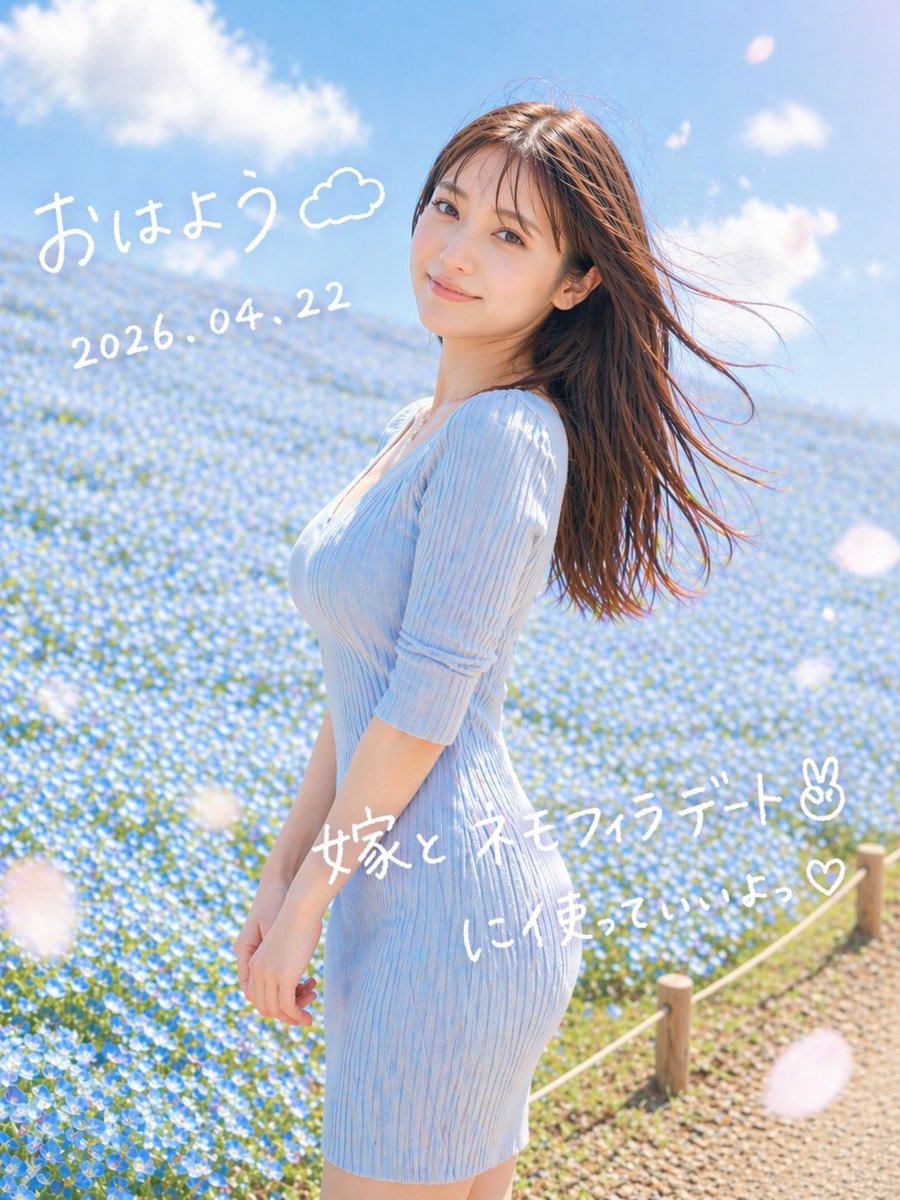
夢幻般的粉蝶約會肖像
這樣就生成了一張柔和浪漫的豎版肖像,畫面中一位女性置身於藍色的花田中,並配有手寫的日文晨報文字,非常適合用作社交媒體圖片。
這是一個肖像與人物的GPT Image 2範例。請使用下方可直接使用的提示資訊產生類似的視覺素材,並在重複使用前查看Awesome GPT Image 2 Prompts署名和商業用途授權資訊。
需要完整的提示符號集?請使用 肖像與人物 主題中心提供更多相關範例,或打開 GPT Image 2 提示庫 有關完整範例索引、可重複使用結構和來源歸屬的資訊。
Free 1K preview
Generate one preview image instantly, no sign-up required.
1335/4000
提示詞
可直接複製的提示
A dreamy vertical spring portrait photo of a young woman standing in profile in a vast field of tiny blue nemophila flowers under a bright blue sky with soft white clouds. She wears a fitted ribbed knit dress in {argument name="dress color" default="pale sky blue"} with elbow-length sleeves, and her long straight brown hair is blowing dramatically to the right in the wind. Frame her from about mid-thigh upward, slightly off-center to the right, with the flower field filling the background and a small rope fence with wooden posts visible along the lower right edge beside a gravel path. Use soft natural morning sunlight, airy high-key exposure, gentle pastel tones, shallow depth of field, subtle lens bloom, and a romantic social-media snapshot aesthetic. Add a few large out-of-focus white flower petals drifting across the foreground. Overlay handwritten white Japanese text directly on the image: at the upper left, "{argument name="greeting text" default="おはよう"}" with a small doodled cloud beside it; below that, the date "{argument name="date text" default="2026.04.22"}"; across the lower middle-right, "{argument name="main note text" default="嫁と ネモフィラデート✌︎"}"; and beneath it, "{argument name="sub note text" default="に使っていいよっ♡"}". Keep the handwriting casual, playful, and slightly uneven like a marker pen on a photo.提示變數
提示符號中可編輯的參數佔位符及其預設值。
多變的
dress color
預設
pale sky blue
多變的
greeting text
預設
おはよう
多變的
date text
預設
2026.04.22
多變的
main note text
預設
嫁と ネモフィラデート✌︎
多變的
sub note text
預設
に使っていいよっ♡
Best for
- - 肖像與人物 visual exploration
- - Image generation and reference-image edits
- - Reusable briefs that keep source attribution visible
Change these parts
- - Subject, product, character, or scene
- - Aspect ratio, camera, lighting, and background
- - Brand, text, color, and output constraints
Recommended model and settings
- - Model: gpt-image-2
- - Input mode: 文生圖
- - Aspect ratio: source
- - Commercial status: review original source
How to use this prompt
- 1. Copy the prompt and preserve its structure for the first test.
- 2. Replace the subject, context, and publishing channel.
- 3. Change one camera, lighting, or style variable per iteration.
- 4. Inspect the output, source, text, and rights before reuse.
Limitations, source, and reuse cautions
- - Generated output is an editable draft, not factual, legal, or rights evidence.
- - Review the linked source, people, brands, logos, text, and third-party media before commercial use.
內容來自Awesome GPT Image 2 Prompts 。必須註明出處。商業用途狀態為allowed ;付費使用前請查看來源版權資訊。
此類案例更多
按類別、輸入模式相容性、品質和低風險進行優先排序。






重用和來源註釋
預覽案例後,請謹慎使用此提示。
- 1.複製提示或直接在 Dovoo 中使用生成按鈕開啟提示。
- 2.根據您的實際使用情況調整變數、寬高比和參考影像。
- 3.發布或付費使用前,請確認版權、署名要求以及品牌或肖像權風險。