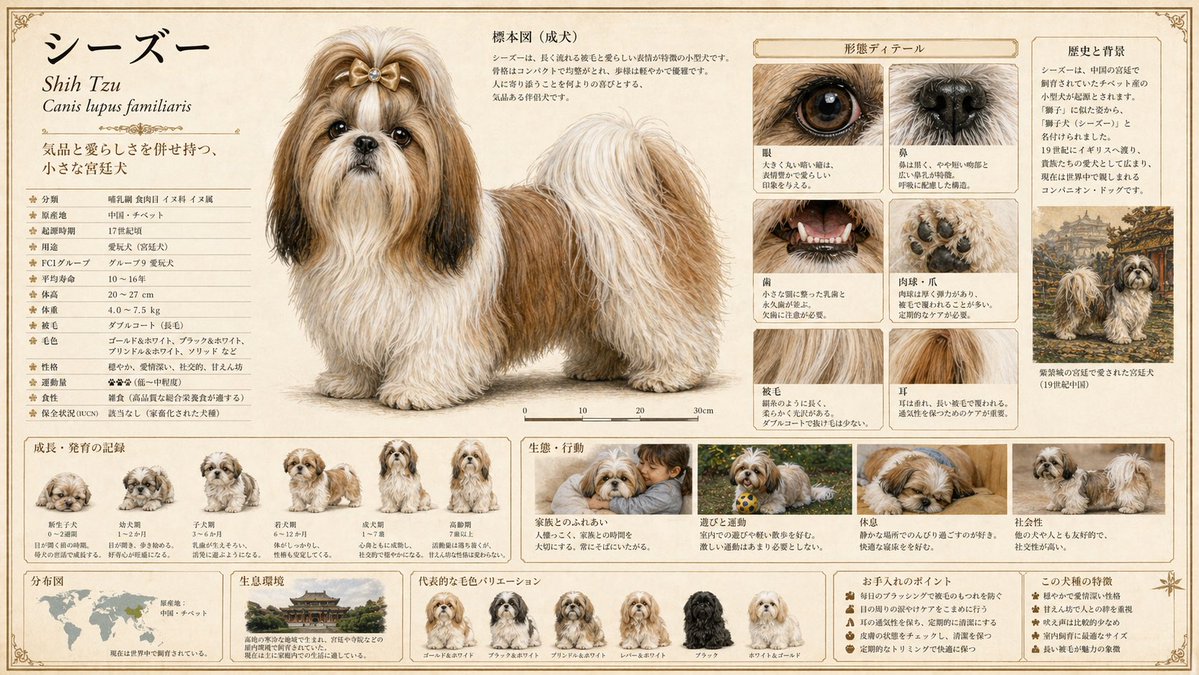
詳細的動物百科全書生成
一個用於創建高品質動物百科全書頁面的複雜提示,包含解剖細節、棲息地資訊和進化階段。
這是一個插畫與藝術的GPT Image 2範例。請使用下方可直接使用的提示資訊產生類似的視覺素材,並在重複使用前查看Awesome GPT Image 2 Prompts署名和商業用途授權資訊。
需要完整的提示符號集?請使用 插畫與藝術 主題中心提供更多相關範例,或打開 GPT Image 2 提示庫 有關完整範例索引、可重複使用結構和來源歸屬的資訊。
Free 1K preview
Generate one preview image instantly, no sign-up required.
2696/4000
提示詞
可直接複製的提示
[Animal Name]
{argument name="animal name" default="insert animal name here"}

[Objective]
Complete a large-format animal encyclopedia plate at a sellable quality level as a single illustration. Generate a publishing-quality plate that balances scientific accuracy with visual appeal.

[Output Format]
- Include all information in one image
- Aspect Ratio: 16:9
- Quality: High (essential for ensuring precision of small text, fine lines, and labels)

[Screen Design Principles]
Layout, zoning, information priority, margin design, typography, decorative elements, and color palette should all be determined autonomously by GPT based on the animal's characteristics, habitat, and classification. Design a layout best suited for this specific animal without being bound by templates.

[Essential Elements to Include]
Integrate the following elements naturally into one frame:

1. Main Specimen Drawing
- Full body of adult depicted with maximum precision
- Scientifically accurate colors, patterns, and proportions
- Scientific name (italicized), common name, and classification info (Order, Family, Genus)
- Scale bar or size comparison

2. Growth/Development Record
- Step-by-step illustration of changes from juvenile to adult
- Concise labels for each stage

3. Ecological/Behavioral Depiction
- Action scenes in natural environments (foraging, predation, breeding, territoriality, etc.)
- Include habitat vegetation and terrain in the background

4. Morphological Details
- Close-ups of characteristic parts (claws, fangs, feathers, scales, eyes, etc.)
- Magnified depictions of surface textures

5. Distribution/Habitat Range
- World or regional distribution map
- Description of habitat types

6. Data Notations
- Length, weight, lifespan, diet, conservation status (IUCN, etc.)
- Easy-to-read table or icon format

[Style Specification]
- Publisher-quality natural history encyclopedia
- Realistic botanical/naturalist painting touch (19th-century naturalist precision + modern color expression)
- Paper texture: Cream-colored hot-press watercolor paper or parchment style
- Font: Unified serif. Scientific names in italics; data can use mixed small sans-serif fonts
- Border: Thin ink border + classical plate decoration
- Overall color scheme, layout tone, and page design optimized by GPT based on habitat, classification, and ecology

[Most Important Instruction]
Deeply understand the unique ecology, cultural significance, and taxonomic features of this animal to design a page that feels like it was "made just for this animal." Visualize the essence of the animal rather than using a generic template. Ensure all text is actually rendered within the frame, leaving no empty labels.
提示變數
提示符號中可編輯的參數佔位符及其預設值。
多變的
animal name
預設
insert animal name here
Best for
- - 插畫與藝術 visual exploration
- - Image generation and reference-image edits
- - Reusable briefs that keep source attribution visible
Change these parts
- - Subject, product, character, or scene
- - Aspect ratio, camera, lighting, and background
- - Brand, text, color, and output constraints
Recommended model and settings
- - Model: gpt-image-2
- - Input mode: 文生圖
- - Aspect ratio: source
- - Commercial status: review original source
How to use this prompt
- 1. Copy the prompt and preserve its structure for the first test.
- 2. Replace the subject, context, and publishing channel.
- 3. Change one camera, lighting, or style variable per iteration.
- 4. Inspect the output, source, text, and rights before reuse.
Limitations, source, and reuse cautions
- - Generated output is an editable draft, not factual, legal, or rights evidence.
- - Review the linked source, people, brands, logos, text, and third-party media before commercial use.
內容來自Awesome GPT Image 2 Prompts 。必須註明出處。商業用途狀態為allowed ;付費使用前請查看來源版權資訊。
此類案例更多
按類別、輸入模式相容性、品質和低風險進行優先排序。






重用和來源註釋
預覽案例後,請謹慎使用此提示。
- 1.複製提示或直接在 Dovoo 中使用生成按鈕開啟提示。
- 2.根據您的實際使用情況調整變數、寬高比和參考影像。
- 3.發布或付費使用前,請確認版權、署名要求以及品牌或肖像權風險。