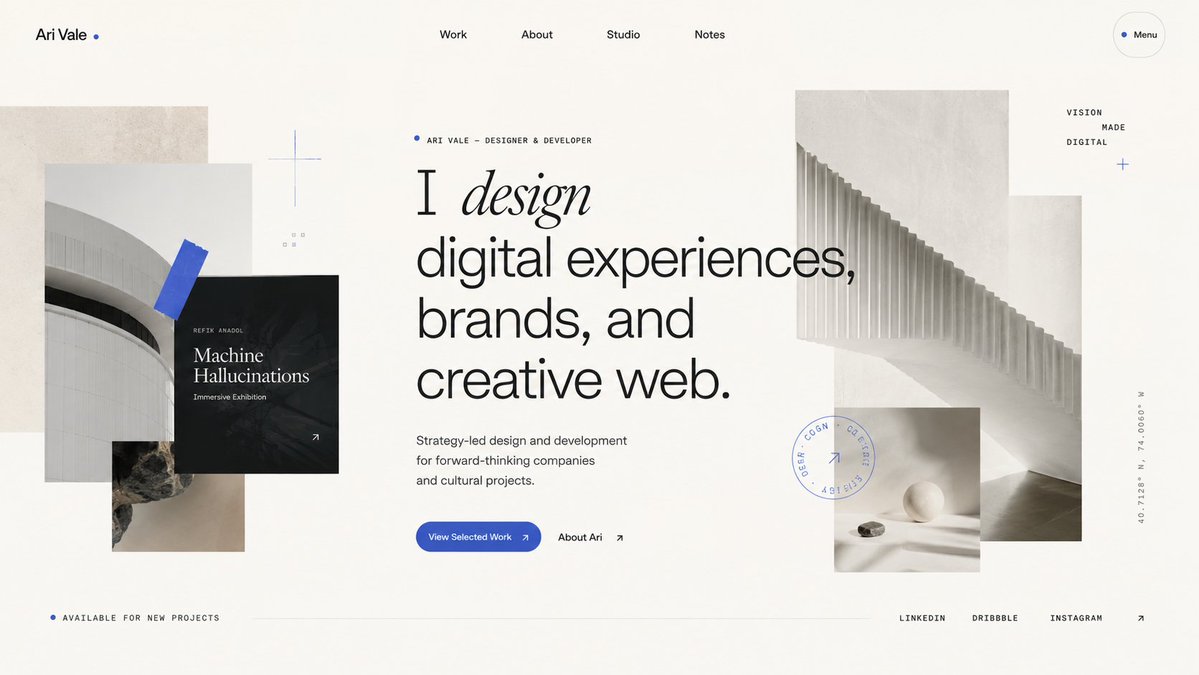
Minimalist Designer Portfolio Homepage
Generates a sophisticated editorial-style portfolio homepage hero for a designer or creative studio website.
這是一個平面設計和海報設計的GPT Image 2範例。請使用下方可直接使用的提示資訊產生類似的視覺素材,並在重複使用前查看Awesome GPT Image 2 Prompts署名和商業用途授權資訊。
需要完整的提示符號集?請使用 平面設計和海報設計 主題中心提供更多相關範例,或打開 GPT Image 2 提示庫 有關完整範例索引、可重複使用結構和來源歸屬的資訊。
Free 1K preview
Generate one preview image instantly, no sign-up required.
3428/4000
提示詞
可直接複製的提示
Goal: Create a refined portfolio homepage hero design for {argument name="designer name" default="Ari Vale"}, a designer/developer, with an editorial Swiss-style layout and layered architectural collage.

Canvas: Wide desktop website screenshot, 16:9 aspect ratio, off-white warm paper background, lots of negative space, subtle grain texture, premium minimalist aesthetic.

Layout: Top navigation bar with 6 visible items: left wordmark “Ari Vale” followed by a small blue dot, centered navigation links “Work”, “About”, “Studio”, “Notes”, and a rounded outlined “Menu” pill on the far right with a blue dot. Main hero content sits slightly left of center with a small eyebrow label, oversized typography, short description, and two calls to action. Layer abstract monochrome architectural images around the text: a collage on the left and a larger stepped architectural image on the right, with a small still-life image below it. Bottom footer strip contains availability text on the left, a thin horizontal divider line through the center, and social links on the right.

Text content: Eyebrow above headline reads “ARI VALE — DESIGNER & DEVELOPER” with a small blue dot. Main headline reads exactly: “I design digital experiences, brands, and creative web.” Make the word “design” italic, elegant serif, while the rest of the headline is large modern sans serif. Supporting copy reads: “Strategy-led design and development for forward-thinking companies and cultural projects.” Primary button text: “View Selected Work” with a small arrow. Secondary text link: “About Ari” with an arrow. Left black project card reads “REFIX ANADOL”, “Machine Hallucinations”, and “Immersive Exhibition”, with a small arrow in the bottom-right corner. Small right-side stacked words read “VISION”, “MADE”, “DIGITAL”. Bottom-left text reads “AVAILABLE FOR NEW PROJECTS”. Bottom-right social links are exactly 3 items: “LINKEDIN”, “DRIBBBLE”, “INSTAGRAM”, followed by an arrow. Add a vertical coordinate label on the far right reading “40.7128° N, 74.0060° W”.

Visual details: Use a restrained palette of warm ivory, black, charcoal gray, pale concrete gray, and vivid cobalt blue accents. Typography should combine a clean grotesk sans serif with one high-contrast italic serif word. Use thin hairline rules, tiny uppercase labels with generous letter spacing, and precise alignment. Add exactly 5 blue accent elements: the wordmark dot, the eyebrow dot, the menu dot, a blue tape-like diagonal rectangle over the left architectural photo, and a small blue plus/cross near the right-side words. Add a faint circular stamp graphic near the lower-right collage with tiny unreadable uppercase text and a small arrow inside.

Image elements count: Include exactly 5 photographic/texture blocks: 1 tall beige concrete rectangle behind the left collage, 1 pale curved building photo on the left, 1 small rocky texture photo below it, 1 large pale architectural staircase/ribbed structure image on the right, and 1 small still-life image with a white sphere and stone beneath the right image. Also include exactly 1 black overlay project card on the left collage.

Constraints: Make it look like a high-end live website landing page, not a poster. Keep all text crisp and legible, avoid browser chrome, avoid extra navigation items, avoid extra images, avoid colorful gradients, avoid stock-photo people, and preserve spacious asymmetrical balance.
提示變數
提示符號中可編輯的參數佔位符及其預設值。
多變的
designer name
預設
Ari Vale
Best for
- - 平面設計和海報設計 visual exploration
- - Image generation and reference-image edits
- - Reusable briefs that keep source attribution visible
Change these parts
- - Subject, product, character, or scene
- - Aspect ratio, camera, lighting, and background
- - Brand, text, color, and output constraints
Recommended model and settings
- - Model: gpt-image-2
- - Input mode: 文生圖
- - Aspect ratio: source
- - Commercial status: review original source
How to use this prompt
- 1. Copy the prompt and preserve its structure for the first test.
- 2. Replace the subject, context, and publishing channel.
- 3. Change one camera, lighting, or style variable per iteration.
- 4. Inspect the output, source, text, and rights before reuse.
Limitations, source, and reuse cautions
- - Generated output is an editable draft, not factual, legal, or rights evidence.
- - Review the linked source, people, brands, logos, text, and third-party media before commercial use.
內容來自Awesome GPT Image 2 Prompts 。必須註明出處。商業用途狀態為allowed ;付費使用前請查看來源版權資訊。
此類案例更多
按類別、輸入模式相容性、品質和低風險進行優先排序。






重用和來源註釋
預覽案例後,請謹慎使用此提示。
- 1.複製提示或直接在 Dovoo 中使用生成按鈕開啟提示。
- 2.根據您的實際使用情況調整變數、寬高比和參考影像。
- 3.發布或付費使用前,請確認版權、署名要求以及品牌或肖像權風險。