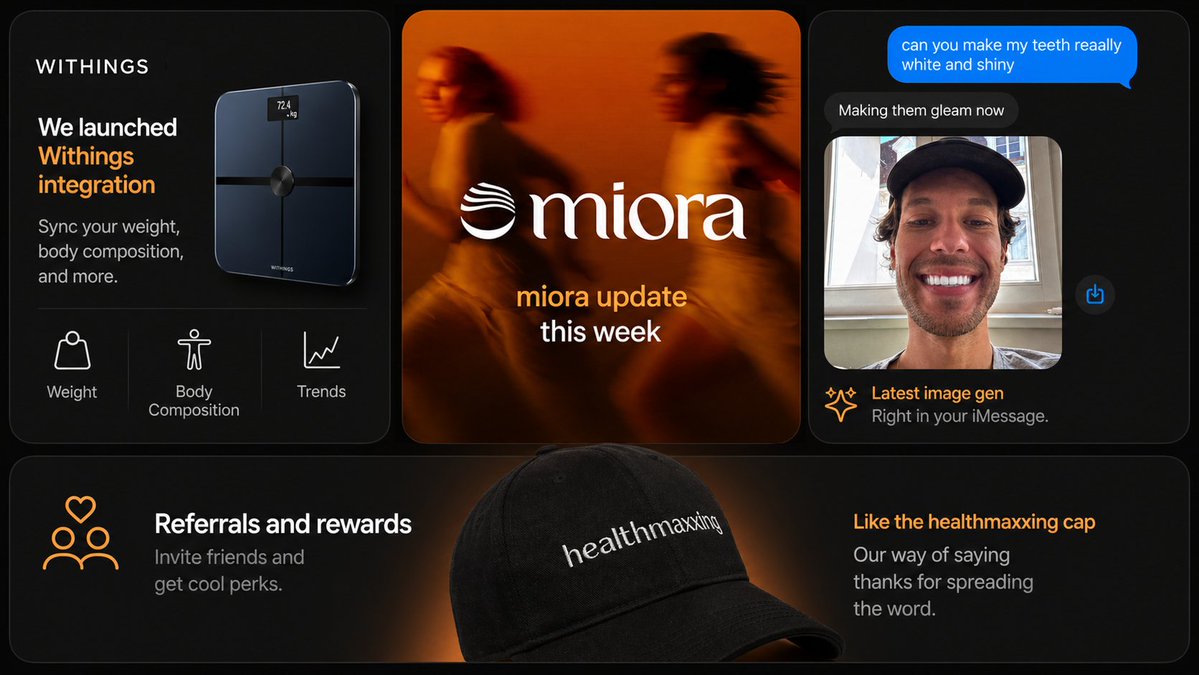
暗黑科技行銷投影片拼貼
一款高級多面板創業行銷幻燈片,包含應用程式整合、品牌更新、AI圖像聊天和推薦商品等功能,適用於社群媒體貼文或簡報。
這是一個平面設計和海報設計的GPT Image 2範例。請使用下方可直接使用的提示資訊產生類似的視覺素材,並在重複使用前查看Awesome GPT Image 2 Prompts署名和商業用途授權資訊。
需要完整的提示符號集?請使用 平面設計和海報設計 主題中心提供更多相關範例,或打開 GPT Image 2 提示庫 有關完整範例索引、可重複使用結構和來源歸屬的資訊。
Free 1K preview
Generate one preview image instantly, no sign-up required.
3740/4000
提示詞
可直接複製的提示
{
  "brand": {
    "accent_color": "warm orange",
    "name": "{argument name=\"brand name\" default=\"WITHINGS\"}"
  },
  "canvas": {
    "aspect_ratio": "16:9",
    "background": "deep black with faint warm orange glow accents"
  },
  "design_details": {
    "borders": "subtle thin gray outlines",
    "corners": "large rounded corners on every card",
    "lighting": "moody black background with orange rim lighting and glow",
    "product_rendering": "high-end realistic 3D product and accessory rendering",
    "spacing": "even gutters between cards",
    "typography": "clean sans-serif for UI and marketing copy, elegant serif for the center logo wordmark",
    "ui_style": "minimal premium app/store promo aesthetic"
  },
  "layout": {
    "card_count": 4,
    "sections": [
      {
        "content": "dark card with the brand name at top left, large white and orange headline reading 'We launched Withings integration', smaller subtext 'Sync your weight, body composition, and more.', a glossy black smart scale floating on the right side with a tiny illuminated screen reading '72.4 kg', and a bottom feature row separated by thin dividers showing 3 white line icons with labels",
        "count": 3,
        "labels": [
          "Weight",
          "Body Composition",
          "Trends"
        ],
        "position": "top-left",
        "title": "smart scale product card"
      },
      {
        "content": "warm blurred orange-toned lifestyle image of 2 runners in motion, large centered white serif logo text '{argument name=\"center brand\" default=\"miora\"}' with a wave-like emblem to the left, and stacked lower text with the first line in orange and second line in white",
        "count": 1,
        "labels": [
          "miora update this week"
        ],
        "position": "top-center",
        "title": "brand update card"
      },
      {
        "content": "dark iMessage-style phone conversation interface, bright blue outgoing message bubble at the top, dark gray reply bubble below, Show every face clearly with natural, detailed facial features, a small blue share icon floating to the right, and a footer caption with a spark icon, orange headline, and gray subtext",
        "count": 4,
        "labels": [
          "can you make my teeth reaally white and shiny",
          "Making them gleam now",
          "Latest image gen",
          "Right in your iMessage."
        ],
        "position": "top-right",
        "title": "chat image generation card"
      },
      {
        "content": "wide dark banner with a soft orange spotlight behind a large black baseball cap in the center foreground, white embroidered text on the cap reading '{argument name=\"cap text\" default=\"healthmaxxing\"}', left side has an orange line icon of 3 people with a heart above plus a white headline and gray subtext 'Invite friends and get cool perks.', right side has an orange headline and gray subtext 'Our way of saying thanks for spreading the word.'",
        "count": 2,
        "labels": [
          "Referrals and rewards",
          "Like the healthmaxxing cap"
        ],
        "position": "bottom full-width",
        "title": "referral banner card"
      }
    ],
    "structure": "3 cards across the top row and 1 wide banner card across the full bottom row"
  },
  "style": "premium dark-mode tech brand presentation, sleek product marketing, soft glow lighting, rounded-corner cards, subtle gradients, high contrast, polished startup aesthetic",
  "text_overrides": {
    "center_update_line": "{argument name=\"update text\" default=\"miora update this week\"}",
    "top_left_brand": "{argument name=\"headline brand\" default=\"WITHINGS\"}"
  },
  "type": "modern marketing slide collage"
}
提示變數
提示符號中可編輯的參數佔位符及其預設值。
多變的
brand name
預設
WITHINGS
多變的
center brand
預設
miora
多變的
cap text
預設
healthmaxxing
多變的
headline brand
預設
WITHINGS
多變的
update text
預設
miora update this week
Best for
- - 平面設計和海報設計 visual exploration
- - Image generation and reference-image edits
- - Reusable briefs that keep source attribution visible
Change these parts
- - Subject, product, character, or scene
- - Aspect ratio, camera, lighting, and background
- - Brand, text, color, and output constraints
Recommended model and settings
- - Model: gpt-image-2
- - Input mode: 文生圖
- - Aspect ratio: source
- - Commercial status: review original source
How to use this prompt
- 1. Copy the prompt and preserve its structure for the first test.
- 2. Replace the subject, context, and publishing channel.
- 3. Change one camera, lighting, or style variable per iteration.
- 4. Inspect the output, source, text, and rights before reuse.
Limitations, source, and reuse cautions
- - Generated output is an editable draft, not factual, legal, or rights evidence.
- - Review the linked source, people, brands, logos, text, and third-party media before commercial use.
內容來自Awesome GPT Image 2 Prompts 。必須註明出處。商業用途狀態為allowed ;付費使用前請查看來源版權資訊。
此類案例更多
按類別、輸入模式相容性、品質和低風險進行優先排序。






重用和來源註釋
預覽案例後,請謹慎使用此提示。
- 1.複製提示或直接在 Dovoo 中使用生成按鈕開啟提示。
- 2.根據您的實際使用情況調整變數、寬高比和參考影像。
- 3.發布或付費使用前,請確認版權、署名要求以及品牌或肖像權風險。