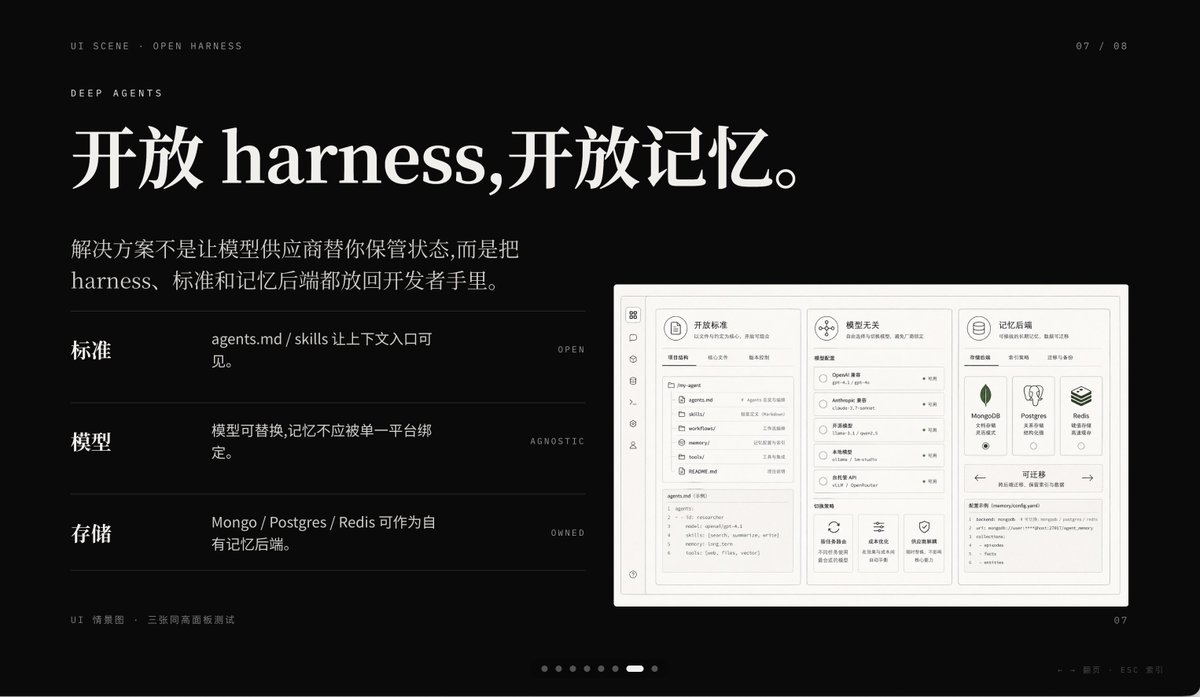
暗黑人工智慧產品主題演講投影片
此提示會產生一個簡潔的黑色簡報投影片,適用於人工智慧產品簡報,非常適合用於主題演講視覺效果、創業故事敘述和精美的 PPT 封面。
這是一個平面設計和海報設計的GPT Image 2範例。請使用下方可直接使用的提示資訊產生類似的視覺素材,並在重複使用前查看Awesome GPT Image 2 Prompts署名和商業用途授權資訊。
需要完整的提示符號集?請使用 平面設計和海報設計 主題中心提供更多相關範例,或打開 GPT Image 2 提示庫 有關完整範例索引、可重複使用結構和來源歸屬的資訊。
Free 1K preview
Generate one preview image instantly, no sign-up required.
3184/4000
提示詞
可直接複製的提示
A sophisticated dark-mode presentation slide employing a minimalist tech aesthetic, 16:9 widescreen layout, matte black background, complemented by refined gray-white typography and subtle gray dividers. The overall atmosphere is fashionable, cinematic, and high-end, reminiscent of a product launch or a design-forward AI startup pitch deck. Position two lines of small navigation text in the upper left corner: “UI SCENE · OPEN HARNESS”, followed by “DEEP AGENTS”, using a slender, uppercase sans-serif font with generous letter-spacing. Add a small page indicator in the upper right corner displaying “07 / 08”. The main title occupies the upper left, employing an elegant, large serif font with a Chinese-English mix: {argument name="headline text" default="Open harness, open memory."}. Below it, add a 2-line Chinese body text, using a smaller serif font: {argument name="body text" default="The solution isn't to have model vendors manage your state for you, but to put the harness, standards, and memory backends in the hands of developers."}. In the left-center area, create 3 horizontal feature rows separated by thin gray lines, each with a bold Chinese label on the left, a brief Chinese description in the middle, and a tiny uppercase English keyword aligned to the right. Row 1 label: “Standards”, description: “agents.md / skills make context entry visible.”, keyword: “OPEN”. Row 2 label: “Models”, description: “Models are replaceable, memory should not be tied to a single platform.”, keyword: “AGNOSTIC”. Row 3 label: “Storage”, description: “Mongo / Postgres / Redis can serve as proprietary memory backends.”, keyword: “OWNED”. On the right side, place a large embedded UI model within a light gray rounded rectangle with a subtle shadow, resembling a screenshot of a product project dashboard. The model should be monochromatic in pale beige and gray, structurally rigorous, divided into 3 main columns. Left column: a narrow vertical icon sidebar, plus a panel listing “agents.md”, “skills”, “workflows”, “memories”, “tools”, etc. items/files, with a code editor block at the bottom. Middle column: a section titled “Model Agnostic”, containing 4 selectable models and small controls, with 3 feature cards at the bottom. Right column: a section titled “Memory Backends”, containing 3 database cards for MongoDB, Postgres, and Redis, plus a panel at the bottom titled “Migratable”, displaying a code snippet. Include another top card within the model, titled “Open Standards”, with tab-like controls. Add a line of tiny Chinese-English explanatory text in the lower left outside the model: “UI Scenario · Three equal-height panel test”. Include a carousel indicator at the bottom center consisting of 8 small dots, with the 7th dot highlighted as a short white capsule, and the rest as dark gray circles. Place a small page number “07” in the lower right corner. Additionally, add a faint line of tiny footnote text (Chinese-English) near the right bottom edge, very discreetly, such as presentation metadata. Use precise grid alignment, ample whitespace, understated luxury, Swiss-style composition, and refined YouMind AI product theme presentation aesthetics.提示變數
提示符號中可編輯的參數佔位符及其預設值。
多變的
headline text
預設
Open harness, open memory.
多變的
body text
預設
The solution isn't to have model vendors manage your state for you, but to put the harness, standards, and memory backends in the hands of developers.
Best for
- - 平面設計和海報設計 visual exploration
- - Image generation and reference-image edits
- - Reusable briefs that keep source attribution visible
Change these parts
- - Subject, product, character, or scene
- - Aspect ratio, camera, lighting, and background
- - Brand, text, color, and output constraints
Recommended model and settings
- - Model: gpt-image-2
- - Input mode: 文生圖
- - Aspect ratio: source
- - Commercial status: review original source
How to use this prompt
- 1. Copy the prompt and preserve its structure for the first test.
- 2. Replace the subject, context, and publishing channel.
- 3. Change one camera, lighting, or style variable per iteration.
- 4. Inspect the output, source, text, and rights before reuse.
Limitations, source, and reuse cautions
- - Generated output is an editable draft, not factual, legal, or rights evidence.
- - Review the linked source, people, brands, logos, text, and third-party media before commercial use.
內容來自Awesome GPT Image 2 Prompts 。必須註明出處。商業用途狀態為allowed ;付費使用前請查看來源版權資訊。
此類案例更多
按類別、輸入模式相容性、品質和低風險進行優先排序。






重用和來源註釋
預覽案例後,請謹慎使用此提示。
- 1.複製提示或直接在 Dovoo 中使用生成按鈕開啟提示。
- 2.根據您的實際使用情況調整變數、寬高比和參考影像。
- 3.發布或付費使用前,請確認版權、署名要求以及品牌或肖像權風險。