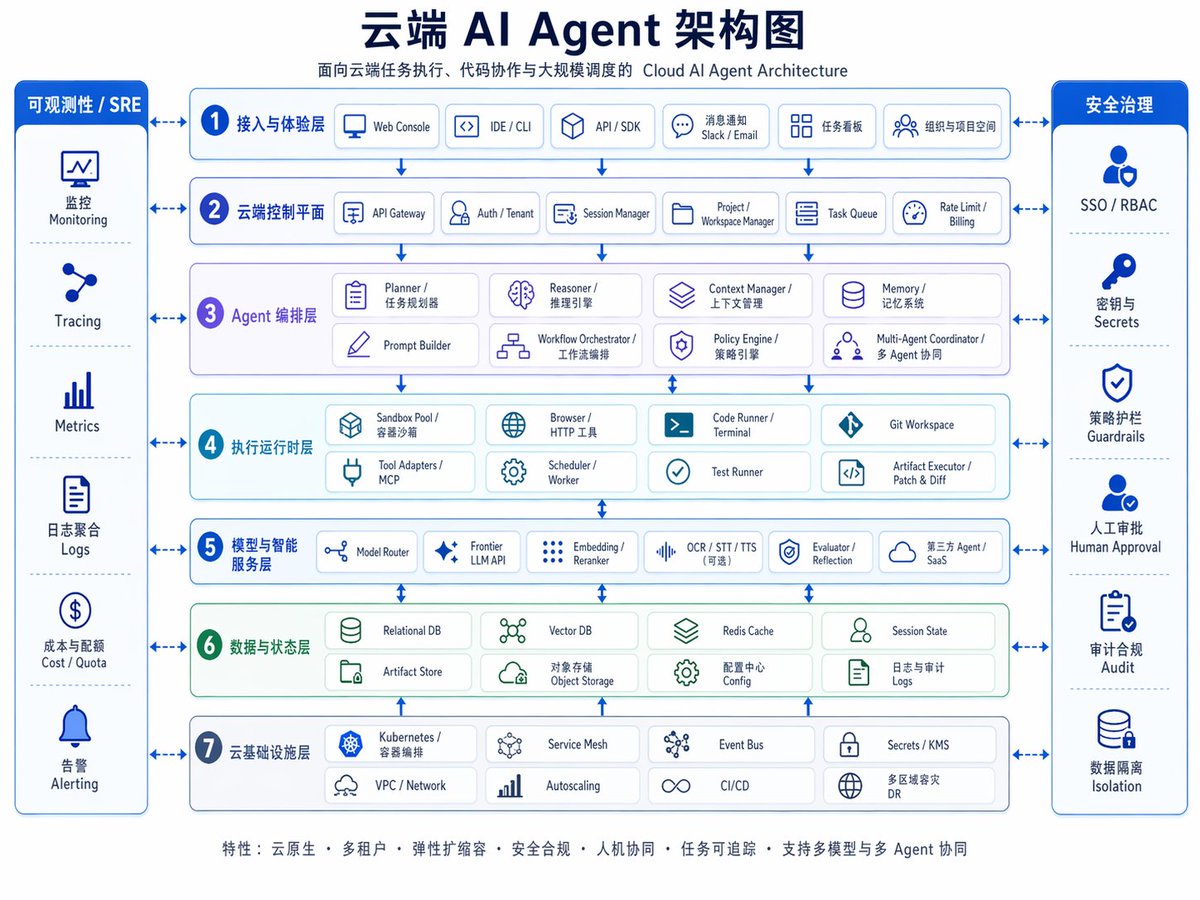
雲AI代理架構圖
精美的雙語企業資訊圖,展示了分層雲端 AI 代理架構,適用於演示、產品解說和技術行銷。
這是一個平面設計和海報設計的GPT Image 2範例。請使用下方可直接使用的提示資訊產生類似的視覺素材,並在重複使用前查看Awesome GPT Image 2 Prompts署名和商業用途授權資訊。
需要完整的提示符號集?請使用 平面設計和海報設計 主題中心提供更多相關範例,或打開 GPT Image 2 提示庫 有關完整範例索引、可重複使用結構和來源歸屬的資訊。
Free 1K preview
Generate one preview image instantly, no sign-up required.
4000/4000
提示詞
可直接複製的提示
{
  "type": "企業雲端 AI 架構資訊圖表",
  "style": "簡潔企業級向量圖,白色背景,藍色和青色調色盤,圓角矩形,細藍色邊框,微妙陰影,中文優先的雙語標籤,帶有較小的英文副標題,對稱佈局,演示文稿品質",
  "canvas": {
    "aspect_ratio": "4:3",
    "resolution": "1024x768"
  },
  "title_block": {
    "headline": "{argument name=\"headline text\" default=\"雲端 AI Agent 架構圖\"}",
    "subtitle": "雲端任務執行、程式碼協作和大規模排程的雲端 AI Agent 架構",
    "position": "頂部中央"
  },
  "layout": {
    "center": {
      "type": "堆疊式架構層",
      "count": 7,
      "numbered": true,
      "layers": [
        {
          "index": 1,
          "title": "存取與體驗層",
          "english": "access and experience layer",
          "count": 5,
          "items": [
            "網頁控制台",
            "IDE / CLI",
            "API / SDK",
            "訊息通知 Slack / Email",
            "任務看板組織與專案空間"
          ]
        },
        {
          "index": 2,
          "title": "雲端控制平面",
          "english": "cloud control plane",
          "count": 6,
          "items": [
            "API 閘道",
            "驗證 / 租戶",
            "會話管理器",
            "專案 / 工作區管理器",
            "任務佇列",
            "速率限制 / 計費"
          ]
        },
        {
          "index": 3,
          "title": "Agent 編排層",
          "english": "agent orchestration layer",
          "count": 8,
          "items": [
            "規劃者 / 任務規劃者",
            "推理者 / 推理引擎",
            "上下文管理器 / 上下文管理",
            "記憶體 / 記憶體系統",
            "提示構建器",
            "工作流程編排器 / 工作流程編排",
            "策略引擎 / 策略引擎",
            "多 Agent 協調器 / 多 Agent 協調"
          ]
        },
        {
          "index": 4,
          "title": "執行運行時層",
          "english": "execution runtime layer",
          "count": 8,
          "items": [
            "沙盒池 / 容器沙盒",
            "瀏覽器 / HTTP 工具",
            "程式碼運行器 / 終端機",
            "Git 工作區",
            "工具適配器 / MCP",
            "排程器 / 工作者",
            "測試運行器",
            "構件執行器 / 修補程式與差異"
          ]
        },
        {
          "index": 5,
          "title": "模型與智慧服務層",
          "english": "model and intelligence services layer",
          "count": 6,
          "items": [
            "模型路由器",
            "前沿 LLM API",
            "嵌入 / 重新排序器",
            "OCR / STT / TTS(可選)",
            "評估者 / 反思",
            "第三方 Agent / SaaS"
          ]
        },
        {
          "index": 6,
          "title": "資料與狀態層",
          "english": "data and state layer",
          "count": 8,
          "items": [
            "關聯式資料庫",
            "向量資料庫",
            "Redis 快取",
            "會話狀態",
            "構件儲存庫",
            "物件儲存",
            "組態中心組態",
            "日誌與審計日誌"
          ]
        },
        {
          "index": 7,
          "title": "雲端基礎設施層",
          "english": "cloud infrastructure layer",
          "count": 8,
          "items": [
            "Kubernetes / 容器編排",
            "服務網格",
            "事件匯流排",
            "密鑰 / KMS",
            "VPC / 網路",
            "自動擴展",
            "CI/CD",
            "多區域災害復原 DR"
          ]
        }
      ]
    },
    "left_sidebar": {
      "title": "可觀測性 / SRE",
      "position": "左側",
      "count": 6,
      "items": [
        "監控",
        "追蹤",
        "指標",
        "日誌聚合日誌",
        "成本 / 配額",
        "警報"
      ]
    },
    "right_sidebar": {
      "title": "安全治理",
      "position": "右側",
      "count": 6,
      "items": [
        "SSO / RBAC",
        "密鑰與密碼",
        "策略防護欄",
        "人工審批",
        "審計合規性",
        "資料隔離"
      ]
    },
    "connectors": "雙向藍色箭頭將兩個側邊欄連結到每個中央層,以及每個架構層之間的垂直箭頭"
  },
  "visual_details": {
    "icons": "每個框中的簡單藍色線條圖示,每個模組一個圖示",
    "boxes": "圓角白色卡片,帶有淡藍色或淡綠色色調的區塊背景",
    "section_colors": {
      "layers_1_2_5_7": "淺藍色",
      "layer_3": "淺薰衣草色",
      "layer_4": "淺青色",
      "layer_6": "淺綠色",
      "sidebars": "深皇家藍色標題,白色文字"
    },
    "typography": "粗體深海軍藍色中文標題,較小的灰藍色副標題,中等字重的中文區塊標籤,緊湊的雙語項目標籤"
  },
  "footer": {
    "position": "底部中央",
    "text": "{argument name=\"footer text\" default=\"功能:雲端原生 • 多租戶 • 彈性擴展 • 安全性與合規性 • 人機協作 • 任務可追溯性 • 支援多模型與多 Agent 協作\"}"
  },
  "quality": "清晰的資訊圖表,平衡的間距,高可讀性,拋光的企业架构幻灯片,适用于主题演讲、文档和产品营销"
}
提示變數
提示符號中可編輯的參數佔位符及其預設值。
多變的
headline text
預設
Cloud AI Agent Architecture Diagram
多變的
footer text
預設
Features: Cloud Native • Multi-tenancy • Elastic Scalability • Security & Compliance • Human-Machine Collaboration • Task Traceability • Support for Multi-Model & Multi-Agent Collaboration
Best for
- - 平面設計和海報設計 visual exploration
- - Image generation and reference-image edits
- - Reusable briefs that keep source attribution visible
Change these parts
- - Subject, product, character, or scene
- - Aspect ratio, camera, lighting, and background
- - Brand, text, color, and output constraints
Recommended model and settings
- - Model: gpt-image-2
- - Input mode: 文生圖
- - Aspect ratio: source
- - Commercial status: review original source
How to use this prompt
- 1. Copy the prompt and preserve its structure for the first test.
- 2. Replace the subject, context, and publishing channel.
- 3. Change one camera, lighting, or style variable per iteration.
- 4. Inspect the output, source, text, and rights before reuse.
Limitations, source, and reuse cautions
- - Generated output is an editable draft, not factual, legal, or rights evidence.
- - Review the linked source, people, brands, logos, text, and third-party media before commercial use.
內容來自Awesome GPT Image 2 Prompts 。必須註明出處。商業用途狀態為allowed ;付費使用前請查看來源版權資訊。
此類案例更多
按類別、輸入模式相容性、品質和低風險進行優先排序。






重用和來源註釋
預覽案例後,請謹慎使用此提示。
- 1.複製提示或直接在 Dovoo 中使用生成按鈕開啟提示。
- 2.根據您的實際使用情況調整變數、寬高比和參考影像。
- 3.發布或付費使用前,請確認版權、署名要求以及品牌或肖像權風險。