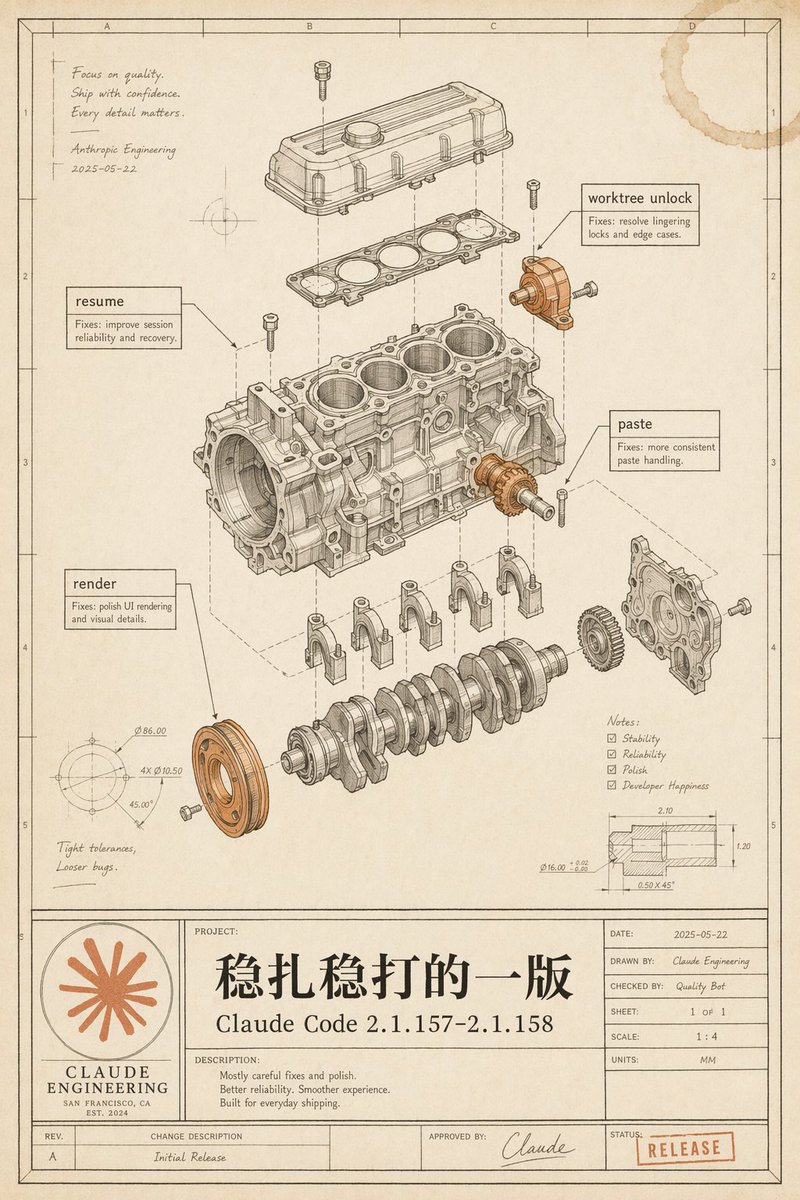
Vintage Claude Code Release Blueprint
Generates a nostalgic engineering blueprint poster that visualizes a Claude Code software release as an exploded mechanical engine diagram.
這是一個平面設計和海報設計的GPT Image 2範例。請使用下方可直接使用的提示資訊產生類似的視覺素材,並在重複使用前查看Awesome GPT Image 2 Prompts署名和商業用途授權資訊。
需要完整的提示符號集?請使用 平面設計和海報設計 主題中心提供更多相關範例,或打開 GPT Image 2 提示庫 有關完整範例索引、可重複使用結構和來源歸屬的資訊。
Free 1K preview
Generate one preview image instantly, no sign-up required.
3878/4000
提示詞
可直接複製的提示
Goal: Create a vintage engineering blueprint poster for {argument name="software release name" default="Claude Code 2.1.157–2.1.158"}, presented as an exploded mechanical engine assembly diagram that metaphorically documents a polished software release.

Canvas: Portrait technical drawing sheet, 4:5 aspect ratio, warm aged cream paper with subtle stains, worn edges, faint grid coordinates, thin black drafting border, and a title-block table along the bottom. Use monochrome ink linework with selective muted copper-orange highlights on a few mechanical parts and the logo/stamp.

Main illustration: Center the page on a detailed exploded isometric engine block assembly, drawn like a patent/automotive CAD manual. Show exactly 11 major visible mechanical groups: 1) top valve cover, 2) gasket plate beneath it, 3) main engine block with four cylinder bores, 4) crankshaft at the bottom, 5) four connecting caps beneath the block, 6) front circular pulley highlighted in copper-orange, 7) right-side gear highlighted in copper-orange, 8) right-side front cover plate, 9) upper-right small bracket/actuator highlighted in copper-orange, 10) scattered bolts/screws around the assembly, 11) dashed vertical and diagonal alignment/construction lines connecting the exploded components. Keep all linework precise, layered, and technically plausible.

Callouts and annotations: Include exactly 4 rectangular software-fix callout boxes with leader lines: 1) “resume” with small text “Fixes: improve session reliability and recovery.” 2) “worktree unlock” with small text “Fixes: resolve lingering locks and edge cases.” 3) “paste” with small text “Fixes: more consistent paste handling.” 4) “render” with small text “Fixes: polish UI rendering and visual details.” Add a handwritten note in the upper-left: “Focus on quality. Ship with confidence. Every detail matters.” followed by “Anthropic Engineering” and the date “2025-05-22”. Add lower-left handwritten note: “Tight tolerances, Looser bugs.” Add a lower-right notes checklist with exactly 4 checked items: “Stability”, “Reliability”, “Polish”, “Developer Happiness”. Add two small technical detail drawings: one circular dimension diagram in the lower-left with tiny dimension labels, and one sectional dimension diagram in the lower-right with tiny measurements.

Bottom title block: Make a large blueprint title panel spanning the bottom. On the left, include a circular orange Claude-like radial starburst logo above the words “CLAUDE ENGINEERING”, “SAN FRANCISCO, CA”, and “EST. 2024”. In the central project area, write a very large Chinese project title {argument name="main Chinese title" default="Steady and sure"}, with the release name below it. Under “DESCRIPTION:” include exactly 3 short lines: “Mostly careful fixes and polish.” “Better reliability. Smoother experience.” “Built for everyday shipping.” On the right, include a standard engineering metadata table with: “DATE: 2025-05-22”, “DRAWN BY: Claude Engineering”, “CHECKED BY: Quality Bot”, “SHEET: 1 OF 1”, “SCALE: 1 : 4”, “UNITS: MM”. Along the bottom revision row include “REV. A”, “CHANGE DESCRIPTION Initial Release”, “APPROVED BY: Claude” with a signature, and a red-orange rubber stamp reading {argument name="status stamp" default="RELEASE"}.

Visual style: High-end retro technical illustration, fine black/brown ink, hatching, small dimension ticks, subtle perspective, realistic paper grain, faint coffee-ring stain in the top-right corner, no glossy modern UI styling. The image should feel like a carefully archived engineering release drawing, elegant, intentional, and slightly nostalgic.

Constraints: Preserve all listed text exactly where specified, keep the Chinese title prominent, avoid extra software names, avoid photorealistic rendering, avoid clutter outside the blueprint page, and make the mechanical diagram the visual focus.
提示變數
提示符號中可編輯的參數佔位符及其預設值。
多變的
software release name
預設
Claude Code 2.1.157–2.1.158
多變的
main Chinese title
預設
Steady and sure
多變的
status stamp
預設
RELEASE
Best for
- - 平面設計和海報設計 visual exploration
- - Image generation and reference-image edits
- - Reusable briefs that keep source attribution visible
Change these parts
- - Subject, product, character, or scene
- - Aspect ratio, camera, lighting, and background
- - Brand, text, color, and output constraints
Recommended model and settings
- - Model: gpt-image-2
- - Input mode: 文生圖
- - Aspect ratio: source
- - Commercial status: review original source
How to use this prompt
- 1. Copy the prompt and preserve its structure for the first test.
- 2. Replace the subject, context, and publishing channel.
- 3. Change one camera, lighting, or style variable per iteration.
- 4. Inspect the output, source, text, and rights before reuse.
Limitations, source, and reuse cautions
- - Generated output is an editable draft, not factual, legal, or rights evidence.
- - Review the linked source, people, brands, logos, text, and third-party media before commercial use.
內容來自Awesome GPT Image 2 Prompts 。必須註明出處。商業用途狀態為allowed ;付費使用前請查看來源版權資訊。
此類案例更多
按類別、輸入模式相容性、品質和低風險進行優先排序。






重用和來源註釋
預覽案例後,請謹慎使用此提示。
- 1.複製提示或直接在 Dovoo 中使用生成按鈕開啟提示。
- 2.根據您的實際使用情況調整變數、寬高比和參考影像。
- 3.發布或付費使用前,請確認版權、署名要求以及品牌或肖像權風險。