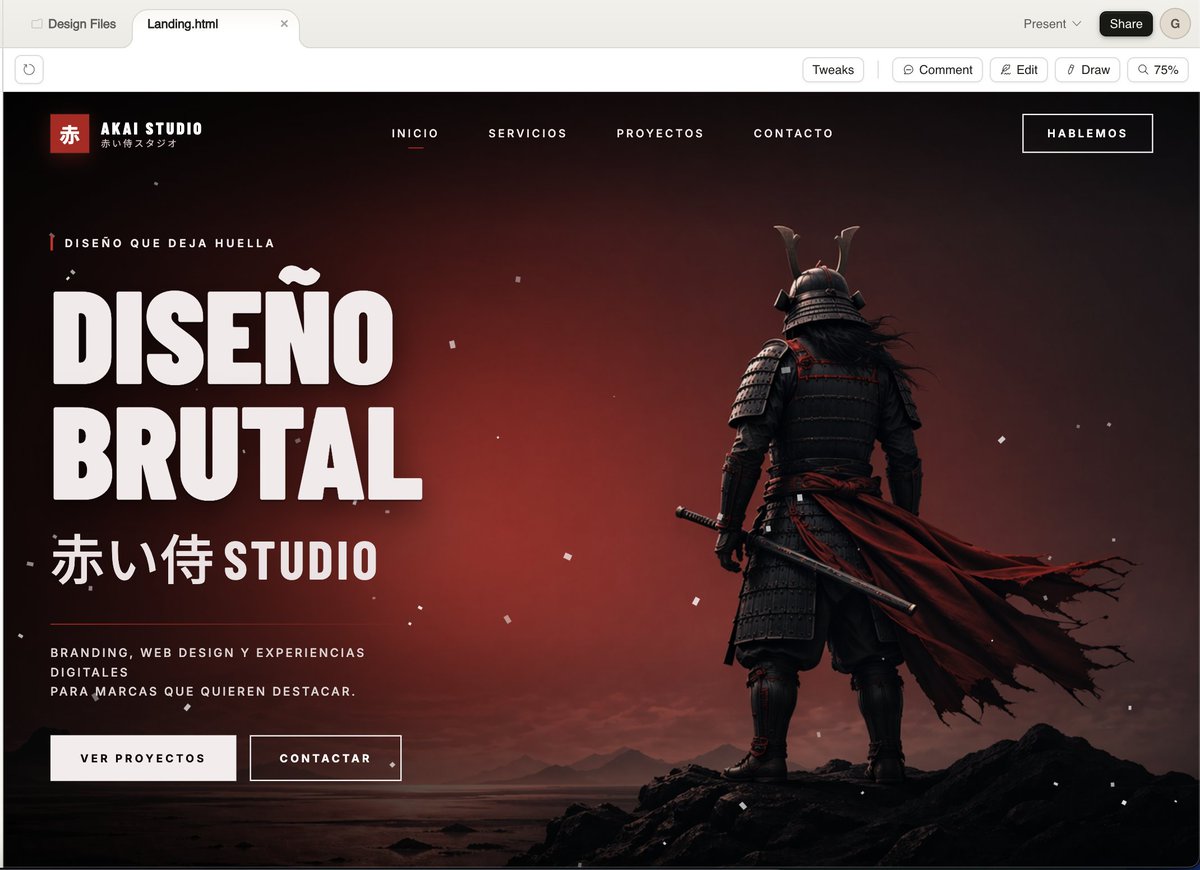
電影武士事務所著陸頁
這可以為創意工作室產生高端暗網著陸頁首頁,非常適合展示大膽的品牌形象、網頁設計或代理商概念作品。
這是一個平面設計和海報設計的GPT Image 2範例。請使用下方可直接使用的提示資訊產生類似的視覺素材,並在重複使用前查看Awesome GPT Image 2 Prompts署名和商業用途授權資訊。
需要完整的提示符號集?請使用 平面設計和海報設計 主題中心提供更多相關範例,或打開 GPT Image 2 提示庫 有關完整範例索引、可重複使用結構和來源歸屬的資訊。
Free 1K preview
Generate one preview image instantly, no sign-up required.
2286/4000
提示詞
可直接複製的提示
A cinematic, dark-style landing page model showcasing a Japanese creative agency named {argument name="studio name" default="AKAI STUDIO"}, presented in a modern desktop browser window. The page features a dramatic black-to-deep-red gradient background with a melancholic sunset glow, scattered with fine white dust or ash particles, and utilizes a widescreen hero layout. On the right, place a full-body shot of a samurai from behind, standing on jagged black rocks on a calm shore, wearing layered dark armor and a horned helmet, holding a katana at his side, with a long, tattered deep-red cloak billowing strongly to the right. On the left, create a prominent, oversized white, compact sans-serif headline text (in Spanish) that reads {argument name="headline text" default="DISEÑO BRUTAL"}, stacked in two lines. Above the headline, add a line of small red vertical decorative micro-copy text: {argument name="eyebrow text" default="DISEÑO QUE DEJA HUELLA"}. Below the headline, add large Japanese characters followed by the word STUDIO: {argument name="subheadline text" default="赤い侍 STUDIO"}. Below that, place a short white, mixed-case supporting paragraph text: {argument name="body text" default="BRANDING, WEB DESIGN Y EXPERIENCIAS DIGITALES PARA MARCAS QUE QUIEREN DESTACAR。"}. Below the copy, add two call-to-action buttons: a solid light-colored button labeled “VER PROYECTOS” and an outlined dark-colored button labeled “CONTACTAR”. In the top navigation bar, include 4 centered, uppercase menu items: “INICIO”, “SERVICIOS”, “PROYECTOS”, “CONTACTO”, with “INICIO” underlined in red to indicate its active state. Place a bordered button labeled {argument name="top button text" default="HABLEMOS"} in the upper right corner. In the upper left corner of the website header, add a Logo area containing a small red square with the Chinese character “赤”, the brand name “AKAI STUDIO”, and a small Japanese subtitle below. The overall style should present a combination of high-end brutalist web design and a cinematic game main visual: ultra-detailed UI modeling, sharp typography, strong contrast, a luxurious agency aesthetic, minimalist yet powerful composition, a black, white, and red color scheme, fine grain, realistic lighting and shadows, and a high-end presentation.提示變數
提示符號中可編輯的參數佔位符及其預設值。
多變的
studio name
預設
AKAI STUDIO
多變的
headline text
預設
DISEÑO BRUTAL
多變的
eyebrow text
預設
DISEÑO QUE DEJA HUELLA
多變的
subheadline text
預設
赤い侍 STUDIO
多變的
body text
預設
BRANDING, WEB DESIGN Y EXPERIENCIAS DIGITALES PARA MARCAS QUE QUIEREN DESTACAR。
多變的
top button text
預設
HABLEMOS
Best for
- - 平面設計和海報設計 visual exploration
- - Image generation and reference-image edits
- - Reusable briefs that keep source attribution visible
Change these parts
- - Subject, product, character, or scene
- - Aspect ratio, camera, lighting, and background
- - Brand, text, color, and output constraints
Recommended model and settings
- - Model: gpt-image-2
- - Input mode: 文生圖
- - Aspect ratio: source
- - Commercial status: review original source
How to use this prompt
- 1. Copy the prompt and preserve its structure for the first test.
- 2. Replace the subject, context, and publishing channel.
- 3. Change one camera, lighting, or style variable per iteration.
- 4. Inspect the output, source, text, and rights before reuse.
Limitations, source, and reuse cautions
- - Generated output is an editable draft, not factual, legal, or rights evidence.
- - Review the linked source, people, brands, logos, text, and third-party media before commercial use.
內容來自Awesome GPT Image 2 Prompts 。必須註明出處。商業用途狀態為allowed ;付費使用前請查看來源版權資訊。
此類案例更多
按類別、輸入模式相容性、品質和低風險進行優先排序。






重用和來源註釋
預覽案例後,請謹慎使用此提示。
- 1.複製提示或直接在 Dovoo 中使用生成按鈕開啟提示。
- 2.根據您的實際使用情況調整變數、寬高比和參考影像。
- 3.發布或付費使用前,請確認版權、署名要求以及品牌或肖像權風險。