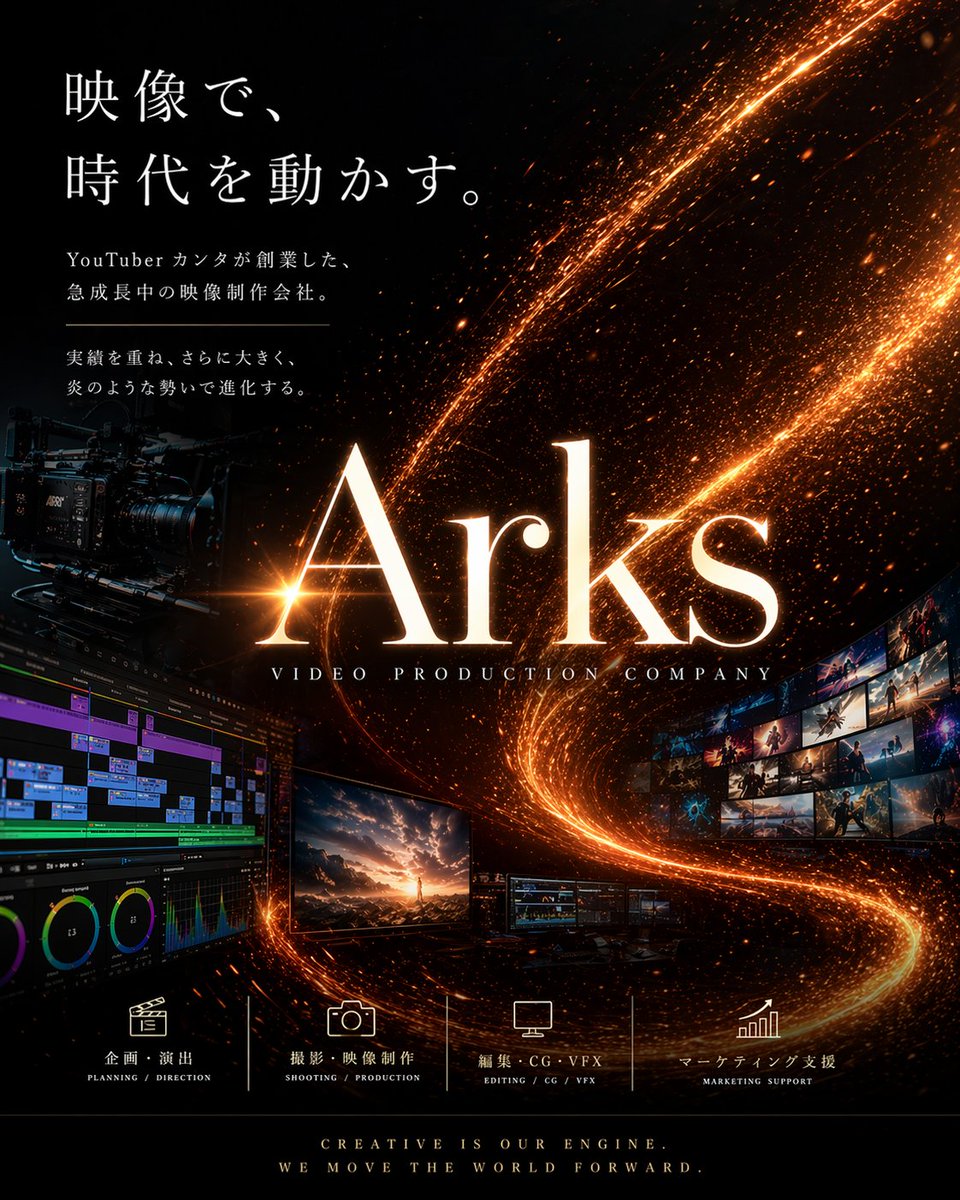
電影影音公司海報
一款面向影片製作公司的優質日本企業海報,設計用於品牌推廣、宣傳或代理商行銷材料。
這是一個平面設計和海報設計的GPT Image 2範例。請使用下方可直接使用的提示資訊產生類似的視覺素材,並在重複使用前查看Awesome GPT Image 2 Prompts署名和商業用途授權資訊。
需要完整的提示符號集?請使用 平面設計和海報設計 主題中心提供更多相關範例,或打開 GPT Image 2 提示庫 有關完整範例索引、可重複使用結構和來源歸屬的資訊。
Free 1K preview
Generate one preview image instantly, no sign-up required.
Free text preview doesn’t preserve reference-image consistency.
4000/4000
提示詞
可直接複製的提示
{
  "type": "cinematic corporate promotional poster",
  "style": "luxury, high-impact, premium film production branding, realistic with polished graphic design",
  "brand": {
    "name": "{argument name=\"brand name\" default=\"Arks\"}",
    "subtitle": "VIDEO PRODUCTION COMPANY"
  },
  "canvas": {
    "orientation": "portrait",
    "aspect_ratio": "4:5"
  },
  "background": {
    "base_color": "deep black",
    "effects": [
      "glowing orange-gold particle trails sweeping diagonally from upper right to lower center and curling upward",
      "dense sparks and embers",
      "subtle cosmic dust texture",
      "high contrast illumination"
    ]
  },
  "layout": {
    "sections": [
      {
        "title": "main headline block",
        "position": "top-left",
        "count": 4,
        "labels": [
          "映像で、",
          "時代を動かす。",
          "YouTuber カンタが創業した、急成長中の映像制作会社。",
          "実績を重ね、さらに大きく、炎のような勢いで進化する。"
        ]
      },
      {
        "title": "service icons row",
        "position": "bottom center",
        "count": 4,
        "labels": [
          "企画・演出",
          "撮影・映像制作",
          "編集・CG・VFX",
          "マーケティング支援"
        ]
      },
      {
        "title": "footer tagline",
        "position": "very bottom center",
        "count": 2,
        "labels": [
          "CREATIVE IS OUR ENGINE.",
          "WE MOVE THE WORLD FORWARD."
        ]
      }
    ],
    "centerpiece": "oversized glowing serif logotype in the center",
    "supporting_elements": "film production equipment and post-production screens arranged around the logo"
  },
  "objects": {
    "left_side": [
      {
        "item": "professional cinema camera rig",
        "placement": "mid-left",
        "look": "dark matte body with lens, mounted on support system, partially emerging from shadows"
      },
      {
        "item": "video editing timeline interface monitor",
        "placement": "bottom-left",
        "look": "large screen showing multitrack editing software with colorful timeline bars, scopes, and panels"
      }
    ],
    "center": [
      {
        "item": "hero monitor",
        "placement": "lower center-left",
        "look": "display showing a dramatic cinematic landscape with a person standing under a glowing sky"
      },
      {
        "item": "two smaller workstation monitors",
        "placement": "lower center-right",
        "look": "compact displays showing editing or grading interfaces"
      }
    ],
    "right_side": [
      {
        "item": "curved wall of image thumbnails",
        "placement": "mid-right",
        "count": 15,
        "look": "15 small cinematic stills arranged in a sweeping arc, showing action, fantasy, landscapes, and dramatic scenes"
      }
    ]
  },
  "typography": {
    "headline": {
      "font_style": "elegant Japanese Mincho-style serif",
      "color": "white",
      "size": "large",
      "line_spacing": "generous"
    },
    "logo": {
      "font_style": "large refined serif",
      "color": "warm white with orange glow",
      "effect": "strong bloom and metallic firelit edges"
    },
    "service_labels": {
      "font_style": "clean small serif/sans mix",
      "color": "white"
    },
    "footer": {
      "font_style": "small caps serif",
      "color": "warm white"
    }
  },
  "color_palette": [
    "black",
    "orange-gold",
    "amber",
    "warm white",
    "subtle blue accents from screens"
  ],
  "lighting": "dark studio atmosphere with fiery glowing trails acting as key visual light source",
  "mood": "ambitious, futuristic, energetic, elite, cinematic",
  "text_rendering": "crisp, accurate Japanese and English typography, professionally typeset",
  "image_goal": "a poster for a film and video production company that feels powerful, trustworthy, and visually spectacular",
  "customization": {
    "headline": "{argument name=\"headline text\" default=\"映像で、時代を動かす。\"}",
    "body_copy": "{argument name=\"body copy\" default=\"YouTuber カンタが創業した、急成長中の映像制作会社。 実績を重ね、さらに大きく、炎のような勢いで進化する。\"}",
    "primary_glow_color": "{argument name=\"glow color\" default=\"orange-gold\"}",
    "footer_tagline": "{argument name=\"footer tagline\" default=\"CREATIVE IS OUR ENGINE. WE MOVE THE WORLD FORWARD.\"}"
  }
}
提示變數
提示符號中可編輯的參數佔位符及其預設值。
多變的
brand name
預設
Arks
多變的
headline text
預設
映像で、時代を動かす。
多變的
body copy
預設
YouTuber カンタが創業した、急成長中の映像制作会社。 実績を重ね、さらに大きく、炎のような勢いで進化する。
多變的
glow color
預設
orange-gold
多變的
footer tagline
預設
CREATIVE IS OUR ENGINE. WE MOVE THE WORLD FORWARD.
Best for
- - 平面設計和海報設計 visual exploration
- - Image generation and reference-image edits
- - Reusable briefs that keep source attribution visible
Change these parts
- - Subject, product, character, or scene
- - Aspect ratio, camera, lighting, and background
- - Brand, text, color, and output constraints
Recommended model and settings
- - Model: gpt-image-2
- - Input mode: 圖生圖
- - Aspect ratio: source
- - Commercial status: review original source
How to use this prompt
- 1. Copy the prompt and preserve its structure for the first test.
- 2. Replace the subject, context, and publishing channel.
- 3. Change one camera, lighting, or style variable per iteration.
- 4. Inspect the output, source, text, and rights before reuse.
Limitations, source, and reuse cautions
- - Generated output is an editable draft, not factual, legal, or rights evidence.
- - Review the linked source, people, brands, logos, text, and third-party media before commercial use.
內容來自Awesome GPT Image 2 Prompts 。必須註明出處。商業用途狀態為allowed ;付費使用前請查看來源版權資訊。
此類案例更多
按類別、輸入模式相容性、品質和低風險進行優先排序。






重用和來源註釋
預覽案例後,請謹慎使用此提示。
- 1.複製提示或直接在 Dovoo 中使用生成按鈕開啟提示。
- 2.根據您的實際使用情況調整變數、寬高比和參考影像。
- 3.發布或付費使用前,請確認版權、署名要求以及品牌或肖像權風險。