Cinematic Cafe 視覺小說 UI
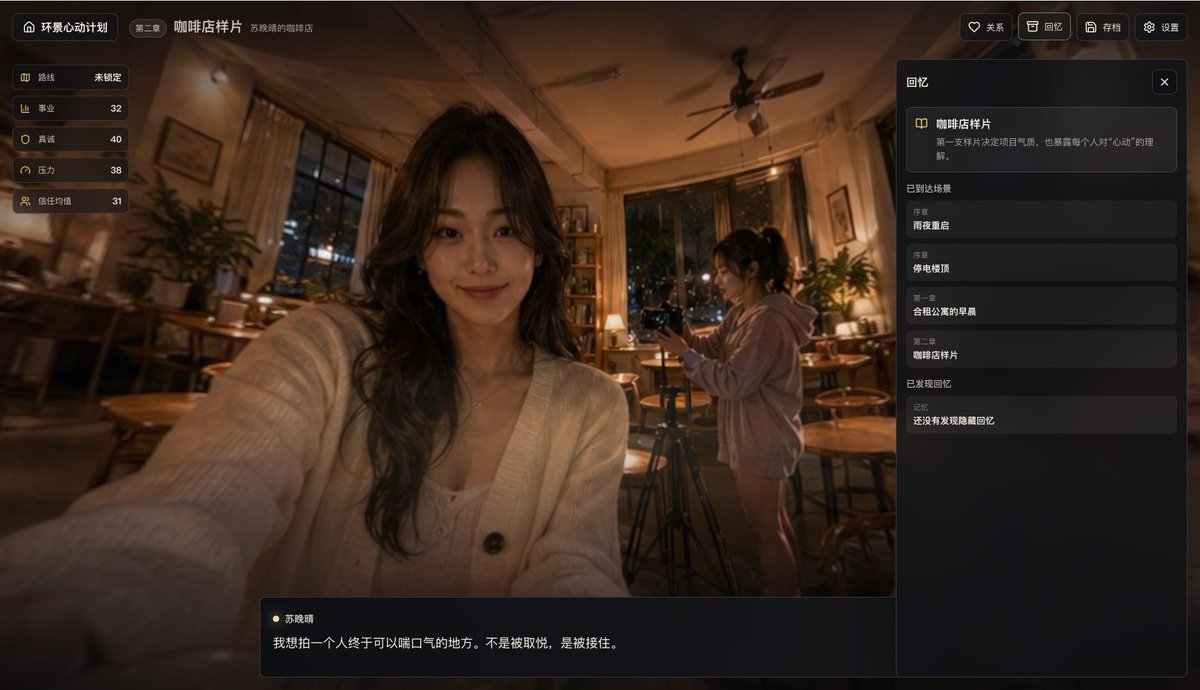
逼真的夜間咖啡店場景,以時尚的中國敘事遊戲截圖形式呈現,可用於視覺小說、互動故事應用程式或電影化使用者介面概念的模擬。
這是一個動漫與遊戲的GPT Image 2範例。請使用下方可直接使用的提示資訊產生類似的視覺素材,並在重複使用前查看Awesome GPT Image 2 Prompts署名和商業用途授權資訊。
需要完整的提示符號集?請使用 動漫與遊戲 主題中心提供更多相關範例,或打開 GPT Image 2 提示庫 有關完整範例索引、可重複使用結構和來源歸屬的資訊。
Free 1K preview
Generate one preview image instantly, no sign-up required.
3027/4000
提示詞
可直接複製的提示
{
  "type": "電影般的敘事遊戲介面螢幕截圖",
  "theme": "溫暖、內省的咖啡廳回憶場景,帶有視覺小說 UI 疊加",
  "setting": {
    "location": "夜晚舒適的獨立咖啡館",
    "lighting": "昏暗的琥珀色鎢絲燈光,柔和的實用燈具,溫暖的高光,深邃的陰影",
    "atmosphere": "安靜、懷舊、情感反思、略帶電影般的寫實感",
    "background_details": [
      "可以看到外面的夜景城市燈光的落地窗",
      "咖啡館內散落著木製桌椅",
      "窗邊和角落擺放著盆栽",
      "後方有書架或展示架",
      "天花板中央有吊扇",
      "窗簾裝飾著窗戶"
    ]
  },
  "composition": {
    "camera": "從坐在前景中的主體略微廣角自拍視角",
    "framing": "前景女性佔據中心左側,手臂伸向鏡頭,第二位女性站在中右側操作三腳架上的相機,UI 面板覆蓋整個螢幕",
    "depth": "淺至中等的景深,帶有柔和的環境模糊和對整體場景氛圍的強烈焦點"
  },
  "subjects": {
    "count": 2,
    "characters": [
      {
        "role": "前景主角",
        "gender_presentation": "年輕女性",
        "position": "中心左前景",
        "pose": "以類似自拍的姿勢拿著相機或手機,一隻手臂伸向觀眾",
        "appearance": {
          "hair": "長波浪深色頭髮",
          "outfit": "鈕扣式柔軟的白色針織開衫,搭配淺色內搭",
          "accessories": "精緻的項鍊"
        }
      },
      {
        "role": "背景同伴",
        "gender_presentation": "年輕女性",
        "position": "中右背景",
        "pose": "站在三腳架旁,看著或調整相機",
        "appearance": {
          "hair": "紮成馬尾的深色頭髮",
          "outfit": "寬鬆的淺色連帽衫和短褲或可見的裸腿"
        }
      }
    ]
  },
  "style": {
    "rendering": "照片級別的電影遊戲螢幕截圖",
    "color_palette": "溫暖的棕色、琥珀金色、柔和的黑色、柔和的奶油色",
    "mood": "溫柔、親密、生活片段、記憶般的",
    "ui_style": "簡潔的深色半透明現代遊戲 UI,帶有圓角矩形和微妙的金色裝飾"
  },
  "layout": {
    "sections": [
      {
        "title": "左側狀態欄",
        "position": "頂部左側垂直面板",
        "count": 5,
        "labels": [
          "路線",
          "職業",
          "真誠度",
          "壓力",
          "信任平均值"
        ]
      },
      {
        "title": "頂部導航",
        "position": "頂部邊緣",
        "count": 6,
        "labels": [
          "全景心跳專案",
          "第 2 章",
          "咖啡廳樣本",
          "人際關係",
          "回憶",
          "檔案"
        ]
      },
      {
        "title": "右側回憶面板",
        "position": "右側側邊欄",
        "count": 3,
        "labels": [
          "咖啡廳樣本",
          "抵達場景",
          "找到的回憶"
        ]
      },
      {
        "title": "抵達場景",
        "position": "右側側邊欄中間",
        "count": 4,
        "labels": [
          "序章",
          "雨夜重逢",
          "序章",
          "停電時的屋頂",
          "第 1 章",
          "共享公寓的早晨",
          "第 2 章",
          "咖啡廳樣本"
        ]
      },
      {
        "title": "底部對話框",
        "position": "底部中心左側",
        "count": 2,
        "labels": [
          "蘇曉晴",
          "我想拍攝一個人們終於可以鬆一口氣的地方。不是為了高興,而是為了被捕捉。"
        ]
      }
    ],
    "centerpiece": "咖啡館內前景自拍式人像,背景中第二個人正在拍攝"
  },
  "text": {
    "language": "中文介面文字",
    "preserve_visible_text": true
  },
  "customization": {
    "chapter": "{argument name=\"chapter label\" default=\"第 2 章\"}",
    "scene title": "{argument name=\"scene title\" default=\"咖啡廳樣本\"}",
    "character name": "{argument name=\"character name\" default=\"蘇曉晴\"}",
    "dialogue": "{argument name=\"quote\" default=\"我想拍攝一個人們終於可以鬆一口氣的地方。不是為了高興,而是為了被捕捉。\"}",
    "interface title": "{argument name=\"interface title\" default=\"全景心跳專案\"}"
  },
  "quality": "高細節、精緻、優質獨立敘事遊戲螢幕截圖、逼真的光照、統一的 UI 設計"
}
提示變數
提示符號中可編輯的參數佔位符及其預設值。
多變的
chapter label
預設
Chapter 2
多變的
scene title
預設
Coffee Shop Sample
多變的
character name
預設
Su Xiaoching
多變的
quote
預設
I want to photograph a place where a person can finally breathe a sigh of relief. Not to be pleased, but to be caught.
多變的
interface title
預設
Panoramic Heartbeat Project
Best for
- - 動漫與遊戲 visual exploration
- - Image generation and reference-image edits
- - Reusable briefs that keep source attribution visible
Change these parts
- - Subject, product, character, or scene
- - Aspect ratio, camera, lighting, and background
- - Brand, text, color, and output constraints
Recommended model and settings
- - Model: gpt-image-2
- - Input mode: 文生圖
- - Aspect ratio: source
- - Commercial status: review original source
How to use this prompt
- 1. Copy the prompt and preserve its structure for the first test.
- 2. Replace the subject, context, and publishing channel.
- 3. Change one camera, lighting, or style variable per iteration.
- 4. Inspect the output, source, text, and rights before reuse.
Limitations, source, and reuse cautions
- - Generated output is an editable draft, not factual, legal, or rights evidence.
- - Review the linked source, people, brands, logos, text, and third-party media before commercial use.
內容來自Awesome GPT Image 2 Prompts 。必須註明出處。商業用途狀態為allowed ;付費使用前請查看來源版權資訊。
此類案例更多
按類別、輸入模式相容性、品質和低風險進行優先排序。






重用和來源註釋
預覽案例後,請謹慎使用此提示。
- 1.複製提示或直接在 Dovoo 中使用生成按鈕開啟提示。
- 2.根據您的實際使用情況調整變數、寬高比和參考影像。
- 3.發布或付費使用前,請確認版權、署名要求以及品牌或肖像權風險。