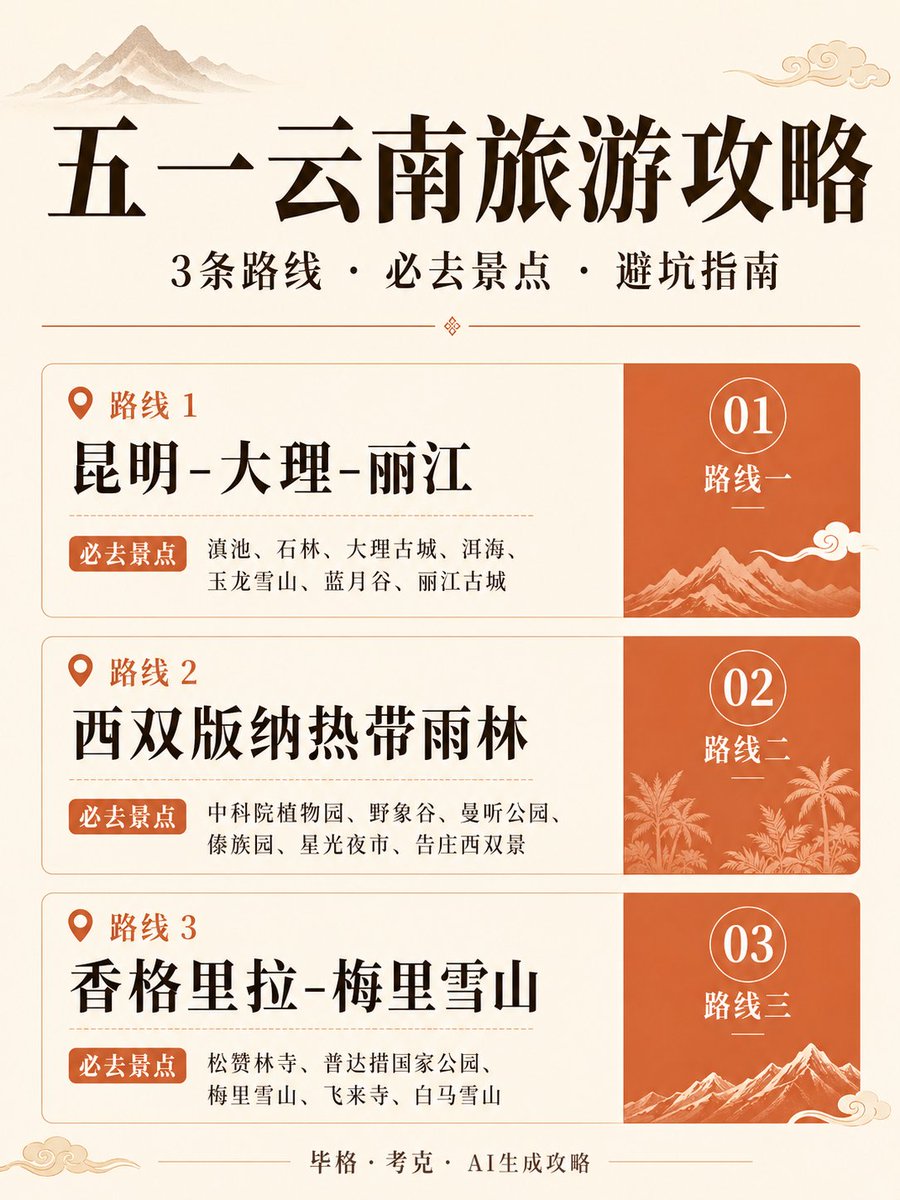
中國雲南旅遊指南海報
一款垂直版設計的中國風資訊圖海報,適用於雲南旅遊指南,非常適合用於社群媒體旅遊推薦和旅遊內容。
這是一個平面設計和海報設計的GPT Image 2範例。請使用下方可直接使用的提示資訊產生類似的視覺素材,並在重複使用前查看Awesome GPT Image 2 Prompts署名和商業用途授權資訊。
需要完整的提示符號集?請使用 平面設計和海報設計 主題中心提供更多相關範例,或打開 GPT Image 2 提示庫 有關完整範例索引、可重複使用結構和來源歸屬的資訊。
Free 1K preview
Generate one preview image instantly, no sign-up required.
2647/4000
提示詞
可直接複製的提示
{
  "type": "中文旅遊資訊圖海報",
  "theme": "傳統中式插畫旅遊指南",
  "subject": "雲南五一旅遊指南",
  "style": {
    "overall": "典雅的中式編輯海報,帶有溫暖的橙紅色調,水墨山水意境,雲紋裝飾,簡潔的排版,高端旅遊宣傳冊美學",
    "palette": {
      "background": "暖象牙色羊皮紙",
      "primary text": "深棕黑色",
      "accent": "焦橙色至橙紅色",
      "linework": "淺卡其色和金米色"
    },
    "texture": "微妙的紙張質感,柔和的啞光印刷效果"
  },
  "canvas": {
    "aspect_ratio": "2:3 垂直",
    "composition": "以頂部大標題為中心的海報,標題下方是副標題,中間堆疊三個路線卡,底部是小字註腳"
  },
  "text": {
    "title": "{argument name=\"headline text\" default=\"五一雲南旅遊指南\"}",
    "subtitle": "3條路線・必去景點・避坑指南",
    "footer": "毕格・考克・AI生成攻略"
  },
  "decorative_elements": {
    "count": 7,
    "items": [
      "左上角水墨山水剪影",
      "右上角雲紋裝飾",
      "副標題下方的小分隔裝飾",
      "路線 1 橙色面板山水插畫",
      "路線 2 橙色面板熱帶雨林和棕櫚樹剪影",
      "路線 3 橙色面板雪山插畫",
      "底部角落雲紋裝飾"
    ]
  },
  "layout": {
    "sections": [
      {
        "title": "路線 1",
        "position": "上部卡片",
        "count": 3,
        "labels": [
          "路線 1",
          "必去景點",
          "01 路線 1"
        ],
        "left_panel": {
          "route_name": "{argument name=\"route 1 name\" default=\"昆明-大理-麗江\"}",
          "spots": "滇池、石林、大理古城、洱海、玉龍雪山、藍月谷、麗江古城"
        },
        "right_panel": {
          "number": "01",
          "caption": "路線 1",
          "art": "橙色風景圖塊,帶有白色線條山水和雲紋"
        }
      },
      {
        "title": "路線 2",
        "position": "中部卡片",
        "count": 3,
        "labels": [
          "路線 2",
          "必去景點",
          "02 路線 2"
        ],
        "left_panel": {
          "route_name": "{argument name=\"route 2 name\" default=\"西雙版納熱帶雨林\"}",
          "spots": "中科院植物園、野象谷、曼聽公園、傣園、星光夜市、告莊西雙景"
        },
        "right_panel": {
          "number": "02",
          "caption": "路線 2",
          "art": "橙色風景圖塊,帶有白色線條熱帶植物和棕櫚樹"
        }
      },
      {
        "title": "路線 3",
        "position": "下部卡片",
        "count": 3,
        "labels": [
          "路線 3",
          "必去景點",
          "路線 3"
        ],
        "left_panel": {
          "route_name": "{argument name=\"route 3 name\" default=\"香格里拉 - 梅里雪山\"}",
          "spots": "松贊林寺、普達措國家公園、梅里雪山、飛來寺、白馬雪山"
        },
        "right_panel": {
          "number": "03",
          "caption": "路線 3",
          "art": "橙色風景圖塊,帶有白色線條雪山和雲紋"
        }
      }
    ],
    "card_style": "3張圓角矩形卡片垂直堆疊,帶有細薄的卡其色邊框;每張卡片分為左側的大面積白色文字區域和右側較窄的橙色插圖面板",
    "section_count": 3
  },
  "typography": {
    "title": "非常大的粗體中文字體",
    "subtitle": "中等粗體中文字體",
    "route headings": "大的粗體中文字體",
    "body": "較小的整潔中文字體或宋體字體",
    "numbers": "大的優雅白色數字,置於細白色圓圈輪廓內"
  },
  "spacing": "寬裕的邊距,平衡的對齊,精緻的編輯層次",
  "quality": "高解析度,精美,準確的中文字體渲染,視覺上引人注目但有條理,適合社交媒體分享或旅遊指南封面"
}
提示變數
提示符號中可編輯的參數佔位符及其預設值。
多變的
headline text
預設
May Day Yunnan Travel Guide
多變的
route 1 name
預設
Kunming-Dali-Lijiang
多變的
route 2 name
預設
Xishuangbanna Tropical Rainforest
多變的
route 3 name
預設
Shangri-La - Meili Snow Mountain
Best for
- - 平面設計和海報設計 visual exploration
- - Image generation and reference-image edits
- - Reusable briefs that keep source attribution visible
Change these parts
- - Subject, product, character, or scene
- - Aspect ratio, camera, lighting, and background
- - Brand, text, color, and output constraints
Recommended model and settings
- - Model: gpt-image-2
- - Input mode: 文生圖
- - Aspect ratio: source
- - Commercial status: review original source
How to use this prompt
- 1. Copy the prompt and preserve its structure for the first test.
- 2. Replace the subject, context, and publishing channel.
- 3. Change one camera, lighting, or style variable per iteration.
- 4. Inspect the output, source, text, and rights before reuse.
Limitations, source, and reuse cautions
- - Generated output is an editable draft, not factual, legal, or rights evidence.
- - Review the linked source, people, brands, logos, text, and third-party media before commercial use.
內容來自Awesome GPT Image 2 Prompts 。必須註明出處。商業用途狀態為allowed ;付費使用前請查看來源版權資訊。
此類案例更多
按類別、輸入模式相容性、品質和低風險進行優先排序。






重用和來源註釋
預覽案例後,請謹慎使用此提示。
- 1.複製提示或直接在 Dovoo 中使用生成按鈕開啟提示。
- 2.根據您的實際使用情況調整變數、寬高比和參考影像。
- 3.發布或付費使用前,請確認版權、署名要求以及品牌或肖像權風險。