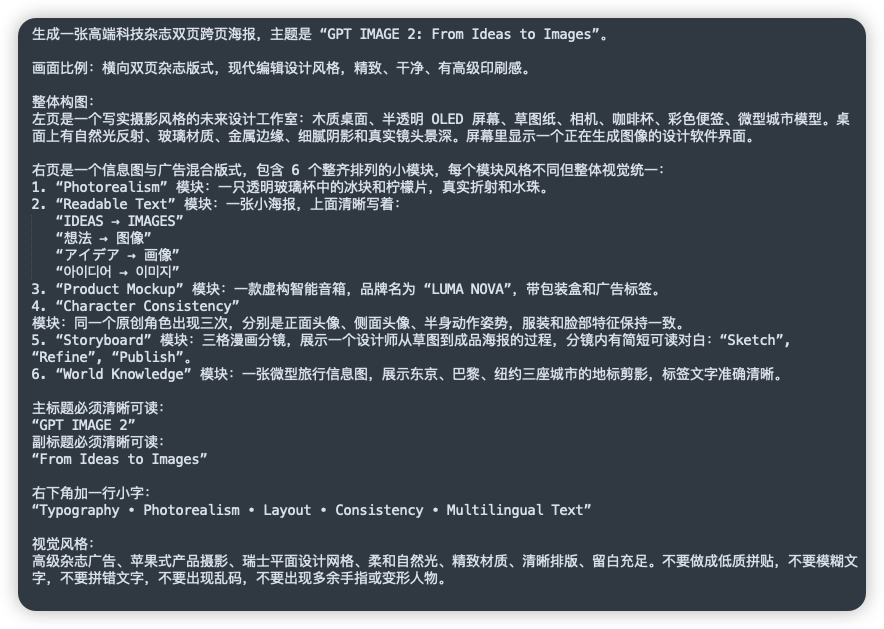
GPT 圖 2 的中文提示表
這將產生一個簡潔的深色 UI 風格的螢幕截圖,其中包含詳細的中文提示文檔,可用於社交媒體帖子或有關複雜圖像生成說明的演示。
這是一個其他靈感的GPT Image 2範例。請使用下方可直接使用的提示資訊產生類似的視覺素材,並在重複使用前查看Awesome GPT Image 2 Prompts署名和商業用途授權資訊。
需要完整的提示符號集?請使用 其他靈感 主題中心提供更多相關範例,或打開 GPT Image 2 提示庫 有關完整範例索引、可重複使用結構和來源歸屬的資訊。
Free 1K preview
Generate one preview image instantly, no sign-up required.
2157/4000
提示詞
可直接複製的提示
A clean screenshot-like image showing a dark charcoal rounded-rectangle panel filled with dense simplified Chinese prompt text in white sans-serif font, presented as a text document or note on a flat dark background. The composition is a single full-frame panel with generous padding and subtle shadow, like a modern UI card. At the top is a sentence describing the creation of a high-end technology magazine double-page spread poster, with the English title in quotation marks: “GPT IMAGE 2: From Ideas to Images”. Below it are multiple left-aligned paragraphs of Chinese text with consistent line spacing, describing layout ratio, modern editorial design style, and a detailed two-page composition. In the middle section, there is a numbered list with exactly 6 items labeled 1 through 6, each item naming a module in English inside quotation marks followed by Chinese explanations. The 6 module names are exactly: “Photorealism”, “Readable Text”, “Product Mockup”, “Character Consistency”, “Storyboard”, and “World Knowledge”. Under item 2, include 5 separate quoted multilingual text lines as subitems, exactly these: “IDEAS → IMAGES”, “想法 → 图像”, “アイデア → 画像”, “아이디어 → 이미지”, and “فكرة → صورة”. Later in the text, add a section specifying the main title and subtitle as clearly readable quoted English lines: “GPT IMAGE 2” and “From Ideas to Images”. Near the lower portion, add another Chinese line introducing a small caption at the bottom right, followed by the exact quoted English caption: “Typography • Photorealism • Layout • Consistency • Multilingual Text”. At the bottom, include a final Chinese paragraph about visual style requirements such as premium ad feel, Apple-style product photography, Swiss graphic design, soft natural light, refined materials, clear layout, ample whitespace, and avoiding low-quality textures, blurry text, gibberish, or deformed fingers. The text should appear crisp and fully legible, with realistic screen-capture fidelity, high contrast, subtle anti-aliased edges, no illustrations, no icons, no photos, no extra interface chrome beyond the single dark card, and an overall polished editorial-tech presentation.
Best for
- - 其他靈感 visual exploration
- - Image generation and reference-image edits
- - Reusable briefs that keep source attribution visible
Change these parts
- - Subject, product, character, or scene
- - Aspect ratio, camera, lighting, and background
- - Brand, text, color, and output constraints
Recommended model and settings
- - Model: gpt-image-2
- - Input mode: 文生圖
- - Aspect ratio: source
- - Commercial status: review original source
How to use this prompt
- 1. Copy the prompt and preserve its structure for the first test.
- 2. Replace the subject, context, and publishing channel.
- 3. Change one camera, lighting, or style variable per iteration.
- 4. Inspect the output, source, text, and rights before reuse.
Limitations, source, and reuse cautions
- - Generated output is an editable draft, not factual, legal, or rights evidence.
- - Review the linked source, people, brands, logos, text, and third-party media before commercial use.
內容來自Awesome GPT Image 2 Prompts 。必須註明出處。商業用途狀態為allowed ;付費使用前請查看來源版權資訊。
此類案例更多
按類別、輸入模式相容性、品質和低風險進行優先排序。






重用和來源註釋
預覽案例後,請謹慎使用此提示。
- 1.複製提示或直接在 Dovoo 中使用生成按鈕開啟提示。
- 2.根據您的實際使用情況調整變數、寬高比和參考影像。
- 3.發布或付費使用前,請確認版權、署名要求以及品牌或肖像權風險。