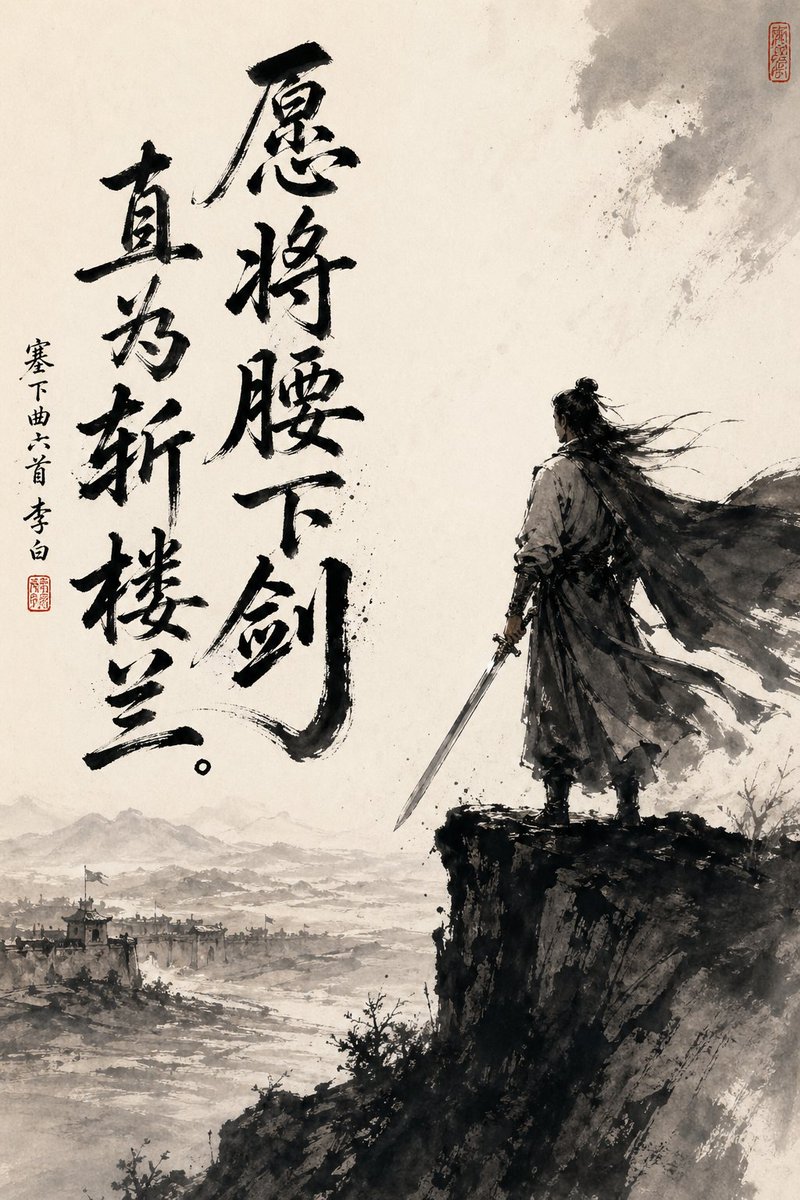
中國水墨劍士與書法
這個提示會產生一幅充滿戲劇性的武俠風格水墨畫海報,畫面中有一位孤膽劍客、邊疆風景和氣勢磅礴的中國書法,適合作為文學或歷史藝術版畫。
這是一個插畫與藝術的GPT Image 2範例。請使用下方可直接使用的提示資訊產生類似的視覺素材,並在重複使用前查看Awesome GPT Image 2 Prompts署名和商業用途授權資訊。
需要完整的提示符號集?請使用 插畫與藝術 主題中心提供更多相關範例,或打開 GPT Image 2 提示庫 有關完整範例索引、可重複使用結構和來源歸屬的資訊。
Free 1K preview
Generate one preview image instantly, no sign-up required.
1377/4000
提示詞
可直接複製的提示
A dramatically composed vertical Chinese ink painting, drawn on aged Xuan paper, employing a minimalist monochrome style with soft, warm parchment tones. On the right side of the painting, an ancient swordsman stands alone on the edge of a steep, dark cliff, shown primarily from a three-quarter back view. He is dressed in flowing ancient attire, with a long cloak billowing in the wind, and his long hair tied in a bun is swept to the side. The lower left extends into a vast misty landscape, revealing 1 distant frontier city, faintly visible watchtowers and rooftops, winding rivers or plains, and layered mountain silhouettes hidden in the mist. Utilize expressive black brushstrokes, splashed ink textures, dry brush edges, ethereal negative space, and a strong contrast between the dark figure and cliff against the pale, open background. Add 2 columns of prominent large black calligraphy on the left side, reading “愿将腰下剑 (Yuàn jiāng yāo xià jiàn)” and “直为斩楼兰 (Zhí wèi zhǎn lóulán),” and add 1 column of smaller vertical text on the far left, reading “塞下曲六首 李白 (Sài xià qǔ liù shǒu Lǐ Bái),” along with 2 red seals, one near the small text and the other near the upper right corner. Overall mood: full of heroic spirit, loneliness, contemplation, and pride, like a poster presenting the image of a Tang Dynasty poet and warrior in the style of traditional ink painting.
Best for
- - 插畫與藝術 visual exploration
- - Image generation and reference-image edits
- - Reusable briefs that keep source attribution visible
Change these parts
- - Subject, product, character, or scene
- - Aspect ratio, camera, lighting, and background
- - Brand, text, color, and output constraints
Recommended model and settings
- - Model: gpt-image-2
- - Input mode: 文生圖
- - Aspect ratio: source
- - Commercial status: review original source
How to use this prompt
- 1. Copy the prompt and preserve its structure for the first test.
- 2. Replace the subject, context, and publishing channel.
- 3. Change one camera, lighting, or style variable per iteration.
- 4. Inspect the output, source, text, and rights before reuse.
Limitations, source, and reuse cautions
- - Generated output is an editable draft, not factual, legal, or rights evidence.
- - Review the linked source, people, brands, logos, text, and third-party media before commercial use.
內容來自Awesome GPT Image 2 Prompts 。必須註明出處。商業用途狀態為allowed ;付費使用前請查看來源版權資訊。
此類案例更多
按類別、輸入模式相容性、品質和低風險進行優先排序。






重用和來源註釋
預覽案例後,請謹慎使用此提示。
- 1.複製提示或直接在 Dovoo 中使用生成按鈕開啟提示。
- 2.根據您的實際使用情況調整變數、寬高比和參考影像。
- 3.發布或付費使用前,請確認版權、署名要求以及品牌或肖像權風險。