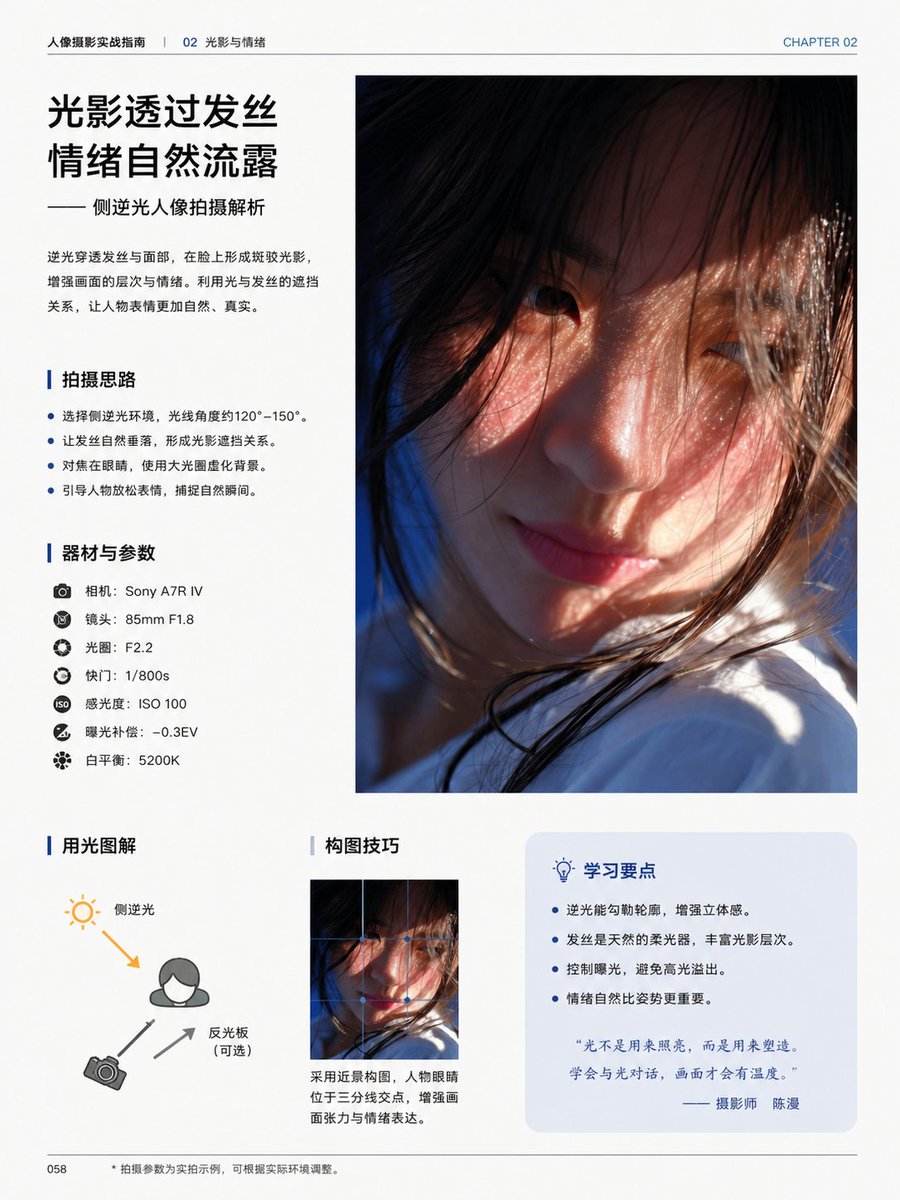
中國攝影教學書頁
這將產生一個精美的中文編輯書籍頁面,用於教授逆光人像攝影,適用於雜誌插頁、攝影指南和高級版面設計模型。
這是一個平面設計和海報設計的GPT Image 2範例。請使用下方可直接使用的提示資訊產生類似的視覺素材,並在重複使用前查看Awesome GPT Image 2 Prompts署名和商業用途授權資訊。
需要完整的提示符號集?請使用 平面設計和海報設計 主題中心提供更多相關範例,或打開 GPT Image 2 提示庫 有關完整範例索引、可重複使用結構和來源歸屬的資訊。
Free 1K preview
Generate one preview image instantly, no sign-up required.
4000/4000
提示詞
可直接複製的提示
{
  "content_blocks": [
    {
      "body": "Backlight penetrates the hair and face, creating mottled light and shadow on the face, enhancing the layers and emotions of the picture. Utilizing the relationship between light and hair occlusion, the subject's expression becomes more natural and authentic.",
      "kind": "headline_block",
      "position": "top-left",
      "subtitle": "—— Analysis of Sideways Backlit Portrait Photography",
      "title": "{argument name=\"headline text\" default=\"Light and shadow pass through the hair\nEmotions are naturally revealed\"}"
    },
    {
      "count": 1,
      "description": "large vertical portrait photo occupying the upper-right half of the page, cinematic close-up of a young woman in side backlight, warm sunlight passing through loose hair strands, soft skin tones, shallow depth of field, Show every face clearly with natural, detailed facial features, white clothing visible near the bottom, emotional and intimate atmosphere",
      "kind": "main_photo",
      "position": "top-right"
    },
    {
      "count": 4,
      "items": [
        "Choose a sideways backlit environment, with a light angle of approximately 120°–150°.",
        "Let the strands of hair fall naturally, creating a relationship of light and shadow obstruction.",
        "Focus on the eyes, using a large aperture to blur the background.",
        "Guide the subject to relax their expression and capture natural moments."
      ],
      "kind": "bullet_section",
      "position": "mid-left",
      "title": "Shooting Ideas"
    },
    {
      "count": 7,
      "items": [
        "Camera: {argument name=\"camera model\" default=\"Sony A7R IV\"}",
        "Lens: 85mm F1.8",
        "Aperture: F2.2",
        "Shutter Speed: 1/800s",
        "ISO: ISO 100",
        "Exposure Compensation: -0.3EV",
        "White balance: 5200K"
      ],
      "kind": "gear_section",
      "position": "left-center",
      "title": "Equipment and Parameters"
    },
    {
      "count": 3,
      "description": "simple lighting diagram with a person icon, sun icon at upper left, camera icon at lower left, one orange arrow showing back-side light direction toward the subject, two gray arrows indicating camera and reflector relationship",
      "kind": "diagram_section",
      "labels": [
        "Side backlight",
        "Reflector (optional)",
        "Camera"
      ],
      "position": "bottom-left",
      "title": "Lighting explained with diagrams"
    },
    {
      "caption": "Use a close-up composition with the subject's eyes positioned at the intersection of the rule of thirds to enhance visual tension and emotional expression.",
      "count": 1,
      "image": "small vertical crop of the same portrait image",
      "kind": "composition_section",
      "position": "bottom-center",
      "title": "Composition Techniques"
    },
    {
      "count": 4,
      "items": [
        "Backlighting can outline the subject and enhance three-dimensionality.",
        "Hair acts as a natural softbox, enriching the layers of light and shadow.",
        "Control exposure to avoid blown highlights.",
        "Natural emotion is more important than posing."
      ],
      "kind": "tips_box",
      "position": "bottom-right",
      "quote": "“Light isn't used to illuminate, but to shape. Learn to communicate with light, and your images will have warmth.” — Photographer {argument name=\"photographer name\" default=\"Chen Man\"}",
      "title": "Key Learning Points"
    }
  ],
  "footer": {
    "center": "• Shooting parameters are examples from actual shooting, and can be adjusted according to the actual environment.",
    "left": "058"
  },
  "page": {
    "chapter_label": "CHAPTER 02",
    "header_left": "Portrait Photography Practical Guide | 02 Light and Emotion",
    "page_number": "058",
    "size": "single portrait-oriented book page"
  },
  "style": "clean modern Chinese magazine layout, minimalist white background, professional typography, generous margins, thin divider lines, blue accent color, premium print design",
  "type": "editorial photography tutorial book page",
  "visual_notes": "all body text in simplified Chinese, headings in bold black Chinese type, blue vertical accent bars before section titles, pale blue rounded rectangle behind the tips box, realistic print-ready editorial composition, high-end educational photography book aesthetic"
}
提示變數
提示符號中可編輯的參數佔位符及其預設值。
多變的
headline text
預設
Light filters through hair\nEmotions flow naturally
多變的
camera model
預設
Sony A7R IV
多變的
photographer name
預設
Chen Man
Best for
- - 平面設計和海報設計 visual exploration
- - Image generation and reference-image edits
- - Reusable briefs that keep source attribution visible
Change these parts
- - Subject, product, character, or scene
- - Aspect ratio, camera, lighting, and background
- - Brand, text, color, and output constraints
Recommended model and settings
- - Model: gpt-image-2
- - Input mode: 文生圖
- - Aspect ratio: source
- - Commercial status: review original source
How to use this prompt
- 1. Copy the prompt and preserve its structure for the first test.
- 2. Replace the subject, context, and publishing channel.
- 3. Change one camera, lighting, or style variable per iteration.
- 4. Inspect the output, source, text, and rights before reuse.
Limitations, source, and reuse cautions
- - Generated output is an editable draft, not factual, legal, or rights evidence.
- - Review the linked source, people, brands, logos, text, and third-party media before commercial use.
內容來自Awesome GPT Image 2 Prompts 。必須註明出處。商業用途狀態為allowed ;付費使用前請查看來源版權資訊。
此類案例更多
按類別、輸入模式相容性、品質和低風險進行優先排序。






重用和來源註釋
預覽案例後,請謹慎使用此提示。
- 1.複製提示或直接在 Dovoo 中使用生成按鈕開啟提示。
- 2.根據您的實際使用情況調整變數、寬高比和參考影像。
- 3.發布或付費使用前,請確認版權、署名要求以及品牌或肖像權風險。