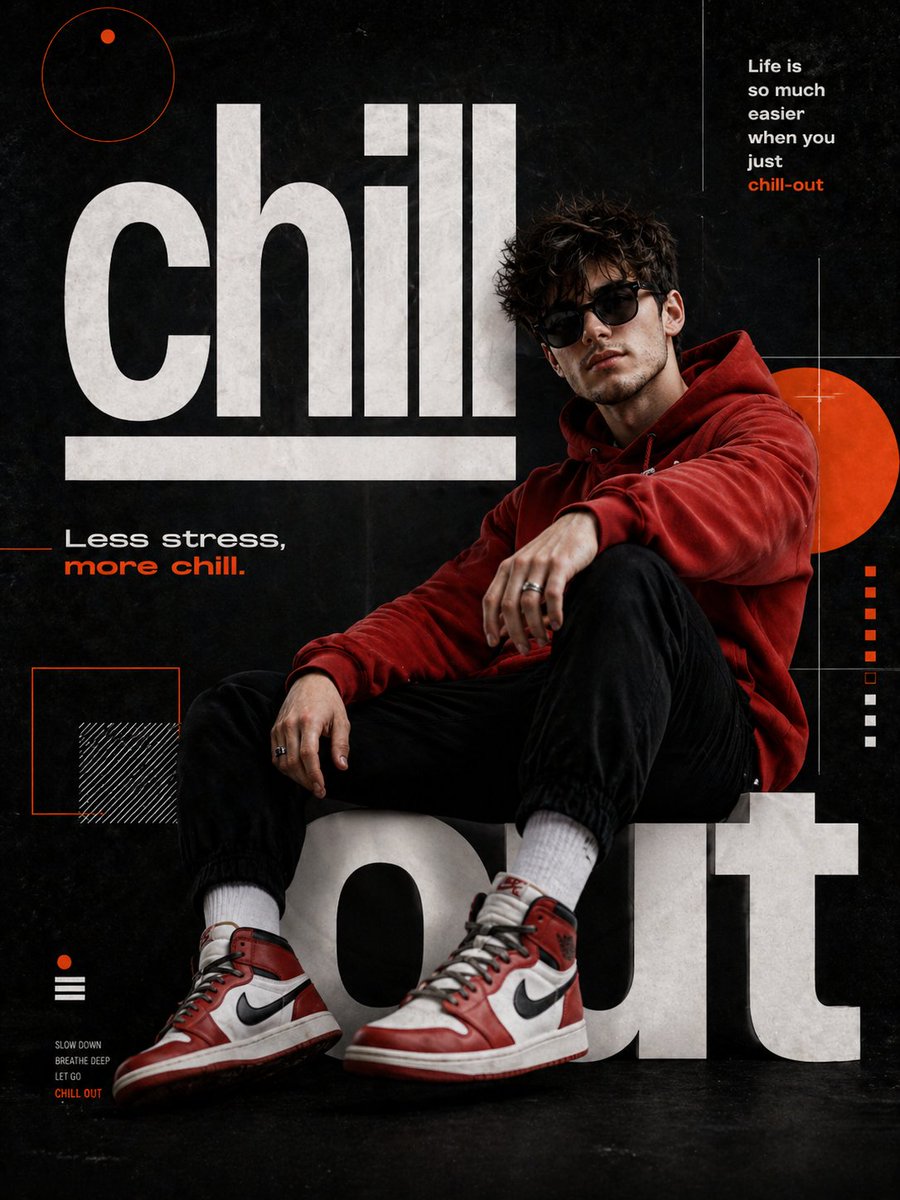
輕鬆電影海報
一份詳細的提示,指導如何創作一張超逼真的 8K 電影海報,海報內容為一名姿態放鬆的男子,並包含特定的字體和單反風格的攝影元素。
這是一個平面設計和海報設計的GPT Image 2範例。請使用下方可直接使用的提示資訊產生類似的視覺素材,並在重複使用前查看Awesome GPT Image 2 Prompts署名和商業用途授權資訊。
需要完整的提示符號集?請使用 平面設計和海報設計 主題中心提供更多相關範例,或打開 GPT Image 2 提示庫 有關完整範例索引、可重複使用結構和來源歸屬的資訊。
Free 1K preview
Generate one preview image instantly, no sign-up required.
Free text preview doesn’t preserve reference-image consistency.
1141/4000
提示詞
可直接複製的提示
Create a hyper-realistic 8K UHD cinematic poster portrait of a {argument name="subject" default="man"} inspired by the reference image, with a similar hairstyle, facial structure, and body build while maintaining a natural realistic look. Shot as if captured on a 35mm lens, f/1.8, with sharp focus, creamy bokeh, cinematic color grading, and detailed DSLR skin texture. Design a modern graphic poster titled “{argument name="title" default="Chill-out"}.”
The man wears a {argument name="clothing" default="red hoodie"}, black cuffed joggers, red and white Air Jordan high-top sneakers, dark sunglasses, and silver rings. He sits in a relaxed reclined pose leaning against oversized typography, one leg bent and the other slightly extended toward the viewer. His body angles right while his face turns toward the camera in a confident three-quarter view. Background is matte textured black.
Large bold white sans-serif text “chill” and “out” forms a bench-like structure, with “chill” underlined. Add orange circles, squares, thin white grid lines, and phrases: “Life is so much easier when you just chill-out” and “Less stress, more chill.”
提示變數
提示符號中可編輯的參數佔位符及其預設值。
多變的
subject
預設
man
多變的
title
預設
Chill-out
多變的
clothing
預設
red hoodie
Best for
- - 平面設計和海報設計 visual exploration
- - Image generation and reference-image edits
- - Reusable briefs that keep source attribution visible
Change these parts
- - Subject, product, character, or scene
- - Aspect ratio, camera, lighting, and background
- - Brand, text, color, and output constraints
Recommended model and settings
- - Model: gpt-image-2
- - Input mode: 圖生圖
- - Aspect ratio: source
- - Commercial status: review original source
How to use this prompt
- 1. Copy the prompt and preserve its structure for the first test.
- 2. Replace the subject, context, and publishing channel.
- 3. Change one camera, lighting, or style variable per iteration.
- 4. Inspect the output, source, text, and rights before reuse.
Limitations, source, and reuse cautions
- - Generated output is an editable draft, not factual, legal, or rights evidence.
- - Review the linked source, people, brands, logos, text, and third-party media before commercial use.
內容來自Awesome GPT Image 2 Prompts 。必須註明出處。商業用途狀態為allowed ;付費使用前請查看來源版權資訊。
此類案例更多
按類別、輸入模式相容性、品質和低風險進行優先排序。






重用和來源註釋
預覽案例後,請謹慎使用此提示。
- 1.複製提示或直接在 Dovoo 中使用生成按鈕開啟提示。
- 2.根據您的實際使用情況調整變數、寬高比和參考影像。
- 3.發布或付費使用前,請確認版權、署名要求以及品牌或肖像權風險。