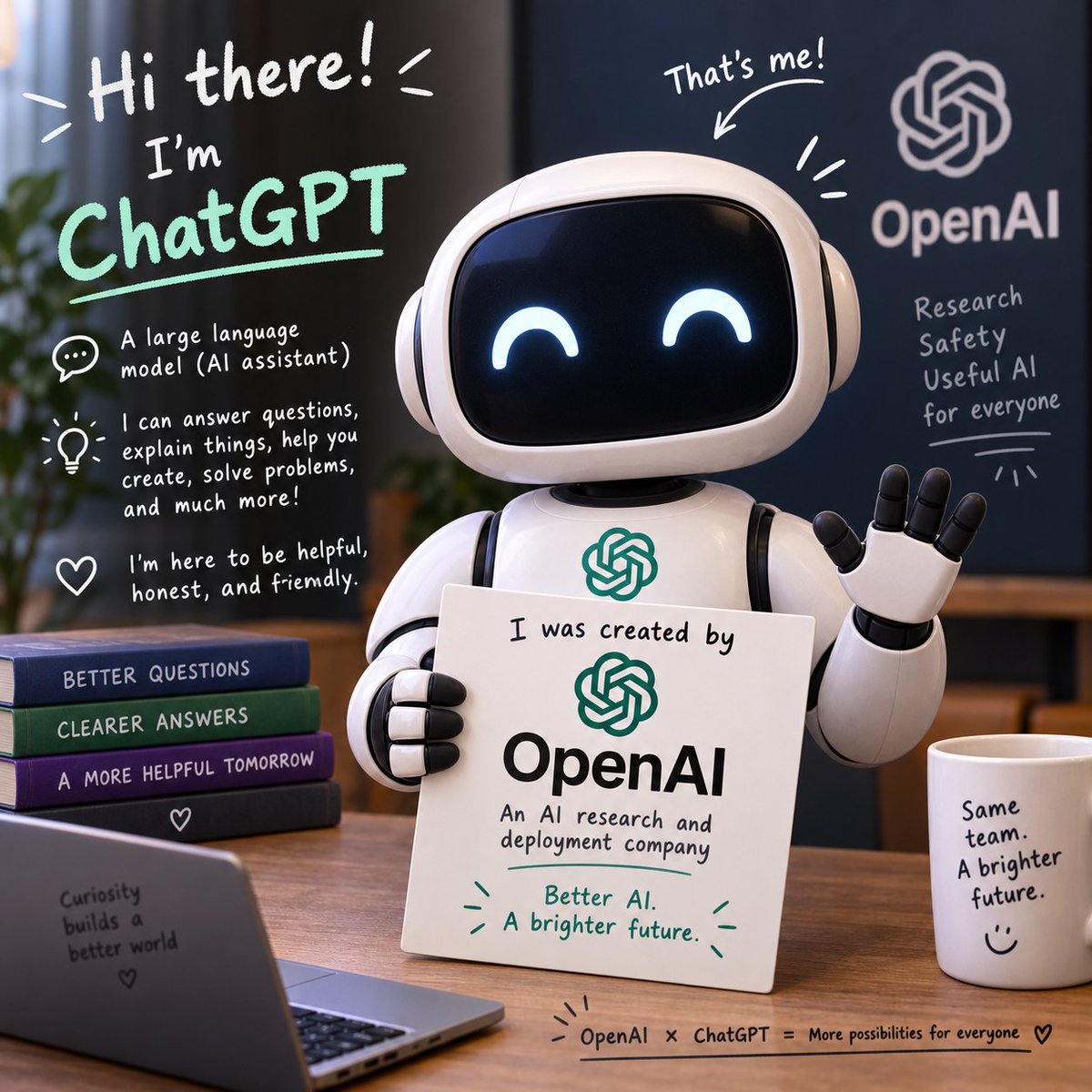
Friendly ChatGPT Robot Intro Scene
A square illustrated promo scene showing a cute ChatGPT robot explaining its OpenAI origin with friendly handwritten annotations.
這是一個插畫與藝術的GPT Image 2範例。請使用下方可直接使用的提示資訊產生類似的視覺素材,並在重複使用前查看Awesome GPT Image 2 Prompts署名和商業用途授權資訊。
需要完整的提示符號集?請使用 插畫與藝術 主題中心提供更多相關範例,或打開 GPT Image 2 提示庫 有關完整範例索引、可重複使用結構和來源歸屬的資訊。
Free 1K preview
Generate one preview image instantly, no sign-up required.
2997/4000
提示詞
可直接複製的提示
Goal: Create a square, polished 3D promotional illustration introducing {argument name="character name" default="ChatGPT"} as a friendly AI assistant made by {argument name="company name" default="OpenAI"}.

Canvas: 1:1 square image, warm indoor office setting, shallow depth of field, soft cinematic lighting, realistic 3D toy-like render with handwritten whiteboard-style annotations overlaid on the scene.

Main subject: Center-right is a cute glossy white robot assistant with a rounded rectangular black screen face, glowing happy crescent eyes, rounded ear-like side pods, segmented arms, and a small OpenAI knot logo on its chest. The robot is waving with its right hand and holding a white placard with its left hand. The placard reads: “I was created by” above a green OpenAI logo, then “OpenAI” in large black type, then “An AI research and deployment company,” and at the bottom in green: “Better AI. A brighter future.” with small decorative emphasis marks.

Layout and objects: Place the robot behind a wooden desk. Include exactly 4 stacked books on the left side of the desk, labeled from top to bottom: “BETTER QUESTIONS,” “CLEARER ANSWERS,” “A MORE HELPFUL TOMORROW,” and a bottom dark book with a small heart icon. In the lower-left foreground, include an open laptop angled toward the viewer with text on its back: “Curiosity builds a better world” plus a small heart. On the right side of the desk, include 1 white coffee mug labeled: “Same team. A brighter future.” with a simple smiley face. Along the bottom edge of the desk, add a small handwritten caption: “OpenAI × ChatGPT = More possibilities for everyone” followed by a heart.

Background: Use a dark navy wall or board on the right with a large white OpenAI knot logo and the word “OpenAI.” Under it, handwritten text reads exactly 4 lines: “Research,” “Safety,” “Useful AI,” “for everyone,” with a small underline and decorative rays. Add a blurred plant on the far left and warm office furniture in the background.

Handwritten annotation overlays: Include a large top-left greeting in white: “Hi there!” with energetic lines. Below it, write “I’m” and then {argument name="headline text" default="ChatGPT"} in large mint-green handwritten letters with an underline. Add exactly 3 explanatory icon callouts down the left side: 1 speech bubble icon with “A large language model (AI assistant)”; 1 lightbulb icon with “I can answer questions, explain things, help you create, solve problems, and much more!”; 1 heart icon with “I’m here to be helpful, honest, and friendly.” Above the robot’s head, add “That’s me!” with an arrow pointing to the robot and a few emphasis strokes.

Visual style: friendly, optimistic, clean tech branding, rounded forms, glossy materials, white and mint-green marker typography, warm wood tones, deep blue background, professional but playful. Keep the OpenAI branding readable, preserve the exact text above, avoid extra logos, avoid misspelled words, and keep all typography legible.
提示變數
提示符號中可編輯的參數佔位符及其預設值。
多變的
character name
預設
ChatGPT
多變的
company name
預設
OpenAI
多變的
headline text
預設
ChatGPT
Best for
- - 插畫與藝術 visual exploration
- - Image generation and reference-image edits
- - Reusable briefs that keep source attribution visible
Change these parts
- - Subject, product, character, or scene
- - Aspect ratio, camera, lighting, and background
- - Brand, text, color, and output constraints
Recommended model and settings
- - Model: gpt-image-2
- - Input mode: 文生圖
- - Aspect ratio: source
- - Commercial status: review original source
How to use this prompt
- 1. Copy the prompt and preserve its structure for the first test.
- 2. Replace the subject, context, and publishing channel.
- 3. Change one camera, lighting, or style variable per iteration.
- 4. Inspect the output, source, text, and rights before reuse.
Limitations, source, and reuse cautions
- - Generated output is an editable draft, not factual, legal, or rights evidence.
- - Review the linked source, people, brands, logos, text, and third-party media before commercial use.
內容來自Awesome GPT Image 2 Prompts 。必須註明出處。商業用途狀態為allowed ;付費使用前請查看來源版權資訊。
此類案例更多
按類別、輸入模式相容性、品質和低風險進行優先排序。






重用和來源註釋
預覽案例後,請謹慎使用此提示。
- 1.複製提示或直接在 Dovoo 中使用生成按鈕開啟提示。
- 2.根據您的實際使用情況調整變數、寬高比和參考影像。
- 3.發布或付費使用前,請確認版權、署名要求以及品牌或肖像權風險。