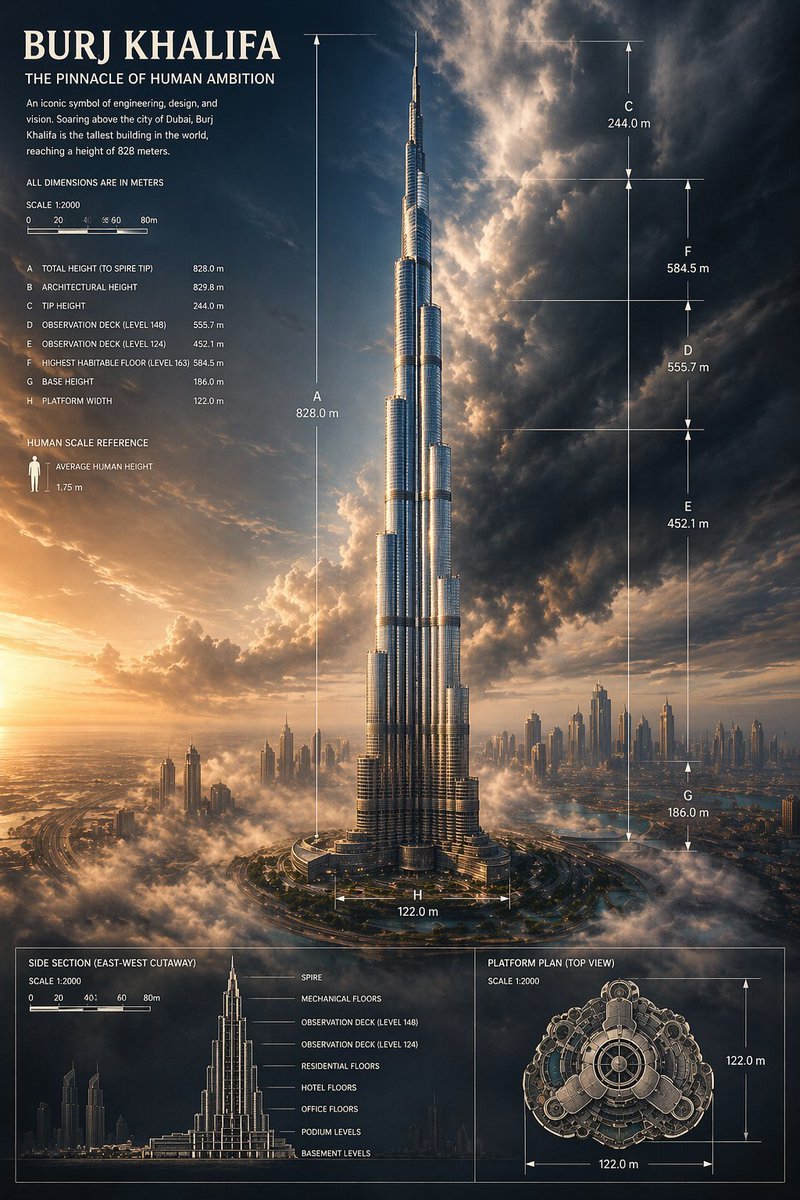
哈利法塔史詩級資訊圖海報
以哈利法塔為主題的電影化建築資訊圖海報,非常適合用於產生具有精確尺寸標註的高級編輯、教育或宣傳天際線視覺效果。
這是一個平面設計和海報設計的GPT Image 2範例。請使用下方可直接使用的提示資訊產生類似的視覺素材,並在重複使用前查看Awesome GPT Image 2 Prompts署名和商業用途授權資訊。
需要完整的提示符號集?請使用 平面設計和海報設計 主題中心提供更多相關範例,或打開 GPT Image 2 提示庫 有關完整範例索引、可重複使用結構和來源歸屬的資訊。
Free 1K preview
Generate one preview image instantly, no sign-up required.
3364/4000
提示詞
可直接複製的提示
{
  "type": "architectural infographic poster",
  "subject": {
    "building": "Burj Khalifa",
    "location": "Dubai",
    "composition": "the tower centered and shown full height from base to spire, rising above low clouds and a distant modern skyline",
    "perspective": "dramatic low-angle aerial city view",
    "lighting": "golden sunset from the lower left with deep blue storm clouds and strong cinematic contrast",
    "materials": "reflective silver glass and steel facade with crisp vertical highlights"
  },
  "style": {
    "genre": "premium engineering infographic mixed with epic architectural visualization",
    "mood": "monumental, awe-inspiring, precise, luxurious",
    "color_palette": [
      "warm gold sunlight",
      "deep navy sky",
      "charcoal storm clouds",
      "silver metal",
      "soft white fog"
    ]
  },
  "text": {
    "headline": "Burj Khalifa",
    "subheadline": "THE PINNACLE OF HUMAN AMBITION",
    "body": "An iconic symbol of engineering, design, and vision. Soaring above the city of Dubai, Burj Khalifa is the tallest building in the world, reaching a height of 828 meters.",
    "note": "ALL DIMENSIONS ARE IN METERS",
    "human_scale_label": "HUMAN SCALE REFERENCE",
    "human_scale_text": "AVERAGE HUMAN HEIGHT 1.75 m"
  },
  "layout": {
    "sections": [
      {
        "title": "main elevation with dimensions",
        "position": "full canvas center",
        "count": 8,
        "labels": [
          "A TOTAL HEIGHT (TO SPIRE TIP) 828.0 m",
          "B ARCHITECTURAL HEIGHT 829.8 m",
          "C TIP HEIGHT 244.0 m",
          "D OBSERVATION DECK (LEVEL 148) 555.7 m",
          "E OBSERVATION DECK (LEVEL 124) 452.1 m",
          "F HIGHEST HABITABLE FLOOR (LEVEL 163) 584.5 m",
          "G BASE HEIGHT 186.0 m",
          "H PLATFORM WIDTH 122.0 m"
        ]
      },
      {
        "title": "side section (east-west cutaway)",
        "position": "bottom left panel",
        "count": 8,
        "labels": [
          "SPIRE",
          "MECHANICAL FLOORS",
          "OBSERVATION DECK (LEVEL 148)",
          "OBSERVATION DECK (LEVEL 124)",
          "RESIDENTIAL FLOORS",
          "HOTEL FLOORS",
          "OFFICE FLOORS",
          "PODIUM LEVELS",
          "BASEMENT LEVELS"
        ]
      },
      {
        "title": "platform plan (top view)",
        "position": "bottom right panel",
        "count": 2,
        "labels": [
          "122.0 m horizontal",
          "122.0 m vertical"
        ]
      },
      {
        "title": "scale bars",
        "position": "upper left and bottom panels",
        "count": 2,
        "labels": [
          "SCALE 1:2000 main panel",
          "SCALE 1:2000 bottom panels"
        ]
      }
    ],
    "graphic_elements": "thin white technical guide lines, arrows, dimension brackets, fine gridless drafting marks, small human icon for scale, narrow bordered panels at the bottom"
  },
  "scene": {
    "sky": "towering, turbulent clouds opening behind the spire with glowing sunlight breaking through",
    "city": "Dubai skyline scattered across the horizon with smaller skyscrapers and haze",
    "ground": "circular road system and landscaped podium around the base, partially covered by mist"
  },
  "rendering": {
    "detail": "ultra-detailed",
    "finish": "polished magazine-cover quality",
    "aspect_ratio": "2:3 vertical"
  }
}
Best for
- - 平面設計和海報設計 visual exploration
- - Image generation and reference-image edits
- - Reusable briefs that keep source attribution visible
Change these parts
- - Subject, product, character, or scene
- - Aspect ratio, camera, lighting, and background
- - Brand, text, color, and output constraints
Recommended model and settings
- - Model: gpt-image-2
- - Input mode: 文生圖
- - Aspect ratio: source
- - Commercial status: review original source
How to use this prompt
- 1. Copy the prompt and preserve its structure for the first test.
- 2. Replace the subject, context, and publishing channel.
- 3. Change one camera, lighting, or style variable per iteration.
- 4. Inspect the output, source, text, and rights before reuse.
Limitations, source, and reuse cautions
- - Generated output is an editable draft, not factual, legal, or rights evidence.
- - Review the linked source, people, brands, logos, text, and third-party media before commercial use.
內容來自Awesome GPT Image 2 Prompts 。必須註明出處。商業用途狀態為allowed ;付費使用前請查看來源版權資訊。
此類案例更多
按類別、輸入模式相容性、品質和低風險進行優先排序。






重用和來源註釋
預覽案例後,請謹慎使用此提示。
- 1.複製提示或直接在 Dovoo 中使用生成按鈕開啟提示。
- 2.根據您的實際使用情況調整變數、寬高比和參考影像。
- 3.發布或付費使用前,請確認版權、署名要求以及品牌或肖像權風險。