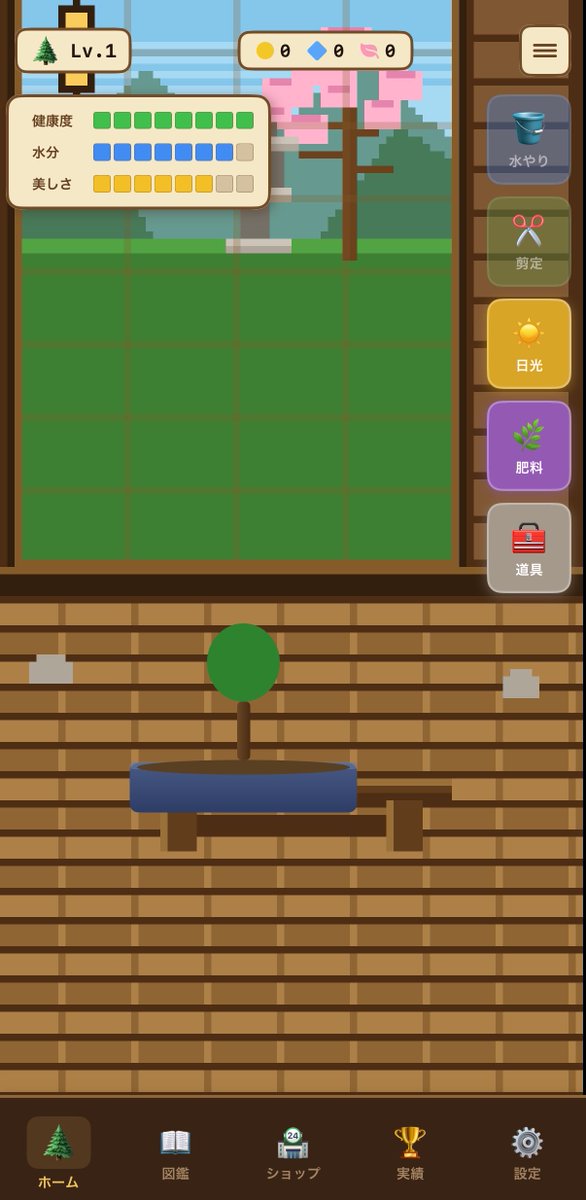
盆景手機遊戲 UI 樣機
一款精緻的垂直螢幕手機遊戲介面概念,適用於盆栽種植模擬遊戲,可用於應用程式螢幕原型設計和休閒遊戲 UI 佈局。
這是一個插畫與藝術的GPT Image 2範例。請使用下方可直接使用的提示資訊產生類似的視覺素材,並在重複使用前查看Awesome GPT Image 2 Prompts署名和商業用途授權資訊。
需要完整的提示符號集?請使用 插畫與藝術 主題中心提供更多相關範例,或打開 GPT Image 2 提示庫 有關完整範例索引、可重複使用結構和來源歸屬的資訊。
Free 1K preview
Generate one preview image instantly, no sign-up required.
2662/4000
提示詞
可直接複製的提示
{"type":"mobile game UI mockup","genre":"bonsai growing game","platform":"smartphone portrait screen","style":"cute casual Japanese game interface, flat 2D vector art, warm wooden UI, soft rounded panels, slightly toy-like app icons, clean mobile-friendly layout","screen":{"background":"traditional Japanese interior with horizontal wooden slat wall in warm brown tones","main subject":"a small bonsai tree with a round green canopy and short brown trunk, planted in a shallow oval blue pot on a simple wooden stand","layout":{"sections":[{"title":"top left level badge","position":"top left","count":2,"labels":["tree icon","Lv.1"]},{"title":"top center currencies","position":"top center","count":3,"labels":["yellow coin 0","blue gem 0","pink token 0"]},{"title":"status panel","position":"upper left over garden area","count":3,"labels":["健康度","水分","美しさ"]},{"title":"right vertical action menu","position":"right side","count":5,"labels":["水やり","剪定","日光","肥料","道具"]},{"title":"bottom navigation bar","position":"bottom full width","count":5,"labels":["ホーム","図鑑","ショップ","実績","設定"]}],"centerpiece":"large grow-area window in the upper half with a green square grid field and a pixel-art outdoor background showing a tree with pink blossoms, greenery, and a pale blue sky behind glass","top right button":"rounded square menu button with three horizontal lines"},"details":{"status meters":{"健康度":"10 green square segments, all filled","水分":"10 segments total, 8 blue filled and 2 beige empty","美しさ":"10 segments total, 8 yellow filled and 2 beige empty"},"right menu buttons":[{"label":"水やり","icon":"blue bucket","state":"dimmed inactive"},{"label":"剪定","icon":"red scissors","state":"dimmed inactive"},{"label":"日光","icon":"yellow sun","state":"highlighted active"},{"label":"肥料","icon":"green sprout","state":"purple button, active-looking"},{"label":"道具","icon":"red toolbox","state":"neutral gray"}],"bottom nav icons":[{"label":"ホーム","icon":"evergreen tree","state":"selected"},{"label":"図鑑","icon":"open book","state":"unselected"},{"label":"ショップ","icon":"shop building with small 24 badge","state":"unselected"},{"label":"実績","icon":"gold trophy","state":"unselected"},{"label":"設定","icon":"gray gear","state":"unselected"}]},"composition":"screenshot-style full app screen, centered symmetrical layout, bonsai in lower middle, game field in upper middle, sidebar controls on the right, navigation along the bottom","color palette":"brown wood, cream panels, green grass and bonsai foliage, blue pot and water icon, yellow sunlight button, purple fertilizer button, soft pastel accents","quality":"polished UI concept art for a casual simulation game"}Best for
- - 插畫與藝術 visual exploration
- - Image generation and reference-image edits
- - Reusable briefs that keep source attribution visible
Change these parts
- - Subject, product, character, or scene
- - Aspect ratio, camera, lighting, and background
- - Brand, text, color, and output constraints
Recommended model and settings
- - Model: gpt-image-2
- - Input mode: 文生圖
- - Aspect ratio: source
- - Commercial status: review original source
How to use this prompt
- 1. Copy the prompt and preserve its structure for the first test.
- 2. Replace the subject, context, and publishing channel.
- 3. Change one camera, lighting, or style variable per iteration.
- 4. Inspect the output, source, text, and rights before reuse.
Limitations, source, and reuse cautions
- - Generated output is an editable draft, not factual, legal, or rights evidence.
- - Review the linked source, people, brands, logos, text, and third-party media before commercial use.
內容來自Awesome GPT Image 2 Prompts 。必須註明出處。商業用途狀態為allowed ;付費使用前請查看來源版權資訊。
此類案例更多
按類別、輸入模式相容性、品質和低風險進行優先排序。






重用和來源註釋
預覽案例後,請謹慎使用此提示。
- 1.複製提示或直接在 Dovoo 中使用生成按鈕開啟提示。
- 2.根據您的實際使用情況調整變數、寬高比和參考影像。
- 3.發布或付費使用前,請確認版權、署名要求以及品牌或肖像權風險。