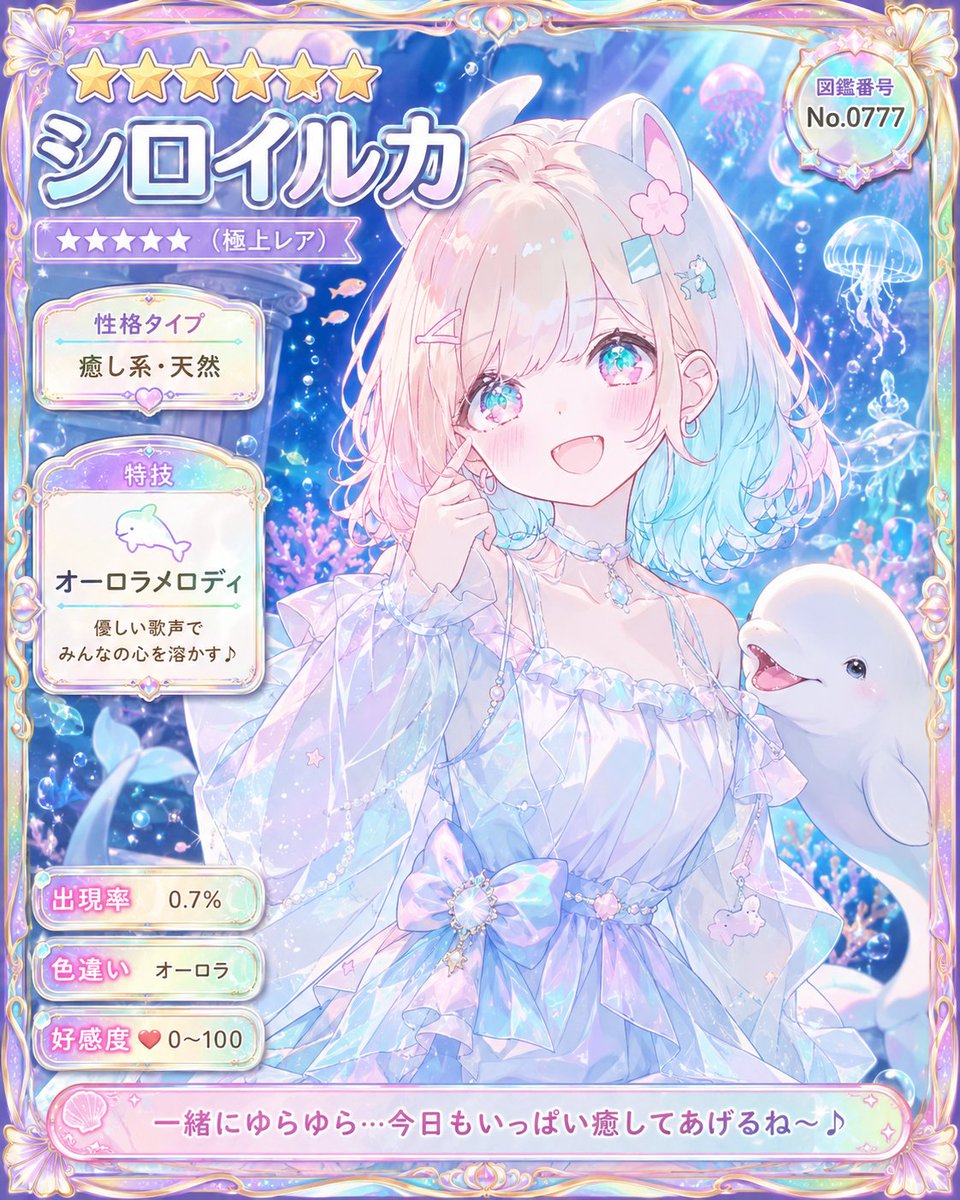
Pastel Beluga Idol Gacha Card
Generates a premium underwater anime gacha character card with Japanese UI labels, rarity stats, and a cute beluga idol heroine.
這是一個動漫與遊戲的GPT Image 2範例。請使用下方可直接使用的提示資訊產生類似的視覺素材,並在重複使用前查看Awesome GPT Image 2 Prompts署名和商業用途授權資訊。
需要完整的提示符號集?請使用 動漫與遊戲 主題中心提供更多相關範例,或打開 GPT Image 2 提示庫 有關完整範例索引、可重複使用結構和來源歸屬的資訊。
Free 1K preview
Generate one preview image instantly, no sign-up required.
3159/4000
提示詞
可直接複製的提示
Goal: Create an ultra-rare collectible anime character card for a pastel underwater idol named {argument name="character name" default="シロイルカ"}, styled like a premium gacha game profile card.

Canvas: Vertical portrait card, 4:5 aspect ratio, filled edge to edge with an ornate iridescent frame. Use dreamy pastel colors: pearl white, lavender, aqua blue, soft pink, holographic highlights, and sparkling bubbles.

Main subject: Center-right is a cheerful anime girl with beluga whale traits, looking at the viewer with a warm open smile. She has fluffy shoulder-length hair with pale pink roots fading into aqua-blue ends, large sparkling turquoise-pink eyes, rosy cheeks, small earrings, and cute hair accessories: exactly 4 visible hair decorations — one pink flower clip, one blue rectangular clip, one pink bobby pin, and one tiny blue whale clip. She has soft white beluga-like animal ears on top of her head. Her pose is gentle and idol-like, with one hand touching her cheek. Outfit: an airy translucent off-shoulder ocean-princess dress with ruffled sleeves, pearl chains, crystal choker, star charms, a large iridescent bow at the waist, and delicate sea-themed dangling ornaments. To her lower right, include one smiling white beluga whale companion emerging into the frame.

Background: Magical aquarium scene with deep blue water, light rays from above, glowing bubbles, coral and sea plants, tiny pink fish, sparkles, and jellyfish. Include exactly 3 prominent jellyfish in the background: one pink jellyfish near the upper right, one blue-white jellyfish at the right edge, and one smaller glowing jellyfish beneath it.

Frame and UI layout: Make the card look like a rare character encyclopedia entry. Use an ornate gold-and-pearl fantasy frame with shell motifs at the corners and rainbow holographic trim. Top left has exactly 6 large gold stars. Beneath them, a huge Japanese character name title reading {argument name="name text" default="シロイルカ"} in thick white letters with blue-purple shadow. Under the name, show exactly 5 small purple rarity stars followed by the label 「(極上レア)」. Top right contains a round badge with the label 「図鑑番号」 and number {argument name="catalog number" default="No.0777"}.

Left information panels: Use exactly 5 separate rounded information boxes stacked vertically. Box 1: title 「性格タイプ」 with value {argument name="personality type" default="癒し系・天然"}. Box 2: title 「特技」, a simple dolphin icon, skill name 「オーロラメロディ」, and description 「優しい歌声で みんなの心を溶かす♪」. Box 3: title 「出現率」 with value 「0.7%」. Box 4: title 「色違い」 with value 「オーロラ」. Box 5: title 「好感度」 with a heart icon and value 「0~100」.

Bottom caption: Add a long pink rounded dialogue banner across the bottom with shell icon decoration and the quote {argument name="bottom quote" default="一緒にゆらゆら…今日もいっぱい癒してあげるね〜♪"}.

Visual style: High-detail modern Japanese anime illustration, cute magical-girl gacha card aesthetic, glossy translucent UI, pearlescent highlights, soft bloom, luminous underwater lighting, clean readable Japanese typography, intricate but not cluttered. No watermark, no extra characters, no additional text beyond the specified labels.
提示變數
提示符號中可編輯的參數佔位符及其預設值。
多變的
character name
預設
シロイルカ
多變的
name text
預設
シロイルカ
多變的
catalog number
預設
No.0777
多變的
personality type
預設
癒し系・天然
多變的
bottom quote
預設
一緒にゆらゆら…今日もいっぱい癒してあげるね〜♪
Best for
- - 動漫與遊戲 visual exploration
- - Image generation and reference-image edits
- - Reusable briefs that keep source attribution visible
Change these parts
- - Subject, product, character, or scene
- - Aspect ratio, camera, lighting, and background
- - Brand, text, color, and output constraints
Recommended model and settings
- - Model: gpt-image-2
- - Input mode: 文生圖
- - Aspect ratio: source
- - Commercial status: review original source
How to use this prompt
- 1. Copy the prompt and preserve its structure for the first test.
- 2. Replace the subject, context, and publishing channel.
- 3. Change one camera, lighting, or style variable per iteration.
- 4. Inspect the output, source, text, and rights before reuse.
Limitations, source, and reuse cautions
- - Generated output is an editable draft, not factual, legal, or rights evidence.
- - Review the linked source, people, brands, logos, text, and third-party media before commercial use.
內容來自Awesome GPT Image 2 Prompts 。必須註明出處。商業用途狀態為allowed ;付費使用前請查看來源版權資訊。
此類案例更多
按類別、輸入模式相容性、品質和低風險進行優先排序。






重用和來源註釋
預覽案例後,請謹慎使用此提示。
- 1.複製提示或直接在 Dovoo 中使用生成按鈕開啟提示。
- 2.根據您的實際使用情況調整變數、寬高比和參考影像。
- 3.發布或付費使用前,請確認版權、署名要求以及品牌或肖像權風險。