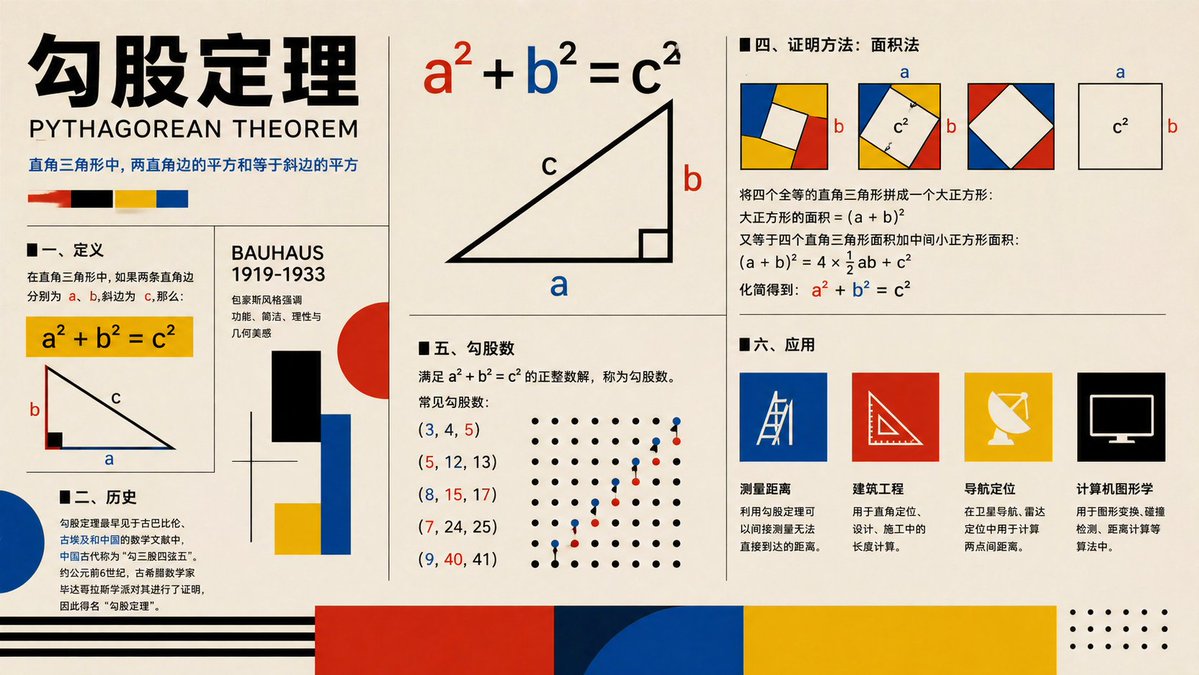
包浩斯畢達哥拉斯定理海報
一張包浩斯風格的教育資訊圖海報,以圖表、證明、歷史、三元組和應用來解釋勾股定理,適合課堂視覺輔助或社會教育內容。
這是一個平面設計和海報設計的GPT Image 2範例。請使用下方可直接使用的提示資訊產生類似的視覺素材,並在重複使用前查看Awesome GPT Image 2 Prompts署名和商業用途授權資訊。
需要完整的提示符號集?請使用 平面設計和海報設計 主題中心提供更多相關範例,或打開 GPT Image 2 提示庫 有關完整範例索引、可重複使用結構和來源歸屬的資訊。
Free 1K preview
Generate one preview image instantly, no sign-up required.
4000/4000
提示詞
可直接複製的提示
{
  "type": "educational infographic poster",
  "topic": "{argument name=\"topic\" default=\"Pythagorean theorem\"}",
  "subtitle": "PYTHAGOREAN THEOREM",
  "style": "Bauhaus-inspired mathematical explainer poster, clean editorial grid, cream paper background, bold black typography, primary color palette of red, blue, yellow, black, geometric accents, vector shapes, high-contrast print design",
  "canvas": {
    "orientation": "landscape",
    "aspect_ratio": "16:9"
  },
  "layout": {
    "grid": "multi-panel poster with thin black dividers",
    "sections": [
      {
        "title": "header",
        "position": "top-left spanning two rows",
        "count": 4,
        "labels": [
          "large Chinese title",
          "English subtitle",
          "one-line Chinese theorem summary",
          "4 color swatches"
        ]
      },
      {
        "title": "I. Definition",
        "position": "left-center",
        "count": 3,
        "labels": [
          "section heading",
          "yellow formula box a² + b² = c²",
          "right-triangle diagram labeled a b c"
        ]
      },
      {
        "title": "II. History",
        "position": "bottom-left",
        "count": 3,
        "labels": [
          "section heading",
          "Chinese history paragraph",
          "large blue semicircle accent"
        ]
      },
      {
        "title": "BAUHAUS 1919-1933",
        "position": "center-left vertical panel",
        "count": 6,
        "labels": [
          "panel title",
          "3 short Chinese descriptive lines",
          "black rectangle",
          "red circle with blue and yellow blocks"
        ]
      },
      {
        "title": "main theorem diagram",
        "position": "top-center",
        "count": 3,
        "labels": [
          "large formula a² + b² = c² with a in red b in blue c in black",
          "large right triangle",
          "labels a b c on triangle"
        ]
      },
      {
        "title": "IV. Proof method: Area method",
        "position": "top-right",
        "count": 4,
        "labels": [
          "section heading",
          "3 square dissection diagrams with colored corner triangles and central white square",
          "1 separate c² square diagram with a and b side labels",
          "Chinese proof text with final formula a² + b² = c² highlighted in red and blue"
        ]
      },
      {
        "title": "V. Pythagorean triples",
        "position": "center-bottom",
        "count": 7,
        "labels": [
          "section heading",
          "definition text",
          "(3, 4, 5)",
          "(5, 12, 13)",
          "(8, 15, 17)",
          "(7, 24, 25)",
          "(9, 40, 41)"
        ]
      },
      {
        "title": "dot lattice illustration",
        "position": "right side of Pythagorean triples section",
        "count": 2,
        "labels": [
          "black dot grid",
          "ascending red and blue point pattern"
        ]
      },
      {
        "title": "6. Applications",
        "position": "bottom-right",
        "count": 5,
        "labels": [
          "section heading",
          "Distance measurement",
          "Civil engineering",
          "Navigation and positioning",
          "Computer graphics"
        ]
      },
      {
        "title": "application icons",
        "position": "bottom-right row",
        "count": 4,
        "labels": [
          "blue square with measuring tool line icon",
          "red square with triangle ruler icon",
          "yellow square with satellite dish icon",
          "black square with computer monitor icon"
        ]
      },
      {
        "title": "footer decorations",
        "position": "bottom edge",
        "count": 4,
        "labels": [
          "black horizontal stripes on left",
          "large red block",
          "large blue semicircle overlapping dark blue block",
          "large yellow block with dotted corner motif on far right"
        ]
      }
    ]
  },
  "typography": {
    "title_style": "extra bold oversized Chinese characters in black",
    "subtitle_style": "uppercase sans serif",
    "body_style": "clean sans serif Chinese text, neatly aligned columns"
  },
  "colors": {
    "background": "warm cream",
    "primary": [
      "black",
      "red",
      "blue",
      "yellow"
    ],
    "formula_emphasis": {
      "a": "red",
      "b": "blue",
      "c": "black"
    }
  },
  "rendering": "flat vector infographic, crisp lines, print-poster aesthetic, balanced negative space, museum graphic design feel"
}
提示變數
提示符號中可編輯的參數佔位符及其預設值。
多變的
topic
預設
Pythagorean theorem
Best for
- - 平面設計和海報設計 visual exploration
- - Image generation and reference-image edits
- - Reusable briefs that keep source attribution visible
Change these parts
- - Subject, product, character, or scene
- - Aspect ratio, camera, lighting, and background
- - Brand, text, color, and output constraints
Recommended model and settings
- - Model: gpt-image-2
- - Input mode: 文生圖
- - Aspect ratio: source
- - Commercial status: review original source
How to use this prompt
- 1. Copy the prompt and preserve its structure for the first test.
- 2. Replace the subject, context, and publishing channel.
- 3. Change one camera, lighting, or style variable per iteration.
- 4. Inspect the output, source, text, and rights before reuse.
Limitations, source, and reuse cautions
- - Generated output is an editable draft, not factual, legal, or rights evidence.
- - Review the linked source, people, brands, logos, text, and third-party media before commercial use.
內容來自Awesome GPT Image 2 Prompts 。必須註明出處。商業用途狀態為allowed ;付費使用前請查看來源版權資訊。
此類案例更多
按類別、輸入模式相容性、品質和低風險進行優先排序。






重用和來源註釋
預覽案例後,請謹慎使用此提示。
- 1.複製提示或直接在 Dovoo 中使用生成按鈕開啟提示。
- 2.根據您的實際使用情況調整變數、寬高比和參考影像。
- 3.發布或付費使用前,請確認版權、署名要求以及品牌或肖像權風險。