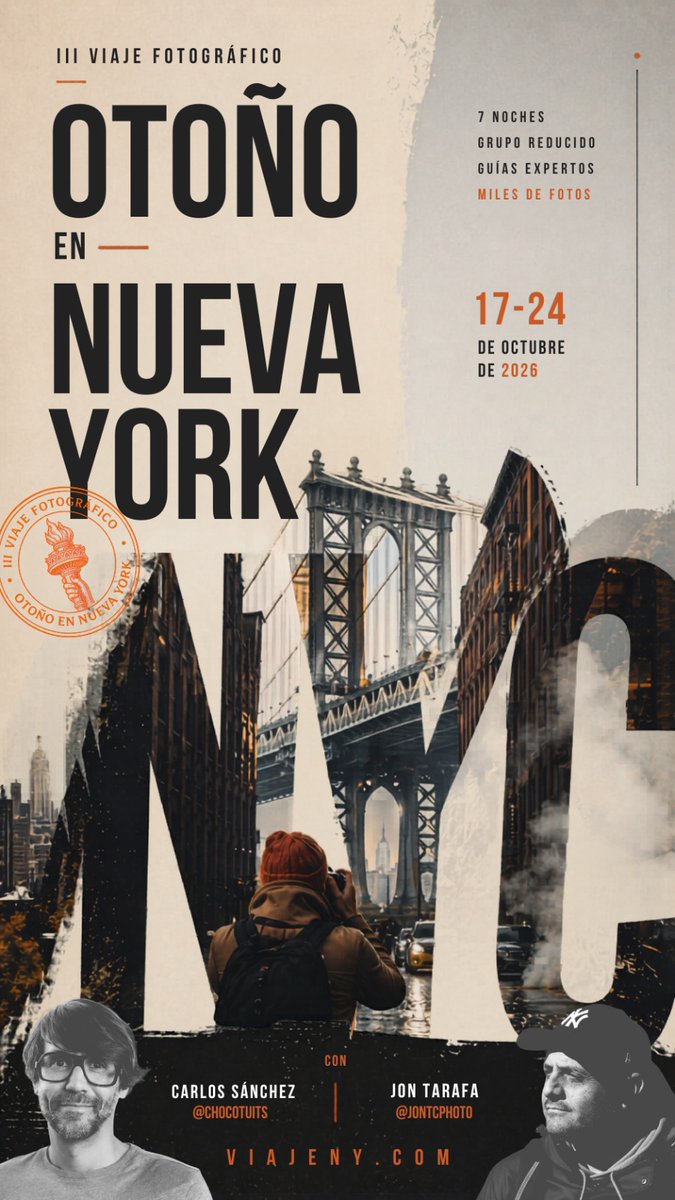
紐約之秋旅行海報
此提示可產生一張引人注目的豎版西班牙語海報,用於宣傳紐約秋季攝影之旅,非常適合用於旅遊推廣、研討會和社交媒體廣告。
這是一個平面設計和海報設計的GPT Image 2範例。請使用下方可直接使用的提示資訊產生類似的視覺素材,並在重複使用前查看Awesome GPT Image 2 Prompts署名和商業用途授權資訊。
需要完整的提示符號集?請使用 平面設計和海報設計 主題中心提供更多相關範例,或打開 GPT Image 2 提示庫 有關完整範例索引、可重複使用結構和來源歸屬的資訊。
Free 1K preview
Generate one preview image instantly, no sign-up required.
2589/4000
提示詞
可直接複製的提示
A vertical editorial-style travel poster in Spanish for a {argument name="trip type" default="III viaje fotográfico"} titled “OTOÑO EN NUEVA YORK,” designed with a sophisticated urban autumn mood and a premium photography-workshop aesthetic. Use a tall mobile-friendly poster layout with a warm off-white, beige, charcoal, and burnt orange palette. The composition is dominated by oversized condensed black sans-serif typography on the left: small text at the top reading “III VIAJE FOTOGRÁFICO,” then the huge stacked headline “OTOÑO” on top, a smaller “EN” with short horizontal orange lines on both sides, and below it the huge stacked words “NUEVA YORK.” On the right side, place a narrow informational column with exactly 4 short benefit lines in uppercase: “7 NOCHES”, “GRUPO REDUCIDO”, “GUÍAS EXPERTOS”, and “MILES DE FOTOS” with the last line in orange. Below that, add the dates in large orange numbers “17-24” and beneath in black uppercase “DE OCTUBRE” and “DE 2026.” Add a thin vertical line near the far right edge and a tiny orange dot at the top. Integrate a moody New York street photo collage into the lower half and through the typography, centered on the Manhattan Bridge framed by dark brick buildings, wet streets, a few cars, steam rising from the roadway, and a lone photographer seen from behind in the foreground wearing a rust-orange beanie and a backpack, holding a camera toward the bridge. Let giant cropped letterforms from “NYC” or similarly bold graphic shapes blend with the city imagery across the bottom half, creating a layered double-exposure poster effect. Add distressed paper textures, rough torn-edge overlays, brushy white paint textures, and subtle grunge for a handcrafted editorial finish. On the left lower-mid area, place a circular orange stamp containing a small Statue of Liberty torch icon and the curved text “III VIAJE FOTOGRÁFICO · OTOÑO EN NUEVA YORK.” Along the bottom, create a dark band with 2 presenter credits, one left and one right, separated by a thin vertical orange line: left “CARLOS SÁNCHEZ” with “@CHOCUTUTS” in orange below, right “JON TARAFA” with “@JONTCPHOTO” in orange below. Centered at the very bottom, add the website “VIAJENY.COM” in spaced orange uppercase letters. Include 2 partially cropped grayscale portrait cutouts in the bottom corners, one on the left and one on the right, blending into the dark footer area. Overall style: cinematic travel advertisement, contemporary magazine poster, bold typographic hierarchy, layered collage, gritty New York autumn atmosphere, high contrast, elegant and dramatic.提示變數
提示符號中可編輯的參數佔位符及其預設值。
多變的
trip type
預設
III viaje fotográfico
Best for
- - 平面設計和海報設計 visual exploration
- - Image generation and reference-image edits
- - Reusable briefs that keep source attribution visible
Change these parts
- - Subject, product, character, or scene
- - Aspect ratio, camera, lighting, and background
- - Brand, text, color, and output constraints
Recommended model and settings
- - Model: gpt-image-2
- - Input mode: 文生圖
- - Aspect ratio: source
- - Commercial status: review original source
How to use this prompt
- 1. Copy the prompt and preserve its structure for the first test.
- 2. Replace the subject, context, and publishing channel.
- 3. Change one camera, lighting, or style variable per iteration.
- 4. Inspect the output, source, text, and rights before reuse.
Limitations, source, and reuse cautions
- - Generated output is an editable draft, not factual, legal, or rights evidence.
- - Review the linked source, people, brands, logos, text, and third-party media before commercial use.
內容來自Awesome GPT Image 2 Prompts 。必須註明出處。商業用途狀態為allowed ;付費使用前請查看來源版權資訊。
此類案例更多
按類別、輸入模式相容性、品質和低風險進行優先排序。






重用和來源註釋
預覽案例後,請謹慎使用此提示。
- 1.複製提示或直接在 Dovoo 中使用生成按鈕開啟提示。
- 2.根據您的實際使用情況調整變數、寬高比和參考影像。
- 3.發布或付費使用前,請確認版權、署名要求以及品牌或肖像權風險。