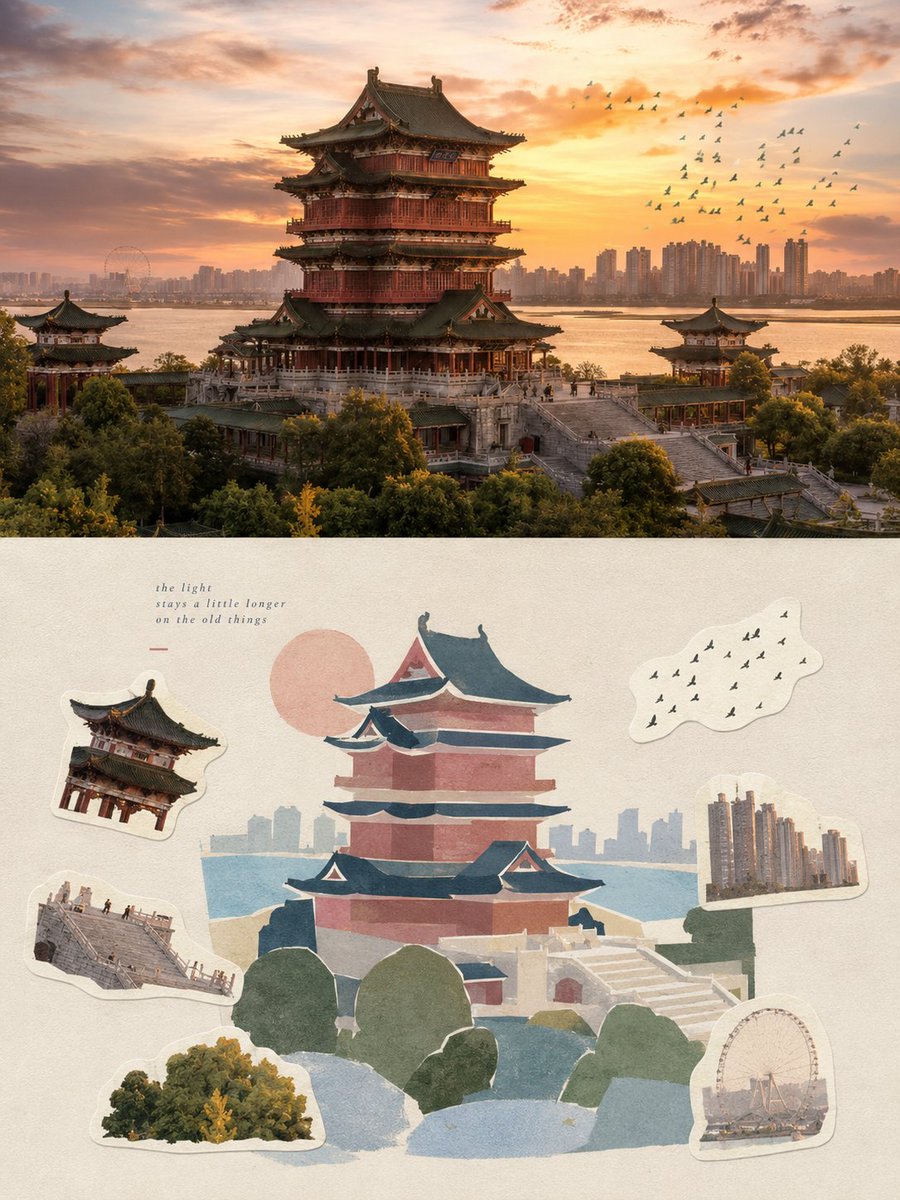
Selective Memory Sticker Poster Design
A sophisticated prompt that transforms photographs into high-end posters featuring a blend of realistic photography and minimalist flat-vector 'selective memory' illustrations with a sticker-based aesthetic.
這是一個平面設計和海報設計的GPT Image 2範例。請使用下方可直接使用的提示資訊產生類似的視覺素材,並在重複使用前查看Awesome GPT Image 2 Prompts署名和商業用途授權資訊。
需要完整的提示符號集?請使用 平面設計和海報設計 主題中心提供更多相關範例,或打開 GPT Image 2 提示庫 有關完整範例索引、可重複使用結構和來源歸屬的資訊。
Free 1K preview
Generate one preview image instantly, no sign-up required.
Free text preview doesn’t preserve reference-image consistency.
3942/4000
提示詞
可直接複製的提示
Please create an independent high-end design poster for each photo I upload. Use a 3:4 vertical composition with a top-and-bottom dual-layer logic: the top half is realistic photography, and the bottom half is a flat reconstruction based on selective memory, creating a natural echo between them.

The top half retains the original photo, keeping the subject's identity, structure, posture, realistic texture, natural lighting, and original color atmosphere, with only slight professional color grading to give it an art magazine or exhibition photography feel. The background can be naturally extended to fit the frame, but the subject must not be stretched or distorted.

The bottom half extracts the most recognizable subjects, outlines, and narrative relationships from the photo, reconstructing them in a way of 'selective memory' rather than descriptive realism. Do not trace the photo completely; keep only the visual clues worth remembering, compressing complex scenes into 3–6 large geometric blocks, reorganized with matte gouache, paper collage, Risograph, or screen-printing styles so the subject is instantly identifiable with a modern graphic and handcrafted feel.

The bottom half uses a composition of a main visual plus six memory stickers. The main visual carries the primary narrative and visual weight; additionally, select six memorable details from the original photo—such as subject features, actions, local structures, plants, utensils, transportation, food, patterns, textures, lighting, or accidental details—and refine them into six independent stickers. The stickers should have thick, light-colored borders, naturally tiled and scattered at different scales, forming loose rows or asymmetrical clusters around the main visual with plenty of negative space. There should be clear primary and secondary relationships and size variations among the six stickers, like fragments cut from the same memory.

The composition emphasizes visual focus, block proportions, scale contrast, positive/negative space, and rhythmic spacing. The main visual should be significantly larger than the sticker fragments. Stickers can overlap, rotate slightly, or echo the subject without stealing the focus. Complex environments are actively reduced to let large areas of quiet background color become a breathing space, resulting in a professional graphic order with a relaxed, natural scrapbook feel.

Materials use opaque gouache, paper collage, Risograph, or screen-printed blocks, retaining slight powdery edges, paper grain, hand-cut edges, and printing deviations. Use the same material language for stickers and the main visual, avoiding watercolor smudges, complex strokes, dense line drafts, realistic textures, smooth vectors, and 3D plastic textures.

The color palette is based on soft, transparent, slightly desaturated high-end colors. Create the main atmosphere with {argument name="main atmosphere colors" default="light powder blue, mist blue, sky blue, and airy cool blue"}, balanced with {argument name="secondary colors" default="ivory white, cream white, light beige, soft gray-green, and architectural neutrals"}. Only a small amount of {argument name="accent color" default="dusty rose or muted blush"} is allowed as tiny accents for flowers, clothing, small logos, or local decorations to give the image breathability and refined layers.

Text is not preset with fixed titles or locations. Freely generate a minimal amount of truly meaningful text based on the subject, action, environment, and cultural context of the photo, naturally placing it in negative spaces or sticker gaps to form an editorial layout relationship. Text should be small, light, and restrained.

The overall result is like an independently published visual travel guide or private memory book page: quiet, modern, sharp, and relaxed, possessing professional graphic order while retaining the warmth of collage and handcrafted materials.
提示變數
提示符號中可編輯的參數佔位符及其預設值。
多變的
main atmosphere colors
預設
light powder blue, mist blue, sky blue, and airy cool blue
多變的
secondary colors
預設
ivory white, cream white, light beige, soft gray-green, and architectural neutrals
多變的
accent color
預設
dusty rose or muted blush
Best for
- - 平面設計和海報設計 visual exploration
- - Image generation and reference-image edits
- - Reusable briefs that keep source attribution visible
Change these parts
- - Subject, product, character, or scene
- - Aspect ratio, camera, lighting, and background
- - Brand, text, color, and output constraints
Recommended model and settings
- - Model: gpt-image-2
- - Input mode: 圖生圖
- - Aspect ratio: source
- - Commercial status: review original source
How to use this prompt
- 1. Copy the prompt and preserve its structure for the first test.
- 2. Replace the subject, context, and publishing channel.
- 3. Change one camera, lighting, or style variable per iteration.
- 4. Inspect the output, source, text, and rights before reuse.
Limitations, source, and reuse cautions
- - Generated output is an editable draft, not factual, legal, or rights evidence.
- - Review the linked source, people, brands, logos, text, and third-party media before commercial use.
內容來自Awesome GPT Image 2 Prompts 。必須註明出處。商業用途狀態為allowed ;付費使用前請查看來源版權資訊。
此類案例更多
按類別、輸入模式相容性、品質和低風險進行優先排序。



重用和來源註釋
預覽案例後,請謹慎使用此提示。
- 1.複製提示或直接在 Dovoo 中使用生成按鈕開啟提示。
- 2.根據您的實際使用情況調整變數、寬高比和參考影像。
- 3.發布或付費使用前,請確認版權、署名要求以及品牌或肖像權風險。