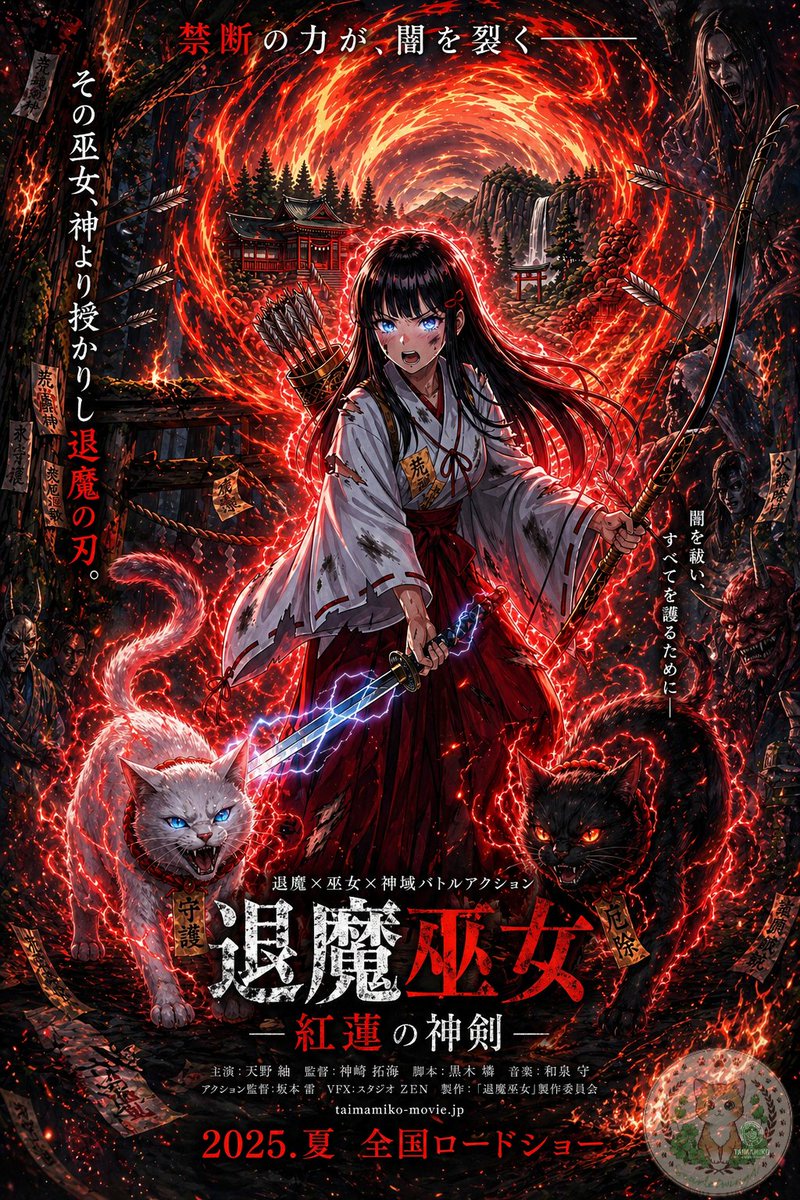
動畫《巫女》電影海報
這個提示將參考的奇幻角色插圖轉化為一部虛構的超自然動作電影的黑暗、文字密集的日本劇院海報。
這是一個平面設計和海報設計的GPT Image 2範例。請使用下方可直接使用的提示資訊產生類似的視覺素材,並在重複使用前查看Awesome GPT Image 2 Prompts署名和商業用途授權資訊。
需要完整的提示符號集?請使用 平面設計和海報設計 主題中心提供更多相關範例,或打開 GPT Image 2 提示庫 有關完整範例索引、可重複使用結構和來源歸屬的資訊。
Free 1K preview
Generate one preview image instantly, no sign-up required.
Free text preview doesn’t preserve reference-image consistency.
1642/4000
提示詞
可直接複製的提示
Using the provided reference image, turn it into a dramatic Japanese theatrical movie poster while keeping the same shrine maiden archer-swordswoman, fiery portal, bow, quiver, lightning sword, and shrine setting as the base. Push the image into a much darker, high-contrast, more detailed cinematic poster style with intense red-and-black grading, denser embers, stronger rim lighting, and a more ominous supernatural atmosphere. Add 2 demonic guardian cats in the foreground at the character’s feet: 1 white cat on the left with blue glowing eyes and an open snarling mouth, and 1 black cat on the right with red glowing eyes and an open snarling mouth, both wrapped in crackling red energy. Add shadowy monster and oni faces emerging from the dark forest edges on both sides. Increase the number of flying arrows, talismans, sparks, and glowing red energy trails around the character. Preserve the central heroic composition, but format the whole image as a full Japanese film poster with layered typography. Add the top tagline in Japanese: "禁断の力が、闇を裂く—". Add 2 vertical side taglines: left side "その巫女神より授かりし退魔の刃。" and right side "闇を祓い、すべてを護るために—". Add a small genre line above the title: "退魔×巫女×神域バトルアクション". Add the main title near the bottom center in large distressed kanji: "退魔巫女", with the subtitle beneath it: "—紅蓮の神剣—". Add a credits block in small Japanese text below the title, then add the website "taimamiko-movie.jp" and the release line at the very bottom: "2025.夏 全国ロードショー". Include a small dark rectangular logo block in the top-right corner. Make it look like a polished fantasy-horror action poster for a fictional movie.
Best for
- - 平面設計和海報設計 visual exploration
- - Image generation and reference-image edits
- - Reusable briefs that keep source attribution visible
Change these parts
- - Subject, product, character, or scene
- - Aspect ratio, camera, lighting, and background
- - Brand, text, color, and output constraints
Recommended model and settings
- - Model: gpt-image-2
- - Input mode: 圖生圖
- - Aspect ratio: source
- - Commercial status: review original source
How to use this prompt
- 1. Copy the prompt and preserve its structure for the first test.
- 2. Replace the subject, context, and publishing channel.
- 3. Change one camera, lighting, or style variable per iteration.
- 4. Inspect the output, source, text, and rights before reuse.
Limitations, source, and reuse cautions
- - Generated output is an editable draft, not factual, legal, or rights evidence.
- - Review the linked source, people, brands, logos, text, and third-party media before commercial use.
內容來自Awesome GPT Image 2 Prompts 。必須註明出處。商業用途狀態為allowed ;付費使用前請查看來源版權資訊。
此類案例更多
按類別、輸入模式相容性、品質和低風險進行優先排序。






重用和來源註釋
預覽案例後,請謹慎使用此提示。
- 1.複製提示或直接在 Dovoo 中使用生成按鈕開啟提示。
- 2.根據您的實際使用情況調整變數、寬高比和參考影像。
- 3.發布或付費使用前,請確認版權、署名要求以及品牌或肖像權風險。