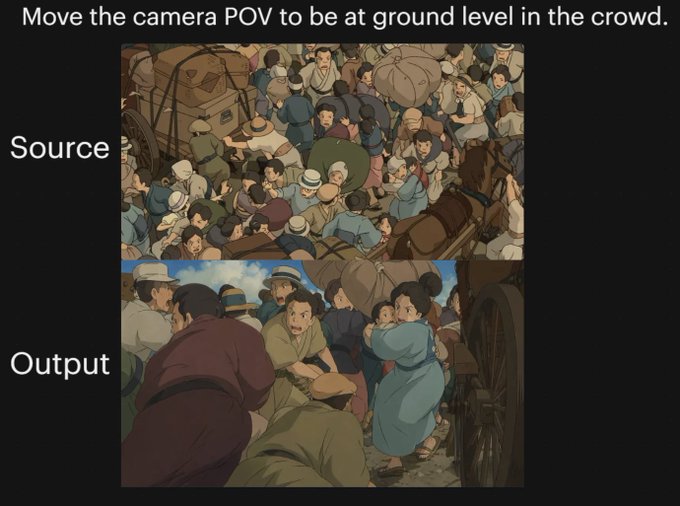
動漫觀眾視角對比
黑底對比圖,顯示原始動畫人群場景和轉換後的地面視角版本,可用於演示複雜的攝影機角度變化。
這是一個動漫與遊戲的GPT Image 2範例。請使用下方可直接使用的提示資訊產生類似的視覺素材,並在重複使用前查看Awesome GPT Image 2 Prompts署名和商業用途授權資訊。
需要完整的提示符號集?請使用 動漫與遊戲 主題中心提供更多相關範例,或打開 GPT Image 2 提示庫 有關完整範例索引、可重複使用結構和來源歸屬的資訊。
Free 1K preview
Generate one preview image instantly, no sign-up required.
Free text preview doesn’t preserve reference-image consistency.
2998/4000
提示詞
可直接複製的提示
{
  "type": "comparison graphic",
  "style": "anime cinematic demonstration image on a black presentation background",
  "canvas": {
    "aspect_ratio": "4:3",
    "background": "solid black"
  },
  "text_elements": [
    {
      "text": "{argument name=\"headline text\" default=\"Move the camera POV to be at ground level in the crowd.\"}",
      "position": "top center",
      "style": "large white sans-serif"
    },
    {
      "text": "Source",
      "position": "left of upper image",
      "style": "large white sans-serif"
    },
    {
      "text": "Output",
      "position": "left of lower image",
      "style": "large white sans-serif"
    }
  ],
  "layout": {
    "sections": [
      {
        "title": "Source",
        "position": "upper center",
        "count": 1,
        "labels": [
          "overhead crowd scene"
        ]
      },
      {
        "title": "Output",
        "position": "lower center",
        "count": 1,
        "labels": [
          "ground-level crowd POV scene"
        ]
      }
    ],
    "image_frames": 2
  },
  "images": [
    {
      "role": "source image",
      "composition": "busy top-down view of a densely packed historical street crowd, seen from above",
      "scene": "a chaotic crowd gathered around a wagon and a horse-drawn carriage, people pressed shoulder to shoulder, many wearing caps and muted early-20th-century or old-European clothing, bundles and sacks visible, one brown horse at the right edge, wooden wagon wheel and cart structure partially visible",
      "camera": "high overhead bird's-eye angle looking down into the crowd",
      "lighting": "soft daylight",
      "color_palette": "muted earthy browns, dusty blues, beige, olive, warm gray",
      "rendering": "hand-painted anime film still, detailed crowd illustration, slightly soft shading"
    },
    {
      "role": "output image",
      "composition": "the same crowded historical street reimagined from inside the mass of people at near-ground height",
      "scene": "view from within the crowd beside a carriage wheel, bodies filling the foreground and midground, a person in dark maroon clothing bent forward at left, a crouched figure in green near the bottom center, a woman in a light blue dress at right-center turning back, tightly packed figures, horse and cart implied nearby, dramatic sense of compression and closeness",
      "camera": "very low ground-level POV from inside the crowd, upward and forward through people, emphasizing complex occlusion and depth",
      "lighting": "soft daylight with warm cinematic shadows",
      "color_palette": "muted earthy browns, dusty blues, beige, olive, warm gray",
      "rendering": "hand-painted anime film still, cinematic perspective shift, detailed character crowding, soft painterly shading"
    }
  ],
  "overall_goal": "show a before-and-after camera angle transformation of the same anime crowd scene, with the output moving from an overhead view to a low immersive POV inside the crowd"
}
提示變數
提示符號中可編輯的參數佔位符及其預設值。
多變的
headline text
預設
Move the camera POV to be at ground level in the crowd.
Best for
- - 動漫與遊戲 visual exploration
- - Image generation and reference-image edits
- - Reusable briefs that keep source attribution visible
Change these parts
- - Subject, product, character, or scene
- - Aspect ratio, camera, lighting, and background
- - Brand, text, color, and output constraints
Recommended model and settings
- - Model: gpt-image-2
- - Input mode: 圖生圖
- - Aspect ratio: source
- - Commercial status: review original source
How to use this prompt
- 1. Copy the prompt and preserve its structure for the first test.
- 2. Replace the subject, context, and publishing channel.
- 3. Change one camera, lighting, or style variable per iteration.
- 4. Inspect the output, source, text, and rights before reuse.
Limitations, source, and reuse cautions
- - Generated output is an editable draft, not factual, legal, or rights evidence.
- - Review the linked source, people, brands, logos, text, and third-party media before commercial use.
內容來自Awesome GPT Image 2 Prompts 。必須註明出處。商業用途狀態為allowed ;付費使用前請查看來源版權資訊。
此類案例更多
按類別、輸入模式相容性、品質和低風險進行優先排序。






重用和來源註釋
預覽案例後,請謹慎使用此提示。
- 1.複製提示或直接在 Dovoo 中使用生成按鈕開啟提示。
- 2.根據您的實際使用情況調整變數、寬高比和參考影像。
- 3.發布或付費使用前,請確認版權、署名要求以及品牌或肖像權風險。