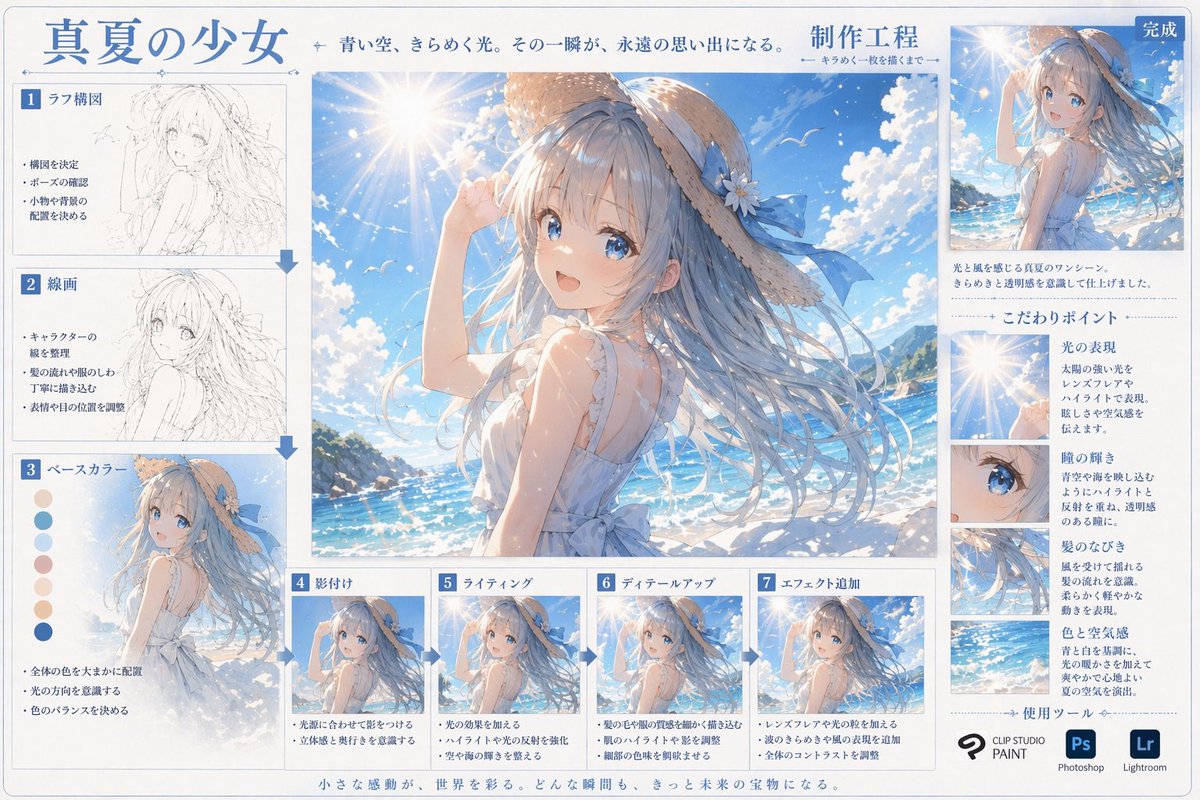
動漫藝術創作過程資訊圖
產生包含過程縮圖、色彩樣本和詳細焦點裁切的綜合逐步數位藝術教學表。
這是一個插畫藝術的gpt-image-2範例。請使用下方可直接使用的提示資訊產生類似的視覺素材,並在重複使用前查看Awesome Nano Banana Pro Prompts署名和商業用途授權資訊。
需要完整的提示符號集?請使用 插畫藝術 主題中心提供更多相關範例,或打開 GPT 影像 2 提示庫 有關完整範例索引、可重複使用結構和來源歸屬的資訊。
提示詞
可直接複製的提示
{ "type": "數位藝術創作流程資訊圖表", "header": { "title": "{argument name=\"主標題\" default=\"夏日少女\"}", "subtitle": "蔚藍的天空在光影中閃爍。那一刻變成了執行檔的記憶」。 "centerpiece": { "description": "高品質的大型動漫插畫,描繪了{argument name=\"角色外觀\" default=\"一位有著飄逸藍髮的動漫少女,頭戴飾有藍色絲帶的草帽,身穿白色無袖夏裝。 default=\"陽光明媚的海灘、波光粼粼的藍色海洋和帶有鏡頭光暈的晴朗天空。"}"." }, "layout": { "left_column": { "count": 3, "steps": [ { "label": "1. 草圖構圖", "image_type": "slabage"線稿", "image_type": "乾淨的單色線稿", "bullet_points": 3 }, { "label": "3. 底色", "image_type": "平塗", "extra_elements": "7 個圓形色塊", "bullet_points": 3:s }, nbot." "4. 陰影", "image_type": "基本賽璐珞陰影", "bullet_points": 2 }, { "label": "5. 光影", "image_type": "新增光照效果與高光", "bullet_points": 2 }, { "label" 新增光照效果與高光", "bullet_points": 2 }, { "label" 新增光照效果與高光", "bullet_points": 2 }, { "label" 新增光照效果與高光", "bullet_points": 2 }, { "label": "6. 細節」 }, { "label": "7. 新增特效", "image_type": "最終後製效果", "bullet_points": 3 } ] }, "right_column": { "top_section": { "label": "完成", "image_type": "point尺寸的最終插圖", 縮小文字_ "關鍵點", "count": 4, "items": [ { "label": "光影表現", "image_crop": "鏡頭暈光"image_crop": "飄逸頭髮的特寫", "description_text": "簡短段落" }, { "label": "色彩與氛圍", "image_crop": "海洋與天空背景", "description_text": "簡短段落" } ] }, "tools_used": { "title: "使用工具" name=\"主要軟體\" default=\"CLIP STUDIO PAINT\"}", "Photoshop (Ps)", "Lightroom (Lr)" ] } }, "footer": { "text": "靈感的瞬間點綴著世界。提示變數
提示符號中可編輯的參數佔位符及其預設值。
多變的
main title
預設
Summer Girl
多變的
process title
預設
Production Engineering
多變的
character appearance
預設
An anime girl with flowing blue hair, wearing a straw hat with a blue ribbon and a white sleeveless summer outfit.
多變的
setting
預設
Sunny beaches, sparkling blue ocean, and clear skies with lens flare.
多變的
primary software
預設
CLIP STUDIO PAINT
此類案例更多
按類別、輸入模式相容性、品質和低風險進行優先排序。



重用和來源註釋
預覽案例後,請謹慎使用此提示。
- 1.複製提示或直接在 Dovoo 中使用生成按鈕開啟提示。
- 2.根據您的實際使用情況調整變數、寬高比和參考影像。
- 3.發布或付費使用前,請確認版權、署名要求以及品牌或肖像權風險。