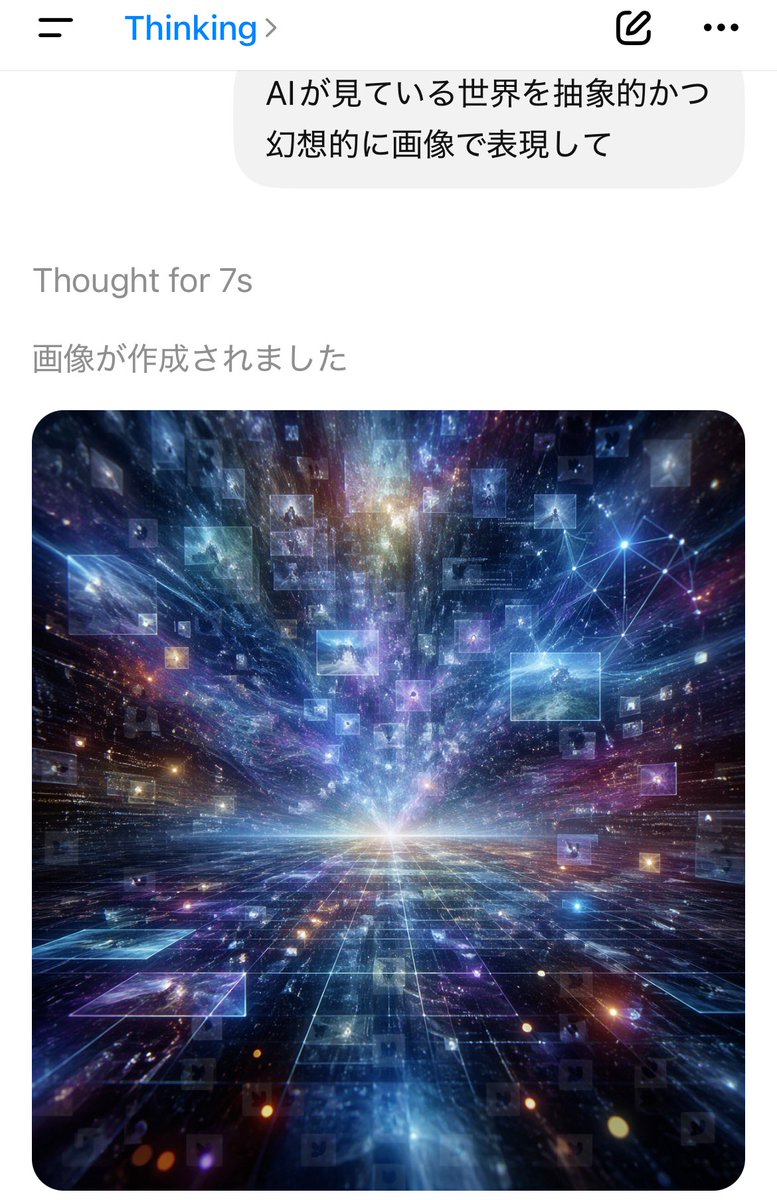
AI思維應用截圖
一張垂直螢幕手機聊天應用程式截圖,顯示了日語提示和生成的宇宙資料視覺藝術作品,適合用來說明人工智慧如何在逼真的介面中生成圖像。
這是一個平面設計和海報設計的GPT Image 2範例。請使用下方可直接使用的提示資訊產生類似的視覺素材,並在重複使用前查看Awesome GPT Image 2 Prompts署名和商業用途授權資訊。
需要完整的提示符號集?請使用 平面設計和海報設計 主題中心提供更多相關範例,或打開 GPT Image 2 提示庫 有關完整範例索引、可重複使用結構和來源歸屬的資訊。
Free 1K preview
Generate one preview image instantly, no sign-up required.
Free text preview doesn’t preserve reference-image consistency.
1557/4000
提示詞
可直接複製的提示
A smartphone chat app screenshot in portrait orientation, minimal iOS-style interface on a white background. At the top is a navigation bar with a hamburger menu icon on the left, the blue title “Thinking” near the top center-left with a right chevron, and 2 icons on the right: a compose/edit square icon and a horizontal three-dots menu icon. Below it is a large rounded light-gray chat bubble containing 2 lines of Japanese text: “AIが見ている世界を抽象的かつ” and “幻想的に画像で表現して”. Under the bubble, left-aligned gray system text reads “Thought for 7s”, and below that another gray Japanese line reads “画像が作成されました”. The lower half of the screen shows a single generated image card with large rounded corners. The image is a surreal abstract cosmic data landscape: a glowing white horizon at the center, a dark reflective grid floor receding in deep perspective, and explosive streaks of light, nebula clouds, stars, and particles rushing outward from the vanishing point. Floating throughout the space are dozens of translucent rectangular image panels or data windows, some faint and some bright, suspended at different depths. In the upper right area of the artwork, include a luminous network node diagram made of connected points and lines. Dominant colors are electric blue, indigo, violet, cyan, and touches of magenta and gold. The mood is futuristic, vast, dreamlike, and intelligent, as if visualizing the world as seen by an AI. Clean mobile app screenshot composition, realistic UI, crisp typography, high-contrast luminous digital art in the embedded image.
Best for
- - 平面設計和海報設計 visual exploration
- - Image generation and reference-image edits
- - Reusable briefs that keep source attribution visible
Change these parts
- - Subject, product, character, or scene
- - Aspect ratio, camera, lighting, and background
- - Brand, text, color, and output constraints
Recommended model and settings
- - Model: gpt-image-2
- - Input mode: 圖生圖
- - Aspect ratio: source
- - Commercial status: review original source
How to use this prompt
- 1. Copy the prompt and preserve its structure for the first test.
- 2. Replace the subject, context, and publishing channel.
- 3. Change one camera, lighting, or style variable per iteration.
- 4. Inspect the output, source, text, and rights before reuse.
Limitations, source, and reuse cautions
- - Generated output is an editable draft, not factual, legal, or rights evidence.
- - Review the linked source, people, brands, logos, text, and third-party media before commercial use.
內容來自Awesome GPT Image 2 Prompts 。必須註明出處。商業用途狀態為allowed ;付費使用前請查看來源版權資訊。
此類案例更多
按類別、輸入模式相容性、品質和低風險進行優先排序。






重用和來源註釋
預覽案例後,請謹慎使用此提示。
- 1.複製提示或直接在 Dovoo 中使用生成按鈕開啟提示。
- 2.根據您的實際使用情況調整變數、寬高比和參考影像。
- 3.發布或付費使用前,請確認版權、署名要求以及品牌或肖像權風險。