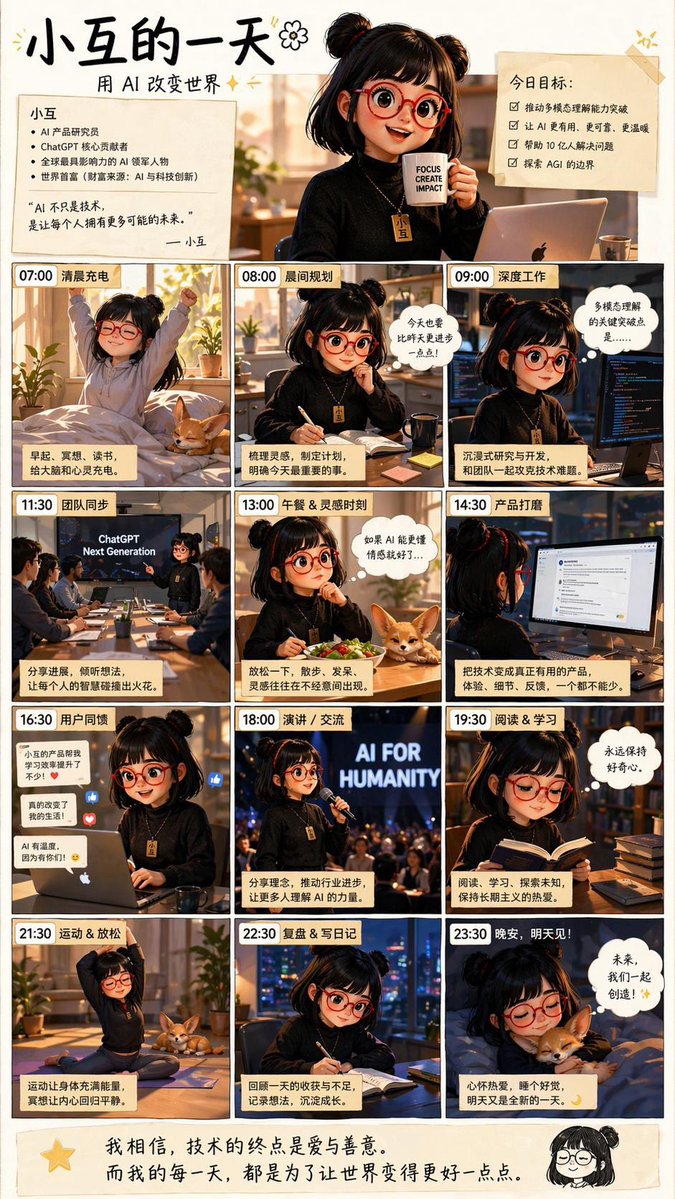
AI女孩日常生活海報
這個提示會產生一張中國動漫風格的資訊圖表海報,以 12 個帶有時間戳的場景展示了一位年輕的 AI 創造者的一天,非常適合用於社交媒體靈感帖子或勵志科技主題插圖。
這是一個動漫與遊戲的GPT Image 2範例。請使用下方可直接使用的提示資訊產生類似的視覺素材,並在重複使用前查看Awesome GPT Image 2 Prompts署名和商業用途授權資訊。
需要完整的提示符號集?請使用 動漫與遊戲 主題中心提供更多相關範例,或打開 GPT Image 2 提示庫 有關完整範例索引、可重複使用結構和來源歸屬的資訊。
Free 1K preview
Generate one preview image instantly, no sign-up required.
4000/4000
提示詞
可直接複製的提示
{
  "type": "Chinese inspirational comic-style daily routine poster",
  "style": "warm cinematic anime illustration with soft golden indoor lighting, cozy productivity aesthetic, clean black panel borders, handwritten Chinese headline, slightly glossy social-media poster finish",
  "subject": {
    "character": "Young AI developer girl, twin pigtails, shoulder-length black hair, round red glasses, black sweater, a golden necklace with a tag that says 'Bean'.",
    "companion": "small tan corgi appearing in 4 panels",
    "theme": "a full day in the life of an AI-focused girl creating technology for humanity"
  },
  "layout": {
    "format": "vertical poster",
    "grid": {
      "columns": 3,
      "rows": 4,
      "count": 12
    },
    "top_header": {
      "count": 4,
      "elements": [
        "Eye-catching Chinese title “A Day in the Life of Xiaodou”",
        "Subtitle “Changing the World with AI”",
        "Left-side profile card, introducing Xiaodou, containing 5 key points and a short introduction, signed “— Xiaodou”",
        "Right-side goal card, titled “Today’s Goals:”, containing 4 checkbox items"
      ]
    },
    "panels": [
      {
        "time": "07:00",
        "title": "Morning Recharge",
        "description": "girl stretching in bed at sunrise in a cozy bedroom, corgi on the bed, plants by the window, caption card at bottom"
      },
      {
        "time": "08:00",
        "title": "Morning Planning",
        "description": "girl seated at desk writing in a notebook with coffee mug nearby, morning sun through the window, speech bubble above her"
      },
      {
        "time": "09:00",
        "title": "Deep Work",
        "description": "girl coding intensely at a desk with a monitor showing code, dark focused workspace, thought bubble at upper right"
      },
      {
        "time": "11:30",
        "title": "Team Sync",
        "description": "conference room meeting with 6 people total, presentation screen reads \"ChatGPT Next Generation\", girl presenting at front, caption card at bottom"
      },
      {
        "time": "13:00",
        "title": "Lunch & Inspiration Time",
        "description": "girl eating a salad at desk, corgi resting beside the bowl, thought bubble about AI inspiration"
      },
      {
        "time": "14:30",
        "title": "Product Polishing",
        "description": "girl viewed from behind using a desktop monitor with a product interface or chat-style UI open, caption card at bottom"
      },
      {
        "time": "16:30",
        "title": "User Feedback",
        "description": "girl at laptop reading feedback, floating reaction icons and short comment bubbles around her, warm office lighting"
      },
      {
        "time": "18:00",
        "title": "Speech / Communication",
        "description": "girl speaking on stage into a microphone before an audience, large glowing backdrop text \"AI FOR HUMANITY\""
      },
      {
        "time": "19:30",
        "title": "Reading & Learning",
        "description": "girl reading a book at a desk stacked with books, thought bubble expressing curiosity and learning"
      },
      {
        "time": "21:30",
        "title": "Exercise & Relaxation",
        "description": "girl doing a seated yoga stretch on a mat at home, corgi nearby, evening relaxation"
      },
      {
        "time": "22:30",
        "title": "Review & Diary",
        "description": "girl writing in a notebook at night by a window with city lights outside, reflective mood"
      },
      {
        "time": "23:30",
        "title": "Good night, see you tomorrow!",
        "description": "girl asleep in bed hugging the corgi, night scene, speech bubble about the future and creating together"
      }
    ],
    "bottom_footer": {
      "count": 2,
      "elements": [
        "large handwritten Chinese quote across the width about technology ending in love and kindness and making the world better every day",
        "small chibi doodle portrait of the girl at bottom right"
      ]
    }
  },
  "text": {
    "language": "Chinese",
    "headline": "{argument name=\"headline text\" default=\"Little Bean's Day\"}",
    "subtitle": "{argument name=\"subtitle text\" default=\"Changing the World with AI\"}",
    "character_name": "{argument name=\"character name\" default=\"Little Bean\"}",
    "stage_phrase": "{argument name=\"stage backdrop text\" default=\"AI FOR HUMANITY\"}",
    "footer_quote": "{argument name=\"quote\" default=\"I believe the ultimate purpose of technology is love and kindness. And every day, I strive to make the world a little bit better.\"}"
  },
  "composition_notes": "Each panel has a bold time label in the top-left corner and a short Chinese title. Include exactly 12 time-stamped panels, 2 top note cards, 1 main hero portrait at the top center holding a mug, and 1 footer quote area. Keep the palette warm beige, amber, black, and soft cream. The overall mood is optimistic, diligent, intelligent, and wholesome, like a motivational lifestyle infographic for AI creators."
}
提示變數
提示符號中可編輯的參數佔位符及其預設值。
多變的
headline text
預設
Little Bean's Day
多變的
subtitle text
預設
Changing the World with AI
多變的
character name
預設
Little Bean
多變的
stage backdrop text
預設
AI FOR HUMANITY
多變的
quote
預設
I believe the ultimate purpose of technology is love and kindness. And every day, I strive to make the world a little bit better.
Best for
- - 動漫與遊戲 visual exploration
- - Image generation and reference-image edits
- - Reusable briefs that keep source attribution visible
Change these parts
- - Subject, product, character, or scene
- - Aspect ratio, camera, lighting, and background
- - Brand, text, color, and output constraints
Recommended model and settings
- - Model: gpt-image-2
- - Input mode: 文生圖
- - Aspect ratio: source
- - Commercial status: review original source
How to use this prompt
- 1. Copy the prompt and preserve its structure for the first test.
- 2. Replace the subject, context, and publishing channel.
- 3. Change one camera, lighting, or style variable per iteration.
- 4. Inspect the output, source, text, and rights before reuse.
Limitations, source, and reuse cautions
- - Generated output is an editable draft, not factual, legal, or rights evidence.
- - Review the linked source, people, brands, logos, text, and third-party media before commercial use.
內容來自Awesome GPT Image 2 Prompts 。必須註明出處。商業用途狀態為allowed ;付費使用前請查看來源版權資訊。
此類案例更多
按類別、輸入模式相容性、品質和低風險進行優先排序。






重用和來源註釋
預覽案例後,請謹慎使用此提示。
- 1.複製提示或直接在 Dovoo 中使用生成按鈕開啟提示。
- 2.根據您的實際使用情況調整變數、寬高比和參考影像。
- 3.發布或付費使用前,請確認版權、署名要求以及品牌或肖像權風險。