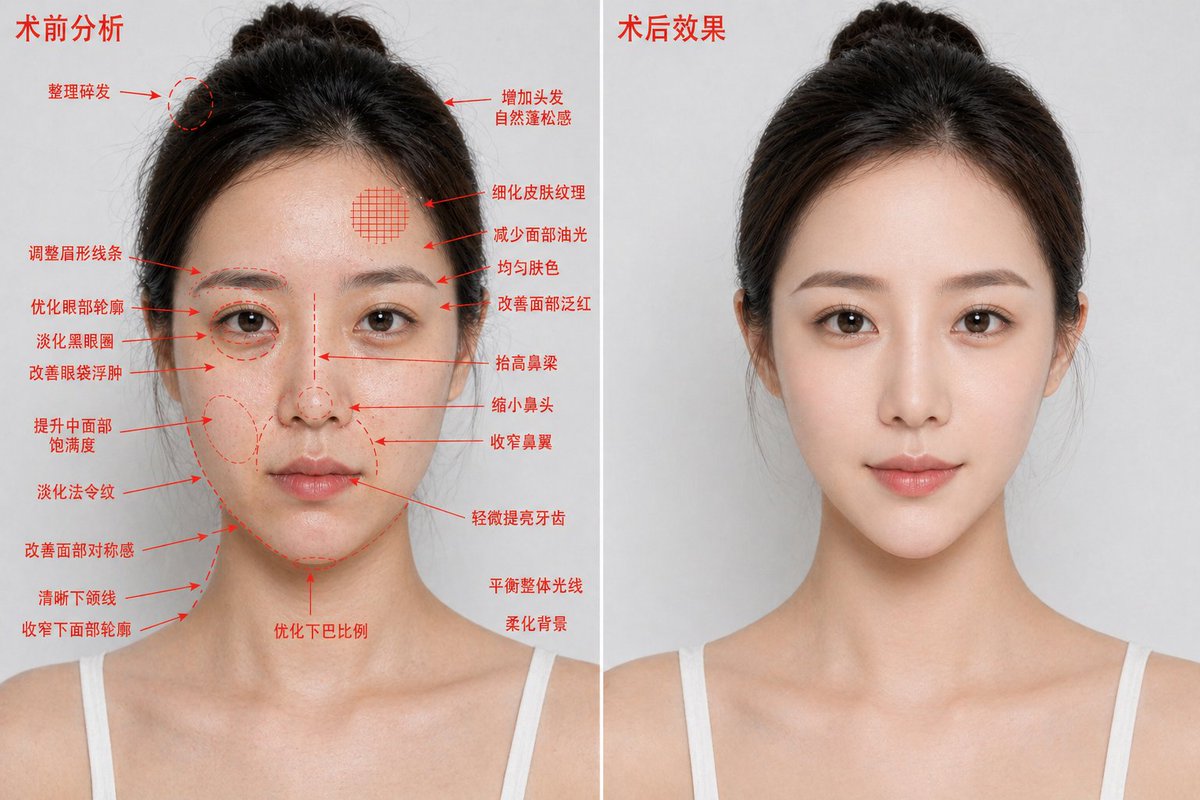
整形手術前後對比海報
此提示會產生逼真的雙面板美容增強對比影像,用於醫療美容廣告或治療效果視覺化。
這是一個產品與商業的GPT Image 2範例。請使用下方可直接使用的提示資訊產生類似的視覺素材,並在重複使用前查看Awesome GPT Image 2 Prompts署名和商業用途授權資訊。
需要完整的提示符號集?請使用 產品與商業 主題中心提供更多相關範例,或打開 GPT Image 2 提示庫 有關完整範例索引、可重複使用結構和來源歸屬的資訊。
Free 1K preview
Generate one preview image instantly, no sign-up required.
2685/4000
提示詞
可直接複製的提示
{
  "type": "medical aesthetic before-and-after comparison poster",
  "style": "photorealistic high-definition cosmetic surgery analysis blueprint, premium clinic advertising look",
  "subject": {
    "gender_presentation": "female",
    "age_appearance": "young adult",
    "ethnicity": "East Asian",
    "pose": "front-facing bust portrait, shoulders visible, same angle and same neutral expression on both sides",
    "hair": {
      "color": "dark brown to black",
      "style": "center-parted hair pulled back into a loose bun with a few flyaways"
    },
    "clothing": "white thin-strap camisole",
    "identity_masking": "large rectangular mosaic blur covering the full face area in both panels"
  },
  "composition": {
    "aspect_ratio": "16:9 horizontal",
    "background": "clean light gray studio background",
    "divider": "1 vertical white dividing line centered between the two panels",
    "panels": [
      {
        "title": "Preoperative analysis",
        "position": "left",
        "count": 1,
        "image": "same woman with slightly rougher, shinier, less refined appearance",
        "annotations": {
          "color": "red",
          "count": 19,
          "items": [
            "Tidy up flyaway hairs",
            "Adjust eyebrow shape",
            "Optimize the eye contour",
            "Reduce dark circles",
            "Improve puffy eyes",
            "Enhance mid-face volume",
            "Diminish nasolabial folds",
            "Improve facial symmetry",
            "Define jawline",
            "Slim lower facial contour",
            "Add natural volume to hair",
            "Refine skin texture",
            "Reduce facial oiliness",
            "Evens skin tone",
            "Improve facial redness",
            "Raise the bridge of the nose",
            "Reduce the size of the nose",
            "Narrow the nostrils",
            "Slightly brighten teeth"
          ]
        },
        "extra_notes": {
          "count": 3,
          "items": [
            "Optimize chin proportions",
            "Balance overall lighting",
            "Soften background"
          ]
        }
      },
      {
        "title": "Post-operative effect",
        "position": "right",
        "count": 1,
        "image": "same woman, same lighting and same framing, but cleaner and more polished, smoother skin, subtly lifted features, more refined contour and nose, brighter overall complexion, no annotation arrows"
      }
    ]
  },
  "rendering": {
    "lighting": "soft even studio lighting",
    "detail_level": "sharp skin texture but naturally retouched",
    "camera": "85mm portrait lens look, straight-on, chest-up crop"
  }
}
Best for
- - 產品與商業 visual exploration
- - Image generation and reference-image edits
- - Reusable briefs that keep source attribution visible
Change these parts
- - Subject, product, character, or scene
- - Aspect ratio, camera, lighting, and background
- - Brand, text, color, and output constraints
Recommended model and settings
- - Model: gpt-image-2
- - Input mode: 文生圖
- - Aspect ratio: source
- - Commercial status: review original source
How to use this prompt
- 1. Copy the prompt and preserve its structure for the first test.
- 2. Replace the subject, context, and publishing channel.
- 3. Change one camera, lighting, or style variable per iteration.
- 4. Inspect the output, source, text, and rights before reuse.
Limitations, source, and reuse cautions
- - Generated output is an editable draft, not factual, legal, or rights evidence.
- - Review the linked source, people, brands, logos, text, and third-party media before commercial use.
內容來自Awesome GPT Image 2 Prompts 。必須註明出處。商業用途狀態為allowed ;付費使用前請查看來源版權資訊。
此類案例更多
按類別、輸入模式相容性、品質和低風險進行優先排序。






重用和來源註釋
預覽案例後,請謹慎使用此提示。
- 1.複製提示或直接在 Dovoo 中使用生成按鈕開啟提示。
- 2.根據您的實際使用情況調整變數、寬高比和參考影像。
- 3.發布或付費使用前,請確認版權、署名要求以及品牌或肖像權風險。