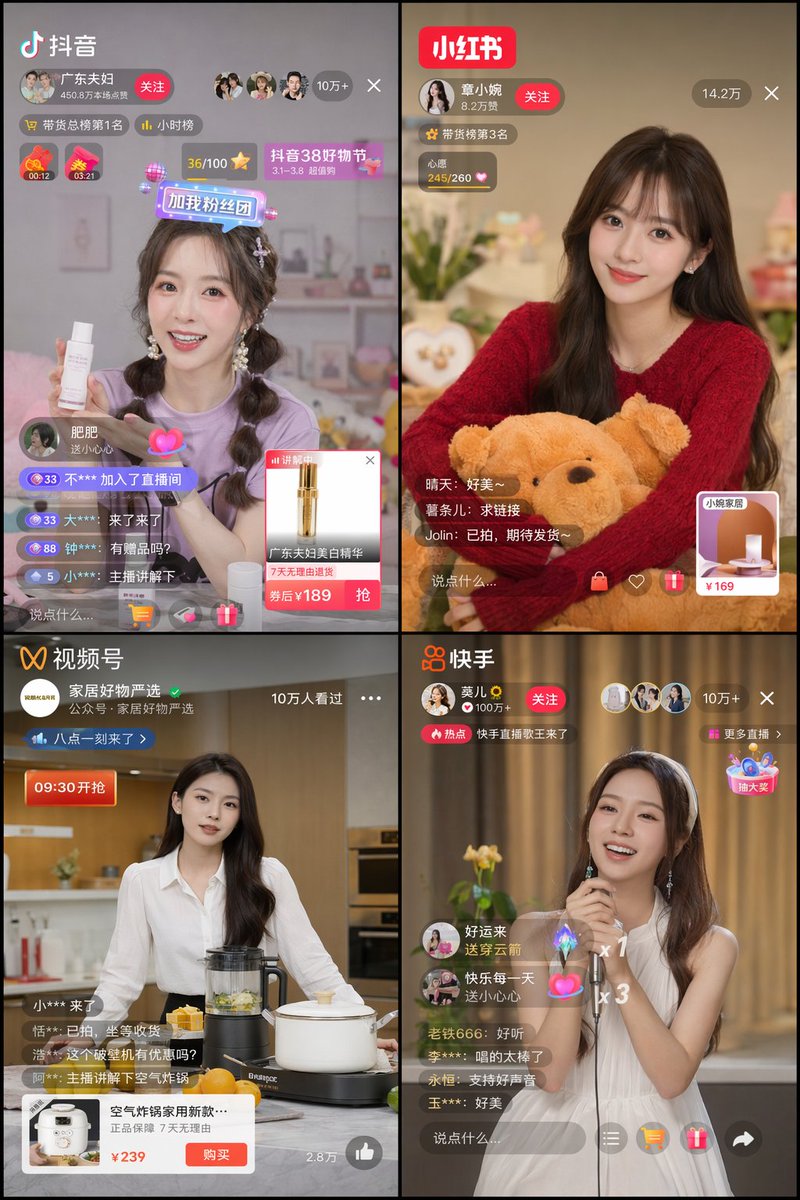
四面板直播應用使用者介面模型
產生一個 2x2 的行動直播介面網格,其中包含不同的主持人、應用程式和電子商務 UI 疊加層。
這是一個其他靈感的GPT Image 2範例。請使用下方可直接使用的提示資訊產生類似的視覺素材,並在重複使用前查看Awesome GPT Image 2 Prompts署名和商業用途授權資訊。
需要完整的提示符號集?請使用 其他靈感 主題中心提供更多相關範例,或打開 GPT Image 2 提示庫 有關完整範例索引、可重複使用結構和來源歸屬的資訊。
Free 1K preview
Generate one preview image instantly, no sign-up required.
1490/4000
提示詞
可直接複製的提示
{
  "type": "2x2 网格的移动直播应用程序界面",
  "theme": "{argument name=\"stream theme\" default=\"电子商务和娱乐直播\"}",
  "layout": {
    "grid": "2x2",
    "panels": [
      {
        "position": "top-left",
        "app_name": "{argument name=\"app 1 name\" default=\"抖音\"}",
        "host": "身穿紫色衬衫的年轻女性拿着白色护肤瓶",
        "ui_elements": [
          "App Logo",
          "带有关注按钮的主播资料",
          "观众 '100k+'",
          "2 个倒计时器",
          "4 条滚动评论",
          "价格为 '¥189' 的产品弹出卡"
        ]
      },
      {
        "position": "top-right",
        "app_name": "{argument name=\"app 2 name\" default=\"小红书 (Little Red Book)\"}",
        "host": "身穿红色毛衣的年轻女性拿着棕色泰迪熊",
        "ui_elements": [
          "App Logo",
          "带有关注按钮的主播资料",
          "观众 '142k'",
          "3 条滚动评论",
          "价格为 '¥169' 的方形产品链接卡"
        ]
      },
      {
        "position": "bottom-left",
        "app_name": "{argument name=\"app 3 name\" default=\"视频频道\"}",
        "host": "身穿白色衬衫的年轻女性站在厨房里,拿着搅拌机和锅",
        "ui_elements": [
          "App Logo",
          "主播资料",
          "'100k+' 人已观看",
          "4 条滚动评论",
          "带有购买按钮和价格 '¥239' 的宽幅产品弹出卡"
        ]
      },
      {
        "position": "bottom-right",
        "app_name": "{argument name=\"app 4 name\" default=\"快手\"}",
        "host": "身穿白色无袖连衣裙的年轻女性拿着麦克风唱歌",
        "ui_elements": [
          "App Logo",
          "带有关注按钮的主播资料",
          "观众 '100k+'",
          "5 条滚动评论",
          "2 个浮动礼物动画",
          "浮动交互式小部件"
        ]
      }
    ]
  }
}
提示變數
提示符號中可編輯的參數佔位符及其預設值。
多變的
stream theme
預設
e-commerce and entertainment live streaming
多變的
app 1 name
預設
Douyin
多變的
app 2 name
預設
Xiaohongshu (Little Red Book)
多變的
app 3 name
預設
Video Channels
多變的
app 4 name
預設
Kuaishou
Best for
- - 其他靈感 visual exploration
- - Image generation and reference-image edits
- - Reusable briefs that keep source attribution visible
Change these parts
- - Subject, product, character, or scene
- - Aspect ratio, camera, lighting, and background
- - Brand, text, color, and output constraints
Recommended model and settings
- - Model: gpt-image-2
- - Input mode: 文生圖
- - Aspect ratio: source
- - Commercial status: review original source
How to use this prompt
- 1. Copy the prompt and preserve its structure for the first test.
- 2. Replace the subject, context, and publishing channel.
- 3. Change one camera, lighting, or style variable per iteration.
- 4. Inspect the output, source, text, and rights before reuse.
Limitations, source, and reuse cautions
- - Generated output is an editable draft, not factual, legal, or rights evidence.
- - Review the linked source, people, brands, logos, text, and third-party media before commercial use.
內容來自Awesome GPT Image 2 Prompts 。必須註明出處。商業用途狀態為allowed ;付費使用前請查看來源版權資訊。
此類案例更多
按類別、輸入模式相容性、品質和低風險進行優先排序。






重用和來源註釋
預覽案例後,請謹慎使用此提示。
- 1.複製提示或直接在 Dovoo 中使用生成按鈕開啟提示。
- 2.根據您的實際使用情況調整變數、寬高比和參考影像。
- 3.發布或付費使用前,請確認版權、署名要求以及品牌或肖像權風險。