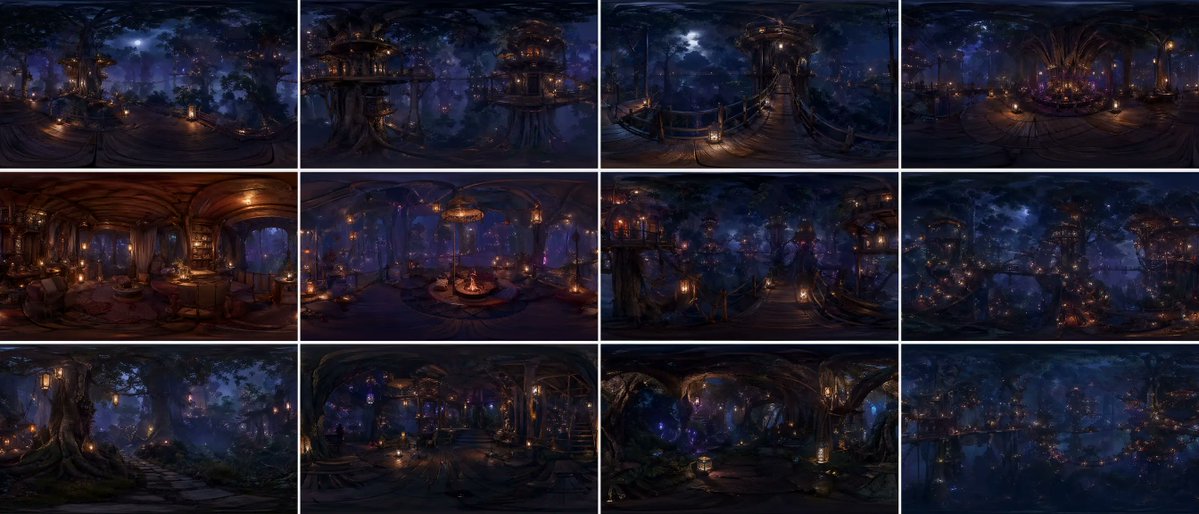
360度森林世界全景網格
一個精妙的提示,用於產生一個由 12 個面板組成的等距柱狀投影全景圖,展現一個連續的森林世界,具有電影般的真實感和整體一致性。
這是一個景觀與自然的GPT Image 2範例。請使用下方可直接使用的提示資訊產生類似的視覺素材,並在重複使用前查看Awesome GPT Image 2 Prompts署名和商業用途授權資訊。
需要完整的提示符號集?請使用 景觀與自然 主題中心提供更多相關範例,或打開 GPT Image 2 提示庫 有關完整範例索引、可重複使用結構和來源歸屬的資訊。
Free 1K preview
Generate one preview image instantly, no sign-up required.
2477/4000
提示詞
可直接複製的提示
{argument name="grid layout" default="12-panel grid (4x3)"}, each panel is an independent FULL equirectangular 360° panorama of the SAME continuous {argument name="environment" default="forest world"}

each panel = complete spherical environment (360° horizontal, 180° vertical)
true equirectangular projection with natural distortion:
stretched edges, curved horizon, vertical compression toward zenith and nadir

STRICT global consistency across panels:
same forest biome, same architectural language, same materials, same lighting logic, same scale, same color palette, no visual drift

cinematic photorealism, live-action quality, physically accurate rendering
natural light behavior, realistic exposure, subtle lens response, filmic dynamic range

ultra-detailed environment, grounded material response (wood, moss, fabric, stone), believable imperfections, micro-detail variation

massive forest environment with large-scale vertical structures integrated into trees
multi-layered platforms, bridges, embedded interiors, organic construction logic

lighting:
motivated light sources only (lanterns, windows, bioluminescence)
soft volumetric fog interacting with light beams
physically correct falloff, no overglow, no artificial bloom
balanced contrast, filmic highlights, deep but readable shadows

atmosphere:
dense air perspective, layered depth, subtle particle presence
natural haze, humidity, soft diffusion

CAMERA (IMPORTANT):
each panel = fixed central capture point of a spherical camera
true 360° capture, no framing, no composition bias, no cropped view
but with subtle real-world camera characteristics:
slight lens softness toward edges, mild exposure adaptation, natural highlight rolloff

each panel represents a different location within the SAME world:
canopy height, mid-bridge level, interior spaces, vertical clearings, forest floor transitions
continuous spatial logic between panels

viewer always positioned at the center of the environment

environment fully resolved in ALL directions:
above (canopy, sky gaps, light sources) and below (structures, roots, depth layers)

COLOR:
{argument name="color scheme" default="deep indigo night base, warm amber practical lights, restrained violet accents"}
cinematic color grading, natural color separation, no oversaturation

STYLE:
cinematic spherical realism, VR-ready environment, physically coherent world
high-end film production quality, not stylized, not game-like

no labels, no text, no numbers
提示變數
提示符號中可編輯的參數佔位符及其預設值。
多變的
grid layout
預設
12-panel grid (4x3)
多變的
environment
預設
forest world
多變的
color scheme
預設
deep indigo night base, warm amber practical lights, restrained violet accents
Best for
- - 景觀與自然 visual exploration
- - Image generation and reference-image edits
- - Reusable briefs that keep source attribution visible
Change these parts
- - Subject, product, character, or scene
- - Aspect ratio, camera, lighting, and background
- - Brand, text, color, and output constraints
Recommended model and settings
- - Model: gpt-image-2
- - Input mode: 文生圖
- - Aspect ratio: source
- - Commercial status: review original source
How to use this prompt
- 1. Copy the prompt and preserve its structure for the first test.
- 2. Replace the subject, context, and publishing channel.
- 3. Change one camera, lighting, or style variable per iteration.
- 4. Inspect the output, source, text, and rights before reuse.
Limitations, source, and reuse cautions
- - Generated output is an editable draft, not factual, legal, or rights evidence.
- - Review the linked source, people, brands, logos, text, and third-party media before commercial use.
內容來自Awesome GPT Image 2 Prompts 。必須註明出處。商業用途狀態為allowed ;付費使用前請查看來源版權資訊。
此類案例更多
按類別、輸入模式相容性、品質和低風險進行優先排序。






重用和來源註釋
預覽案例後,請謹慎使用此提示。
- 1.複製提示或直接在 Dovoo 中使用生成按鈕開啟提示。
- 2.根據您的實際使用情況調整變數、寬高比和參考影像。
- 3.發布或付費使用前,請確認版權、署名要求以及品牌或肖像權風險。