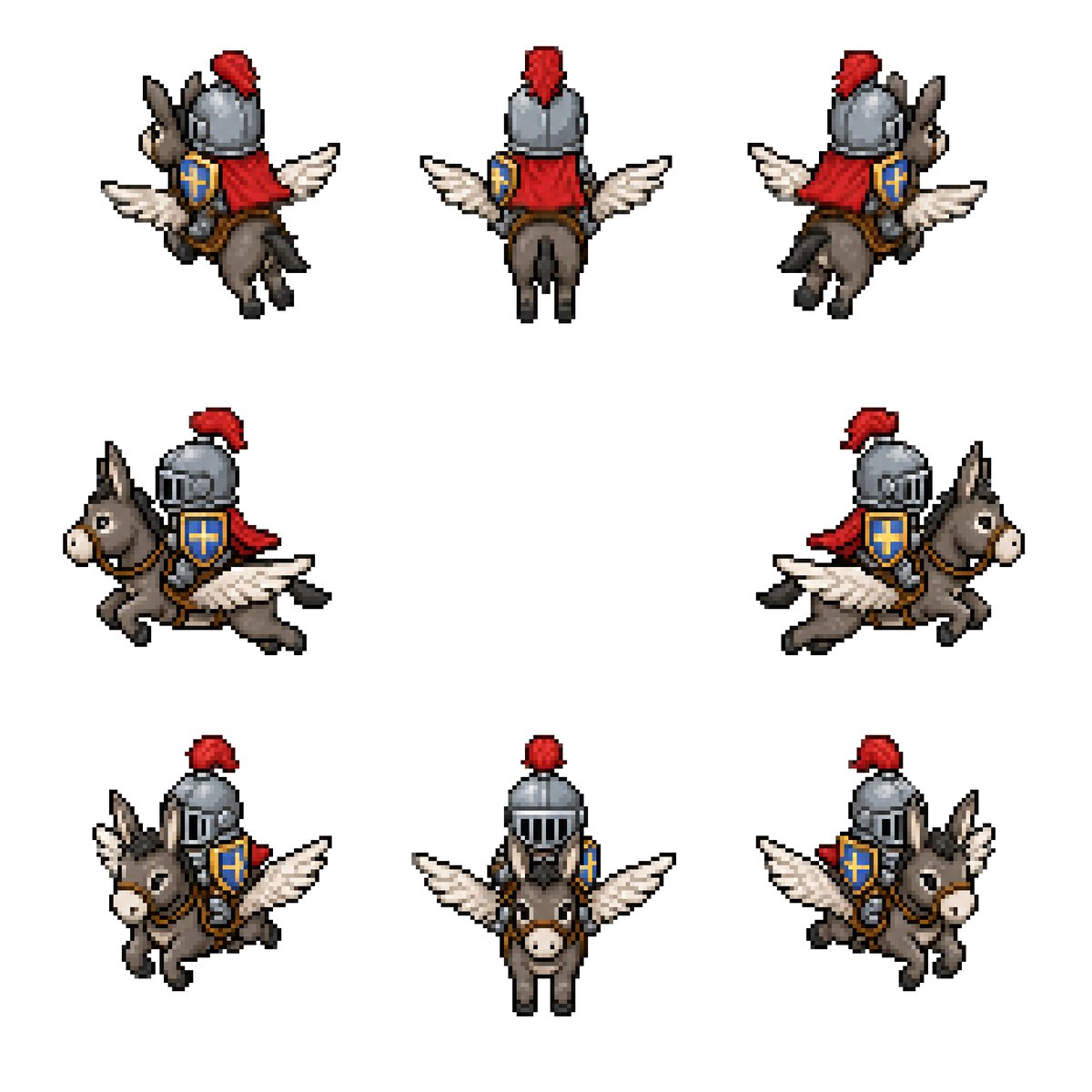
Kanatlı Eşek Şövalye Karakter Çizim Sayfası
Fantastik oyun varlıkları için kanatlı bir eşeğe binen ortaçağ şövalyesinin 8 yönlü retro piksel sanat tarzında bir sprite sayfası oluşturur.
Bu Anime ve Oyun için bir GPT Image 2 örnek senaryosudur. Benzer görseller oluşturmak için aşağıdaki hazır metni kullanın ve yeniden kullanmadan önce Awesome GPT Image 2 Prompts atıfını ve ticari kullanım haklarını inceleyin.
Tüm komut istemi setine mi ihtiyacınız var? Şunu kullanın: Anime ve Oyun Daha fazla ilgili örnek için konu merkezini ziyaret edin veya açın. GPT Image 2 istem kataloğu Tam örnek dizin, yeniden kullanılabilir yapılar ve kaynak atfı için.
Free 1K preview
Generate one preview image instantly, no sign-up required.
2329/4000
İpucu
Kopyalamaya hazır istemi
Goal: Create a clean pixel-art sprite sheet for a fantasy game asset: {argument name="character concept" default="a medieval knight riding a winged donkey"}.

Canvas: Square 768×768 image on a plain white background, no borders, no UI, no text. Use a crisp retro RPG pixel-art style with visible chunky pixels, dark outlines, limited palette, and subtle dithering/shading.

Layout: Show exactly 8 separate sprites of the same mount-and-rider character, evenly spaced with large white gaps, arranged as 3 sprites on the top row, 2 sprites on the middle row, and 3 sprites on the bottom row. Each sprite should be roughly the same scale and read like an animation/rotation sheet.

Sprite count and views: 1) top-left: rear three-quarter view facing upper-left, 2) top-center: straight rear view, 3) top-right: rear three-quarter view facing upper-right, 4) middle-left: side view traveling left, 5) middle-right: side view traveling right, 6) bottom-left: front three-quarter view facing lower-left, 7) bottom-center: straight front view, 8) bottom-right: front three-quarter view facing lower-right.

Subject details: The mount is a small gray-brown donkey with long upright ears, pale muzzle, black hooves, simple bridle and saddle, and a pair of white feathered wings extended from its sides like a small pegasus. The rider is a compact armored knight wearing a rounded steel helmet with vertical visor slits, a bright red plume, a red cape or cloth drape, brown leather tack, and a blue shield with a gold cross emblem strapped at the side. Use {argument name="armor color" default="steel gray"}, {argument name="cape color" default="red"}, {argument name="shield color" default="blue and gold"}, and {argument name="mount color" default="gray-brown"}. Maintain the same proportions and costume details across all 8 sprites.

Visual style: Classic 16-bit fantasy RPG sprite sheet, isometric/top-down compatible proportions, high readability at small size, black and dark-brown pixel outlines, soft shadowless presentation, minimal anti-aliasing, no blur, no gradients beyond pixel shading.

Constraints: Keep exactly 8 sprites, do not add extra frames, labels, weapons, scenery, background texture, watermark, or character variations. All sprites must depict the same mounted knight and winged donkey from different directions.
İstem değişkenleri
Komut isteminde bulunan, düzenlenebilir argüman yer tutucuları ve varsayılan değerleri.
Değişken
character concept
Varsayılan
a medieval knight riding a winged donkey
Değişken
armor color
Varsayılan
steel gray
Değişken
cape color
Varsayılan
red
Değişken
shield color
Varsayılan
blue and gold
Değişken
mount color
Varsayılan
gray-brown
Best for
- - Anime ve Oyun visual exploration
- - Image generation and reference-image edits
- - Reusable briefs that keep source attribution visible
Change these parts
- - Subject, product, character, or scene
- - Aspect ratio, camera, lighting, and background
- - Brand, text, color, and output constraints
Recommended model and settings
- - Model: gpt-image-2
- - Input mode: Metinden görsele
- - Aspect ratio: source
- - Commercial status: review original source
How to use this prompt
- 1. Copy the prompt and preserve its structure for the first test.
- 2. Replace the subject, context, and publishing channel.
- 3. Change one camera, lighting, or style variable per iteration.
- 4. Inspect the output, source, text, and rights before reuse.
Limitations, source, and reuse cautions
- - Generated output is an editable draft, not factual, legal, or rights evidence.
- - Review the linked source, people, brands, logos, text, and third-party media before commercial use.
Awesome GPT Image 2 Prompts kaynağından içe aktarılmıştır. Kaynak belirtilmesi zorunludur. Ticari kullanım durumu allowed şeklindedir; ücretli kullanım öncesinde kaynak haklarını inceleyin.
Bu kategoride daha fazla vaka
Kategoriye, giriş modu uyumluluğuna, kaliteye ve düşük riske göre önceliklendirilmiştir.

Anime Girl Heterochromia Portrait
Metinden görsele

Hell Hound Character Sheet Infographic
Metinden görsele

MotoGP POV Cornering Shot
Metinden görsele

Cute Speech Bubble Mascot Profile Icon
Metinden görsele

GPT Image 2 Real-Life Character Street Snap
Metinden görsele

Luxury Travel Fashion Portrait Prompt
Metinden görsele
Yeniden kullanım ve kaynak notları
Vaka önizlemesini yaptıktan sonra bu istemi güvenle kullanın.
- 1.Komut istemini kopyalayın veya oluşturma düğmesini kullanarak doğrudan Dovoo'da açın.
- 2.Değişkenleri, en boy oranını ve referans görselleri kendi kullanım durumunuza göre ayarlayın.
- 3.Yayınlamadan veya ücretli kullanımdan önce, kaynak haklarını, atıf gerekliliklerini ve marka veya benzerlik risklerini doğrulayın.