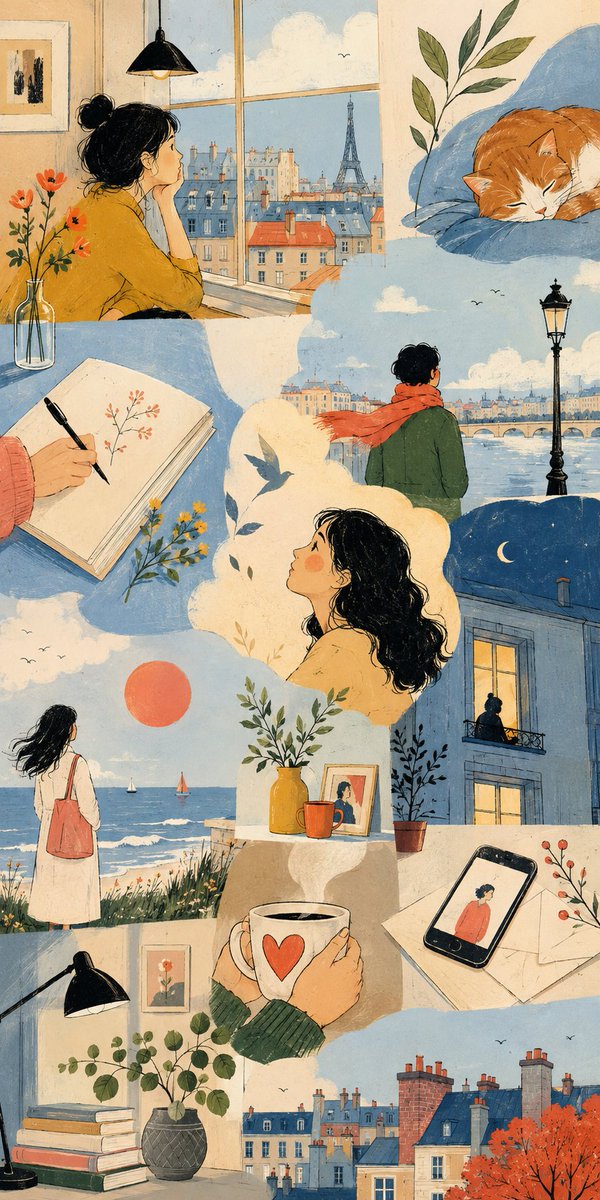
Thematic Artistic Collage Template
An extensive template for creating artistic multi-scene collages based on a specific theme, allowing for varied layouts and visual scale while maintaining harmony.
Bu İllüstrasyon ve Sanat için bir GPT Image 2 örnek senaryosudur. Benzer görseller oluşturmak için aşağıdaki hazır metni kullanın ve yeniden kullanmadan önce Awesome GPT Image 2 Prompts atıfını ve ticari kullanım haklarını inceleyin.
Tüm komut istemi setine mi ihtiyacınız var? Şunu kullanın: İllüstrasyon ve Sanat Daha fazla ilgili örnek için konu merkezini ziyaret edin veya açın. GPT Image 2 istem kataloğu Tam örnek dizin, yeniden kullanılabilir yapılar ve kaynak atfı için.
Free 1K preview
Generate one preview image instantly, no sign-up required.
2926/4000
İpucu
Kopyalamaya hazır istemi
THEME = {argument name="theme" default="enter theme"}
STYLE = {argument name="style" default="enter the style you want"}
PALETTE = {argument name="palette" default="enter the color palette"}
ASPECT RATIO = {argument name="aspect ratio" default="enter the aspect ratio you want"}

DO:
  Create an artistic multi-scene collage built entirely around THEME.
  Derive subjects, environments, objects, characters and visual events naturally from THEME.
  Derive the emotional tone, atmosphere and energy naturally from THEME.
  Use people, animals, objects, landscapes, architecture, abstract forms or any combination of them when they meaningfully support THEME.
  Treat each scene as a distinct emotional or conceptual fragment from the same world.
  Build the composition like an expressive editorial art spread rather than a storyboard or regular panel grid.
  Freely vary the number, scale, proportions and placement of scenes.
  Combine large dominant images with narrow vertical fragments, wide horizontal crops, small detail scenes and partially cropped compositions.
  Stagger scene edges and shift their alignments to create an irregular visual rhythm.
  Let some scenes extend fully to the canvas edge while others terminate against neighboring imagery.
  Use occasional L-shaped, stepped or offset arrangements created naturally by neighboring scene proportions.
  Avoid repeating the same rectangle size or alignment across the composition.
  Keep scenes visually separate without visible frames or empty gaps between them.
  Let neighboring scenes meet through irregular crop relationships while keeping their environments independent.
  Do not blend separate locations into one continuous environment.
  Keep the main subjects of each scene visually contained within that scene.
  Use architecture, large color fields and negative space to shape the overall composition.
  Connect neighboring scenes through color relationships, visual rhythm and thematic echoes rather than physically merging their content.
  Choose environments and situations specifically suited to THEME.
  Include occasional intimate fragments such as hands, objects, windows, silhouettes, architectural details or empty spaces when they strengthen THEME.
  Give each scene a different visual scale, point of view and conceptual focus.
  Use expressive lighting, shape, perspective and negative space according to STYLE.
  Vary the emphasis of PALETTE from scene to scene while preserving overall harmony.
  Maintain consistency whenever subjects, characters, objects or locations recur.
  Keep the final composition visually clean, sophisticated and intentionally irregular.

CAMERA: varied editorial framing, environmental wides, cropped medium views, isolated details, unusual negative-space compositions, overhead fragments and off-center perspectives chosen according to THEME

RULES:
  Use STYLE as the authority for medium, linework, text
İstem değişkenleri
Komut isteminde bulunan, düzenlenebilir argüman yer tutucuları ve varsayılan değerleri.
Değişken
theme
Varsayılan
enter theme
Değişken
style
Varsayılan
enter the style you want
Değişken
palette
Varsayılan
enter the color palette
Değişken
aspect ratio
Varsayılan
enter the aspect ratio you want
Best for
- - İllüstrasyon ve Sanat visual exploration
- - Image generation and reference-image edits
- - Reusable briefs that keep source attribution visible
Change these parts
- - Subject, product, character, or scene
- - Aspect ratio, camera, lighting, and background
- - Brand, text, color, and output constraints
Recommended model and settings
- - Model: gpt-image-2
- - Input mode: Metinden görsele
- - Aspect ratio: source
- - Commercial status: review original source
How to use this prompt
- 1. Copy the prompt and preserve its structure for the first test.
- 2. Replace the subject, context, and publishing channel.
- 3. Change one camera, lighting, or style variable per iteration.
- 4. Inspect the output, source, text, and rights before reuse.
Limitations, source, and reuse cautions
- - Generated output is an editable draft, not factual, legal, or rights evidence.
- - Review the linked source, people, brands, logos, text, and third-party media before commercial use.
Awesome GPT Image 2 Prompts kaynağından içe aktarılmıştır. Kaynak belirtilmesi zorunludur. Ticari kullanım durumu allowed şeklindedir; ücretli kullanım öncesinde kaynak haklarını inceleyin.
Bu kategoride daha fazla vaka
Kategoriye, giriş modu uyumluluğuna, kaliteye ve düşük riske göre önceliklendirilmiştir.



Yeniden kullanım ve kaynak notları
Vaka önizlemesini yaptıktan sonra bu istemi güvenle kullanın.
- 1.Komut istemini kopyalayın veya oluşturma düğmesini kullanarak doğrudan Dovoo'da açın.
- 2.Değişkenleri, en boy oranını ve referans görselleri kendi kullanım durumunuza göre ayarlayın.
- 3.Yayınlamadan veya ücretli kullanımdan önce, kaynak haklarını, atıf gerekliliklerini ve marka veya benzerlik risklerini doğrulayın.