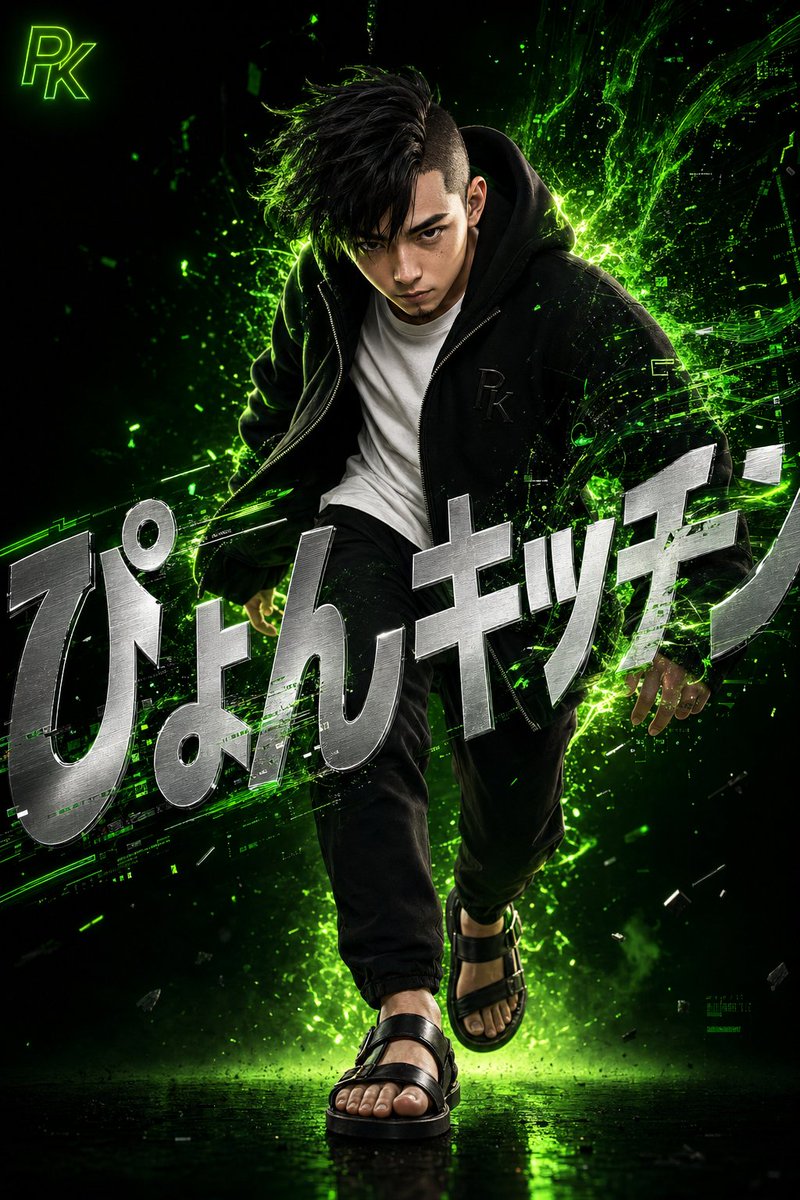
Sürreal Japon Teknoloji Tarzı Poster
Şık bir Japon erkeği, neon yeşil dijital enerji efektleri ve entegre tipografiyle gösteren detaylı bir 3D dijital sanat eseri tasarımı.
Bu Grafik ve Poster için bir GPT Image 2 örnek senaryosudur. Benzer görseller oluşturmak için aşağıdaki hazır metni kullanın ve yeniden kullanmadan önce Awesome GPT Image 2 Prompts atıfını ve ticari kullanım haklarını inceleyin.
Tüm komut istemi setine mi ihtiyacınız var? Şunu kullanın: Grafik ve Poster Daha fazla ilgili örnek için konu merkezini ziyaret edin veya açın. GPT Image 2 istem kataloğu Tam örnek dizin, yeniden kullanılabilir yapılar ve kaynak atfı için.
Free 1K preview
Generate one preview image instantly, no sign-up required.
1407/4000
İpucu
Kopyalamaya hazır istemi
A highly detailed 3D digital artwork in a surreal and dynamic style. Capturing the moment a young Japanese man with black hair in an asymmetrical undercut and a sharp, intensely focused expression steps forward, leaning slightly forward as if quiet confidence and energy are exploding from within. Precise and realistic 3D rendering, depicting skin texture, pores, and individual hairs. He wears a loose black zip-up hoodie with a subtle embossed '{argument name="monogram" default="PK"}' monogram on the chest, over a clean white crew-neck T-shirt. Below are tapered black pants and leather sandals on his feet. Vibrant neon green digital energy and light particles erupt dramatically from behind him, swirling and blending into glitch-like data stream shapes, interacting with his clothes and hair to represent the fusion of technology and humanity. The background is a deep, moody gradient from deep black to glowing neon green, emphasizing a minimal yet striking composition. Large, bold metallic silver text '{argument name="title" default="Pyon Kitchen"}' in a sharp modern sans-serif font is overlaid across the screen, distorted and tilted for design while remaining readable, partially integrated and hidden by the energy effects and the figure to feel like an organic part of the scene. In the upper left corner, place a small '{argument name="logo" default="PK"}' logo mark in glowing neon green.İstem değişkenleri
Komut isteminde bulunan, düzenlenebilir argüman yer tutucuları ve varsayılan değerleri.
Değişken
monogram
Varsayılan
PK
Değişken
title
Varsayılan
Pyon Kitchen
Değişken
logo
Varsayılan
PK
Best for
- - Grafik ve Poster visual exploration
- - Image generation and reference-image edits
- - Reusable briefs that keep source attribution visible
Change these parts
- - Subject, product, character, or scene
- - Aspect ratio, camera, lighting, and background
- - Brand, text, color, and output constraints
Recommended model and settings
- - Model: gpt-image-2
- - Input mode: Metinden görsele
- - Aspect ratio: source
- - Commercial status: review original source
How to use this prompt
- 1. Copy the prompt and preserve its structure for the first test.
- 2. Replace the subject, context, and publishing channel.
- 3. Change one camera, lighting, or style variable per iteration.
- 4. Inspect the output, source, text, and rights before reuse.
Limitations, source, and reuse cautions
- - Generated output is an editable draft, not factual, legal, or rights evidence.
- - Review the linked source, people, brands, logos, text, and third-party media before commercial use.
Awesome GPT Image 2 Prompts kaynağından içe aktarılmıştır. Kaynak belirtilmesi zorunludur. Ticari kullanım durumu allowed şeklindedir; ücretli kullanım öncesinde kaynak haklarını inceleyin.
Bu kategoride daha fazla vaka
Kategoriye, giriş modu uyumluluğuna, kaliteye ve düşük riske göre önceliklendirilmiştir.

Surreal 3D Chess Match Artwork
Metinden görsele

Android Quantum Lab Workstation
Metinden görsele

Grumpy Rhino Storybook Illustration
Metinden görsele

Martial Arts Legend Character Bible Sheet
Metinden görsele

Pink Hijab Mirror Selfie Portrait
Metinden görsele

Manga Desert Radio Telescope Road Trip
Metinden görsele
Yeniden kullanım ve kaynak notları
Vaka önizlemesini yaptıktan sonra bu istemi güvenle kullanın.
- 1.Komut istemini kopyalayın veya oluşturma düğmesini kullanarak doğrudan Dovoo'da açın.
- 2.Değişkenleri, en boy oranını ve referans görselleri kendi kullanım durumunuza göre ayarlayın.
- 3.Yayınlamadan veya ücretli kullanımdan önce, kaynak haklarını, atıf gerekliliklerini ve marka veya benzerlik risklerini doğrulayın.