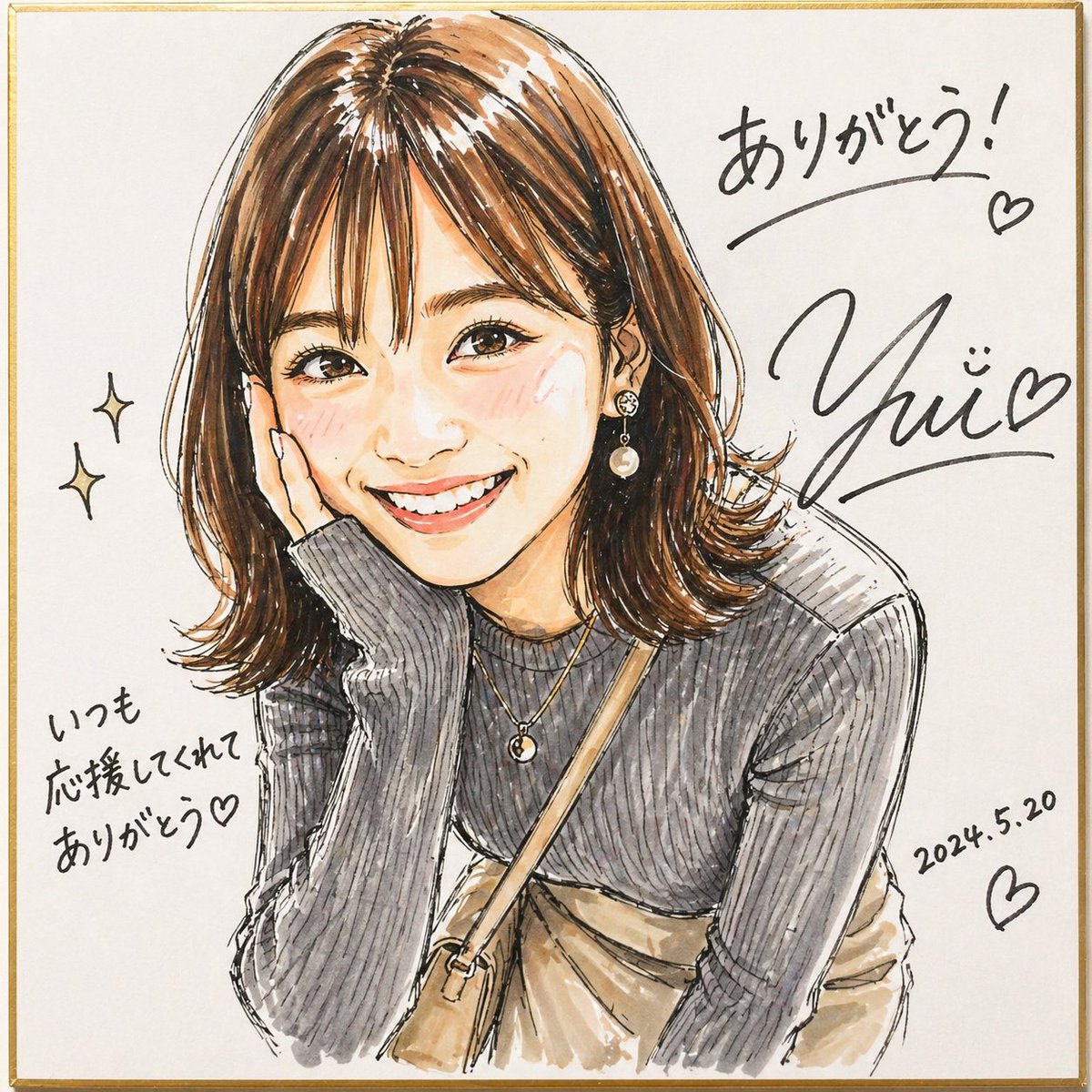
Shikishi üzerine imzalı keçeli portre.
Bu, kare bir shikishi tahtası üzerinde canlı, imzalı, keçeli kalem tarzı bir portre oluşturur; hayran çizimleri, hatıra amaçlı illüstrasyon paylaşımları ve kişiselleştirilmiş teşekkür görselleri için kullanışlıdır.
Bu İllüstrasyon ve Sanat için bir GPT Image 2 örnek senaryosudur. Benzer görseller oluşturmak için aşağıdaki hazır metni kullanın ve yeniden kullanmadan önce Awesome GPT Image 2 Prompts atıfını ve ticari kullanım haklarını inceleyin.
Tüm komut istemi setine mi ihtiyacınız var? Şunu kullanın: İllüstrasyon ve Sanat Daha fazla ilgili örnek için konu merkezini ziyaret edin veya açın. GPT Image 2 istem kataloğu Tam örnek dizin, yeniden kullanılabilir yapılar ve kaynak atfı için.
Free 1K preview
Generate one preview image instantly, no sign-up required.
1710/4000
İpucu
Kopyalamaya hazır istemi
A lively hand-drawn fashion portrait in a changed illustration style, made to look like a signed fan-art sketch drawn with markers on a square white shikishi board with a thin gold border. Show a stylish young woman from about the waist up, leaning slightly forward with one elbow resting up near her face in a casual, friendly pose. Her face area is covered by a simple rectangular censor block in a muted beige tone. She has shoulder-length medium brown hair with warm highlights, soft volume, side-swept bangs, and flipped-out ends. Render the art with expressive black ink outlines, visible marker strokes, watercolor-like blending, sketchy hatching, and an energetic, vivid handmade feel. She wears a fitted dark gray ribbed long-sleeve knit top with subtle puffed shoulders, layered delicate gold necklaces, a dangling pearl earring, a beige crossbody bag strap running diagonally across her chest, and a light beige skirt or dress visible at the waist. Leave plenty of clean white background around the figure. Add 2 small sparkle doodles on the left side. Add handwritten Japanese thank-you messages and signature-style black ink writing around the portrait: at upper right write {argument name="top message" default="ありがとう!"} with an underline and a small heart, beneath it place a large stylized autograph reading {argument name="signature name" default="Yui"} with a smiling face mark and a heart, at lower left write {argument name="side message" default="いつも応援してくれてありがとう♡"}, and at lower right write the date {argument name="date" default="2024.5.20"} with another heart. The overall image should feel warm, personal, lively, and like a celebratory signed illustration on a square autograph board.İstem değişkenleri
Komut isteminde bulunan, düzenlenebilir argüman yer tutucuları ve varsayılan değerleri.
Değişken
top message
Varsayılan
ありがとう!
Değişken
signature name
Varsayılan
Yui
Değişken
side message
Varsayılan
いつも応援してくれてありがとう♡
Değişken
date
Varsayılan
2024.5.20
Best for
- - İllüstrasyon ve Sanat visual exploration
- - Image generation and reference-image edits
- - Reusable briefs that keep source attribution visible
Change these parts
- - Subject, product, character, or scene
- - Aspect ratio, camera, lighting, and background
- - Brand, text, color, and output constraints
Recommended model and settings
- - Model: gpt-image-2
- - Input mode: Metinden görsele
- - Aspect ratio: source
- - Commercial status: review original source
How to use this prompt
- 1. Copy the prompt and preserve its structure for the first test.
- 2. Replace the subject, context, and publishing channel.
- 3. Change one camera, lighting, or style variable per iteration.
- 4. Inspect the output, source, text, and rights before reuse.
Limitations, source, and reuse cautions
- - Generated output is an editable draft, not factual, legal, or rights evidence.
- - Review the linked source, people, brands, logos, text, and third-party media before commercial use.
Awesome GPT Image 2 Prompts kaynağından içe aktarılmıştır. Kaynak belirtilmesi zorunludur. Ticari kullanım durumu allowed şeklindedir; ücretli kullanım öncesinde kaynak haklarını inceleyin.
Bu kategoride daha fazla vaka
Kategoriye, giriş modu uyumluluğuna, kaliteye ve düşük riske göre önceliklendirilmiştir.






Yeniden kullanım ve kaynak notları
Vaka önizlemesini yaptıktan sonra bu istemi güvenle kullanın.
- 1.Komut istemini kopyalayın veya oluşturma düğmesini kullanarak doğrudan Dovoo'da açın.
- 2.Değişkenleri, en boy oranını ve referans görselleri kendi kullanım durumunuza göre ayarlayın.
- 3.Yayınlamadan veya ücretli kullanımdan önce, kaynak haklarını, atıf gerekliliklerini ve marka veya benzerlik risklerini doğrulayın.