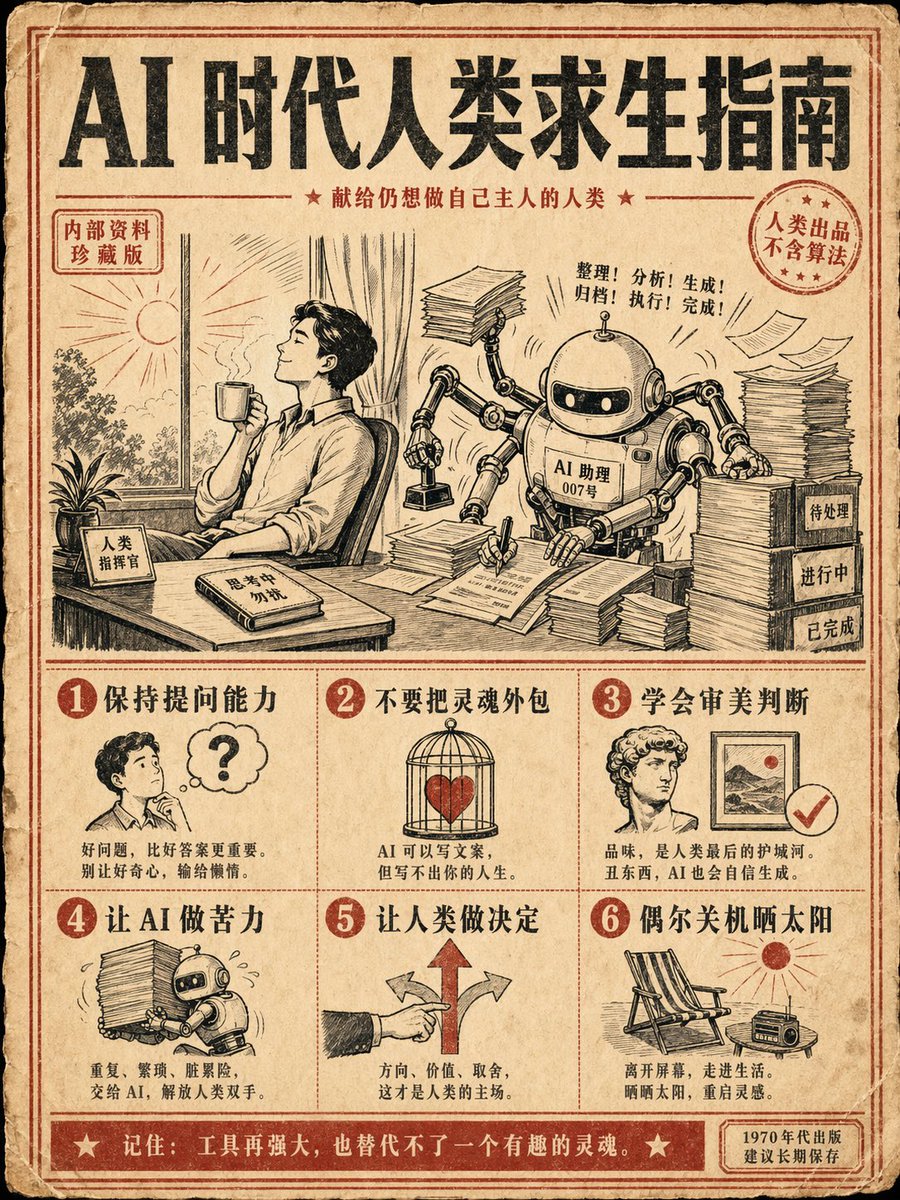
Retro Yapay Zeka Hayatta Kalma Rehberi Posteri
1970'ler tarzında, çok adımlı ve yapay zeka çağında insanlığın hayatta kalmasıyla ilgili Çince metin içeren bir eğitim posteri için bir talimat.
Bu Grafik ve Poster için bir GPT Image 2 örnek senaryosudur. Benzer görseller oluşturmak için aşağıdaki hazır metni kullanın ve yeniden kullanmadan önce Awesome GPT Image 2 Prompts atıfını ve ticari kullanım haklarını inceleyin.
Tüm komut istemi setine mi ihtiyacınız var? Şunu kullanın: Grafik ve Poster Daha fazla ilgili örnek için konu merkezini ziyaret edin veya açın. GPT Image 2 istem kataloğu Tam örnek dizin, yeniden kullanılabilir yapılar ve kaynak atfı için.
Free 1K preview
Generate one preview image instantly, no sign-up required.
1040/4000
İpucu
Kopyalamaya hazır istemi
Generate a 3:4 vertical retro instruction poster with the theme: "{argument name="topic" default="AI Survival Guide for Humans"}". Style: {argument name="style" default="1970s science popularization manual + modern internet memes"}, beige old paper, black and red dual-color printing, coarse grain texture, and retro illustration icons. The screen is divided into 6 steps, each with a small illustration and a clear Chinese title: 1. Maintain questioning ability 2. Do not outsource your soul 3. Learn aesthetic judgment 4. Let AI do the hard labor 5. Let humans make decisions 6. Occasionally shut down and enjoy the sun. {argument name="center illustration" default="Center illustration: a human sitting at a desk with a gentle robot assistant next to them, the robot is frantically processing documents while the human holds a coffee looking at the sunlight outside the window."} Requirements: accurate and readable Chinese text, layout like a real publication, humorous but thoughtful, suitable as a collectible poster for social media.İstem değişkenleri
Komut isteminde bulunan, düzenlenebilir argüman yer tutucuları ve varsayılan değerleri.
Değişken
topic
Varsayılan
AI Survival Guide for Humans
Değişken
style
Varsayılan
1970s science popularization manual + modern internet memes
Değişken
center illustration
Varsayılan
Center illustration: a human sitting at a desk with a gentle robot assistant next to them, the robot is frantically processing documents while the human holds a coffee looking at the sunlight outside the window.
Best for
- - Grafik ve Poster visual exploration
- - Image generation and reference-image edits
- - Reusable briefs that keep source attribution visible
Change these parts
- - Subject, product, character, or scene
- - Aspect ratio, camera, lighting, and background
- - Brand, text, color, and output constraints
Recommended model and settings
- - Model: gpt-image-2
- - Input mode: Metinden görsele
- - Aspect ratio: source
- - Commercial status: review original source
How to use this prompt
- 1. Copy the prompt and preserve its structure for the first test.
- 2. Replace the subject, context, and publishing channel.
- 3. Change one camera, lighting, or style variable per iteration.
- 4. Inspect the output, source, text, and rights before reuse.
Limitations, source, and reuse cautions
- - Generated output is an editable draft, not factual, legal, or rights evidence.
- - Review the linked source, people, brands, logos, text, and third-party media before commercial use.
Awesome GPT Image 2 Prompts kaynağından içe aktarılmıştır. Kaynak belirtilmesi zorunludur. Ticari kullanım durumu allowed şeklindedir; ücretli kullanım öncesinde kaynak haklarını inceleyin.
Bu kategoride daha fazla vaka
Kategoriye, giriş modu uyumluluğuna, kaliteye ve düşük riske göre önceliklendirilmiştir.

Grumpy Rhino Storybook Illustration
Metinden görsele

Martial Arts Legend Character Bible Sheet
Metinden görsele

Manga Desert Radio Telescope Road Trip
Metinden görsele

Android Quantum Lab Workstation
Metinden görsele

Surreal 3D Chess Match Artwork
Metinden görsele

Pink Hijab Mirror Selfie Portrait
Metinden görsele
Yeniden kullanım ve kaynak notları
Vaka önizlemesini yaptıktan sonra bu istemi güvenle kullanın.
- 1.Komut istemini kopyalayın veya oluşturma düğmesini kullanarak doğrudan Dovoo'da açın.
- 2.Değişkenleri, en boy oranını ve referans görselleri kendi kullanım durumunuza göre ayarlayın.
- 3.Yayınlamadan veya ücretli kullanımdan önce, kaynak haklarını, atıf gerekliliklerini ve marka veya benzerlik risklerini doğrulayın.