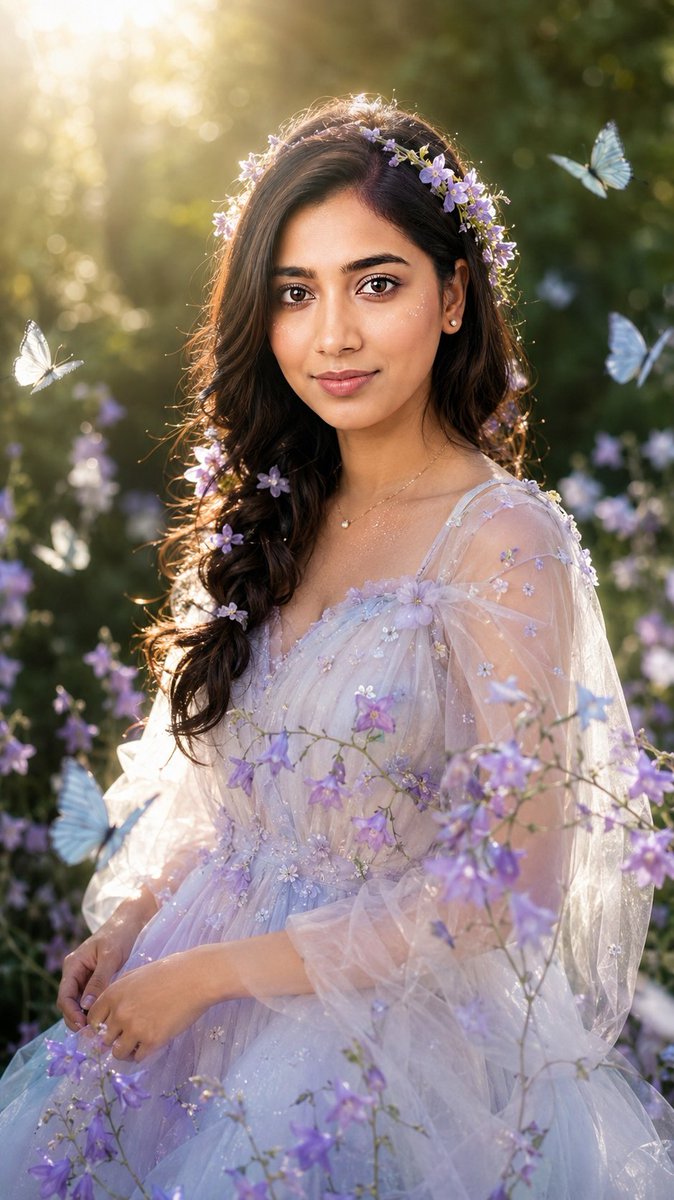
Gerçekçi Bahçe Perisi Editöryel Portresi
Referans fotoğrafın özgün kimliğini ve yüz yapısını koruyarak, rüya gibi, uhrevi bir bahçe perisi portresi oluşturmak için ayrıntılı bir talimat seti.
Bu Portre ve Karakter için bir GPT Image 2 örnek senaryosudur. Benzer görseller oluşturmak için aşağıdaki hazır metni kullanın ve yeniden kullanmadan önce Awesome GPT Image 2 Prompts atıfını ve ticari kullanım haklarını inceleyin.
Tüm komut istemi setine mi ihtiyacınız var? Şunu kullanın: Portre ve Karakter Daha fazla ilgili örnek için konu merkezini ziyaret edin veya açın. GPT Image 2 istem kataloğu Tam örnek dizin, yeniden kullanılabilir yapılar ve kaynak atfı için.
Free 1K preview
Generate one preview image instantly, no sign-up required.
Free text preview doesn’t preserve reference-image consistency.
3891/4000
İpucu
Kopyalamaya hazır istemi
Use only my uploaded portrait photo as the identity reference. Accurately preserve my real face shape, facial proportions, facial contours, skin tone, hairstyle outline, hair volume, hairline, and overall natural presence. Do not turn me into another person. Do not over-beautify the face. Do not create an influencer-style face, plastic skin, or anime look. Generate a realistic garden fairy-style portrait in a vertical composition, framed from half-body to three-quarter body. The subject is placed in a summer forest garden, with deep green leaves, softly blurred flowers, natural dappled sunlight, and creamy bokeh in the background. The atmosphere should feel dreamy, clean, ethereal, and fairy-like, but still realistic, like an outdoor editorial photoshoot rather than a 2D illustration. The subject wears a light, dreamy, pale-colored gauze dress with soft lavender, silver-white, and pale blue gradient tones. The material should look transparent, airy, elegant, and refined, without being vulgar or overly revealing. The outfit is decorated with small purple flowers, subtle glitter, and soft tulle. The overall styling should resemble a garden fairy or flower spirit. The dress can be naturally adjusted according to the temperament of my uploaded portrait, but it must keep a clean, beautiful, ethereal garden-fairy aesthetic. Use my uploaded portrait as the reference for the hairstyle and real hair volume. Based on that, create a natural loose braid or soft half-up hairstyle. Add small loose hair strands around the edges to make the hair feel realistic and natural. Decorate the hair with light purple flowers, forming a soft floral crown effect. Do not make it look like an exaggerated wig. Keep the face realistic with natural skin texture, visible pores, slight natural shine, and real facial details. The makeup should be clean and soft. The eyes should look gentle, and the lips should have a natural moist texture. Add a small amount of delicate starlight-like glitter on the cheeks and collarbone, but do not overdo it. Add several pale blue and white butterflies flying naturally around the subject. Place them in the foreground and background without covering the facial features. Add purple bellflowers or similar small flower branches passing naturally across the chest and shoulders in the foreground to create depth. The background should be softly blurred deep green foliage. The subject should be surrounded by soft backlight. Sunlight should come from the upper left or from behind, passing through the leaves and creating a golden rim light, natural hair highlights, slight lens flare, and soft highlights. The lighting must be realistic and unified across the person, flowers, butterflies, and background. Nothing should look pasted or composited. High-quality realistic portrait photography, 85mm portrait lens, shallow depth of field, soft natural backlight, cinematic garden atmosphere, realistic skin texture, delicate bokeh, high detail, elegant fantasy editorial portrait, dreamy but photorealistic. Vertical 9:16 aspect ratio, high-resolution details, no text, no watermark, no logo. Negative Prompt: No watermark, no text, no logo, no “Doubao AI generated” text, no anime, no 2D illustration, no AI plastic skin, no over-smoothed skin, no fake face, no influencer face, no distorted facial features, do not change the person’s identity, no Westernized face, no excessive beauty filter, no exaggerated big eyes, no overly heavy false eyelashes, no vulgar or overly revealing outfit, no cheap cosplay feeling, no hard cutout edges, no pasted collage look, no inconsistent lighting between face and body, no butterflies covering the face, no flowers covering facial features, no deformed fingers, no incorrect body proportions, no fake-looking background, no oil painting style, no cartoon style, no glass skin, no overexposure, no messy composition.
Best for
- - Portre ve Karakter visual exploration
- - Image generation and reference-image edits
- - Reusable briefs that keep source attribution visible
Change these parts
- - Subject, product, character, or scene
- - Aspect ratio, camera, lighting, and background
- - Brand, text, color, and output constraints
Recommended model and settings
- - Model: gpt-image-2
- - Input mode: Görselden görsele
- - Aspect ratio: source
- - Commercial status: review original source
How to use this prompt
- 1. Copy the prompt and preserve its structure for the first test.
- 2. Replace the subject, context, and publishing channel.
- 3. Change one camera, lighting, or style variable per iteration.
- 4. Inspect the output, source, text, and rights before reuse.
Limitations, source, and reuse cautions
- - Generated output is an editable draft, not factual, legal, or rights evidence.
- - Review the linked source, people, brands, logos, text, and third-party media before commercial use.
Awesome GPT Image 2 Prompts kaynağından içe aktarılmıştır. Kaynak belirtilmesi zorunludur. Ticari kullanım durumu allowed şeklindedir; ücretli kullanım öncesinde kaynak haklarını inceleyin.
Bu kategoride daha fazla vaka
Kategoriye, giriş modu uyumluluğuna, kaliteye ve düşük riske göre önceliklendirilmiştir.

Sci-Fi Cyan Lighting Effect
Görselden görsele

Stylish Man Street Lamp Portrait
Görselden görsele

GPT Image 2 Real-Life Character Street Snap
Metinden görsele

Oversized Head Cartoon Caricature Prompt
Görselden görseleOrta risk

Street Selfie with Cat in Matching Cap
Metinden görsele

Cinematic Blue Backlit Portrait
Metinden görsele
Yeniden kullanım ve kaynak notları
Vaka önizlemesini yaptıktan sonra bu istemi güvenle kullanın.
- 1.Komut istemini kopyalayın veya oluşturma düğmesini kullanarak doğrudan Dovoo'da açın.
- 2.Değişkenleri, en boy oranını ve referans görselleri kendi kullanım durumunuza göre ayarlayın.
- 3.Yayınlamadan veya ücretli kullanımdan önce, kaynak haklarını, atıf gerekliliklerini ve marka veya benzerlik risklerini doğrulayın.