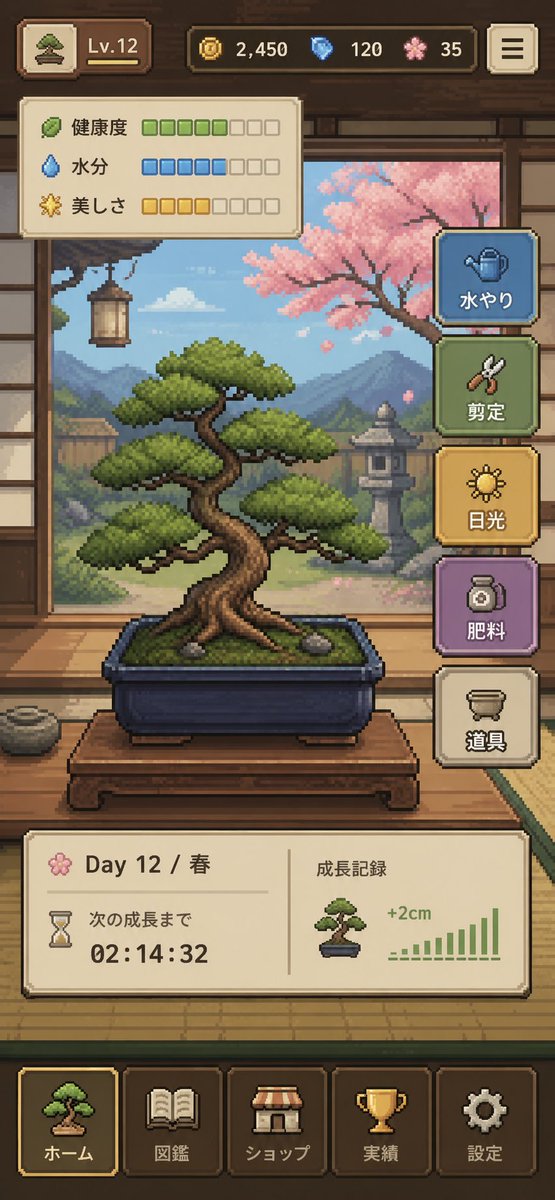
Piksel Sanatı Bonsai Oyunu Arayüzü
Şık bir dikey mobil oyun arayüzü; piksel sanatıyla tasarlanmış, samimi bir bonsai bakım simülatörünü gösteriyor. Kullanıcı arayüzü konseptleri, bağımsız oyun taslakları ve uygulama mağazası sunum görselleri için ideal.
Bu Anime ve Oyun için bir GPT Image 2 örnek senaryosudur. Benzer görseller oluşturmak için aşağıdaki hazır metni kullanın ve yeniden kullanmadan önce Awesome GPT Image 2 Prompts atıfını ve ticari kullanım haklarını inceleyin.
Tüm komut istemi setine mi ihtiyacınız var? Şunu kullanın: Anime ve Oyun Daha fazla ilgili örnek için konu merkezini ziyaret edin veya açın. GPT Image 2 istem kataloğu Tam örnek dizin, yeniden kullanılabilir yapılar ve kaynak atfı için.
Free 1K preview
Generate one preview image instantly, no sign-up required.
4000/4000
İpucu
Kopyalamaya hazır istemi
{
  "type": "pixel art mobile game UI mockup",
  "theme": "cozy Japanese bonsai cultivation simulator",
  "style": {
    "rendering": "detailed 2D pixel art, polished retro game aesthetic, crisp sprites, warm lighting, soft atmospheric background",
    "aspect_ratio": "9:16 portrait",
    "camera": "straight-on view of a traditional Japanese room interior framing the bonsai in the center"
  },
  "subject": {
    "main_object": "bonsai tree in a rectangular dark blue ceramic pot",
    "bonsai": {
      "species_look": "pine-like bonsai with layered rounded foliage pads",
      "trunk": "thick twisted brown trunk with exposed roots",
      "placement": "on a low wooden display table",
      "soil": "mossy green surface with 2 small visible stones"
    }
  },
  "environment": {
    "setting": "traditional Japanese tatami room with open shoji view to a garden",
    "background_elements": [
      "wooden beams and wall trim",
      "hanging lantern on the left",
      "mountains in the distance",
      "stone lantern in the garden",
      "pink cherry blossom tree on the right",
      "soft blue sky with clouds"
    ],
    "mood": "calm, handcrafted, meditative"
  },
  "ui": {
    "top_bar": {
      "count": 5,
      "elements": [
        "small bonsai icon button at top left",
        "level badge showing \"Lv.12\"",
        "coin counter showing \"2,450\"",
        "blue gem counter showing \"120\"",
        "pink blossom currency counter showing \"35\""
      ],
      "top_right": "menu button with 3 horizontal lines"
    },
    "status_panel": {
      "position": "upper left below top bar",
      "count": 3,
      "rows": [
        {
          "label": "Health",
          "icon": "leaf",
          "filled": 5,
          "total": 8,
          "color": "green"
        },
        {
          "label": "Moisture",
          "icon": "water droplet",
          "filled": 5,
          "total": 8,
          "color": "blue"
        },
        {
          "label": "美しさ",
          "icon": "sparkle flower",
          "filled": 4,
          "total": 8,
          "color": "gold"
        }
      ]
    },
    "action_buttons": {
      "position": "right side vertical stack",
      "count": 5,
      "buttons": [
        {
          "label": "水やり",
          "icon": "watering can",
          "color": "blue"
        },
        {
          "label": "Pruning",
          "icon": "shears",
          "color": "green"
        },
        {
          "label": "Light",
          "icon": "sun",
          "color": "gold"
        },
        {
          "label": "Fertilizing",
          "icon": "fertilizer jar",
          "color": "purple"
        },
        {
          "label": "Tools",
          "icon": "pot or tools container",
          "color": "cream"
        }
      ]
    },
    "info_panel": {
      "position": "lower middle above navigation",
      "count": 2,
      "sections": [
        {
          "label": "Day 12 / Spring",
          "subitems": [
            "flower icon",
            "hourglass icon",
            "text \"次の成長まで\"",
            "countdown timer \"02:14:32\""
          ]
        },
        {
          "label": "Growth Record",
          "subitems": [
            "small bonsai thumbnail",
            "text \"+2cm\"",
            "green bar chart with 10 ascending bars"
          ]
        }
      ]
    },
    "bottom_navigation": {
      "position": "bottom",
      "count": 5,
      "tabs": [
        "ホーム",
        "Pokedex",
        "ショップ",
        "Achievements",
        "Settings"
      ],
      "icons": [
        "bonsai",
        "book",
        "shop awning",
        "trophy",
        "gear"
      ],
      "active_tab": "ホーム"
    }
  },
  "composition": "central bonsai hero object, UI panels framing the scene without covering the tree, game-ready mockup that looks like a screenshot from a finished mobile app",
  "color_palette": {
    "dominant": [
      "warm wood brown",
      "tatami beige",
      "moss green",
      "sky blue",
      "cherry blossom pink",
      "muted gold"
    ],
    "accent_buttons": [
      "dusty blue",
      "sage green",
      "mustard gold",
      "soft purple",
      "cream"
    ]
  },
  "quality": "clean, legible interface, professional indie game prototype, charming and highly cohesive"
}
Best for
- - Anime ve Oyun visual exploration
- - Image generation and reference-image edits
- - Reusable briefs that keep source attribution visible
Change these parts
- - Subject, product, character, or scene
- - Aspect ratio, camera, lighting, and background
- - Brand, text, color, and output constraints
Recommended model and settings
- - Model: gpt-image-2
- - Input mode: Metinden görsele
- - Aspect ratio: source
- - Commercial status: review original source
How to use this prompt
- 1. Copy the prompt and preserve its structure for the first test.
- 2. Replace the subject, context, and publishing channel.
- 3. Change one camera, lighting, or style variable per iteration.
- 4. Inspect the output, source, text, and rights before reuse.
Limitations, source, and reuse cautions
- - Generated output is an editable draft, not factual, legal, or rights evidence.
- - Review the linked source, people, brands, logos, text, and third-party media before commercial use.
Awesome GPT Image 2 Prompts kaynağından içe aktarılmıştır. Kaynak belirtilmesi zorunludur. Ticari kullanım durumu allowed şeklindedir; ücretli kullanım öncesinde kaynak haklarını inceleyin.
Bu kategoride daha fazla vaka
Kategoriye, giriş modu uyumluluğuna, kaliteye ve düşük riske göre önceliklendirilmiştir.

Manga Desert Radio Telescope Road Trip
Metinden görsele

Grumpy Rhino Storybook Illustration
Metinden görsele

Female Clown Cyborg Portrait
Metinden görsele

Imperial Research Bunker on Volcanic Planet
Metinden görsele

Surreal 3D Chess Match Artwork
Metinden görsele

Pink Hijab Mirror Selfie Portrait
Metinden görsele
Yeniden kullanım ve kaynak notları
Vaka önizlemesini yaptıktan sonra bu istemi güvenle kullanın.
- 1.Komut istemini kopyalayın veya oluşturma düğmesini kullanarak doğrudan Dovoo'da açın.
- 2.Değişkenleri, en boy oranını ve referans görselleri kendi kullanım durumunuza göre ayarlayın.
- 3.Yayınlamadan veya ücretli kullanımdan önce, kaynak haklarını, atıf gerekliliklerini ve marka veya benzerlik risklerini doğrulayın.