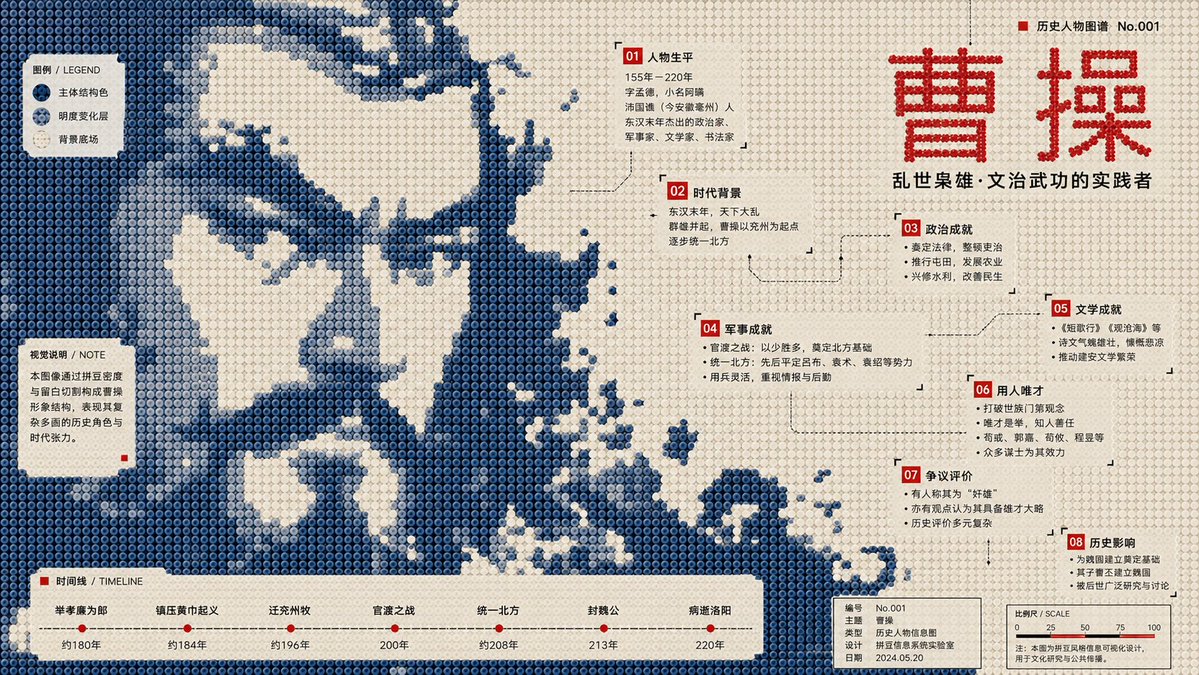
Perler Bead Pixel Infographic Poster
An incredibly comprehensive structural prompt for generating museum-style infographic posters using a Perler bead/pixel art aesthetic, focusing on layout, color layers, and data nodes.
Bu Grafik ve Poster için bir GPT Image 2 örnek senaryosudur. Benzer görseller oluşturmak için aşağıdaki hazır metni kullanın ve yeniden kullanmadan önce Awesome GPT Image 2 Prompts atıfını ve ticari kullanım haklarını inceleyin.
Tüm komut istemi setine mi ihtiyacınız var? Şunu kullanın: Grafik ve Poster Daha fazla ilgili örnek için konu merkezini ziyaret edin veya açın. GPT Image 2 istem kataloğu Tam örnek dizin, yeniden kullanılabilir yapılar ve kaynak atfı için.
Free 1K preview
Generate one preview image instantly, no sign-up required.
Free text preview doesn’t preserve reference-image consistency.
3422/4000
İpucu
Kopyalamaya hazır istemi
Generate a 16:9 horizontal infographic poster.

Subject: {argument name="subject" default="Pan Jinlian"}

Required Knowledge Points:
[Point 1] through [Point 8]

Visual Style Definition:
This is a structural flat infographic poster in the style of "Perler beads / fuse beads / pixel bead array." The image is composed of a large number of regularly arranged circular plastic beads, each with clear circular boundaries, a slight center indentation, uniform spacing, low-saturation plastic texture, and a stable grid order. The overall composition must maintain a front-view flat layout, resembling a public cultural infographic poster made of beads, rather than toy photography, 3D models, cartoon illustrations, or ordinary pixel art.

Core Composition:
Compress the subject into a large-scale monochromatic bead image field. The subject must surge in from the edges of the frame, crossing page boundaries and being cropped as if a larger bead media image fragment is entering the page. The subject occupies the main visual weight but is not fully presented; viewers must reconstruct the theme through silhouette, direction, missing areas, bead density, and local texture.

Subject Morphology:
The outer edges of the subject exhibit low-resolution bead steps, block fractures, hard-cut gaps, pixelated jagged outlines, missing bead cross-sections, and rough boundaries after sampling. Forbid smooth silhouettes, complete icon outlines, or realistic details. Use only different brightness levels of the same subject structural color within the body to form low-contrast image fragments, halftone noise, scan grains, material afterimages, archival textures, and local density variations.

Background and Negative Space:
The background uses a high-brightness light-colored bead field, close to unprinted paper, light creamy white plastic board, or pale grey-white bead arrays. The background is not a decorative base color but actively cuts back into the subject, forming large voids, winding channels, quiet text windows, reading pause areas, and knowledge point containers. White space must provide a sense of breath while cutting the subject's structure.

Color System:
Adopt a strict three-layer functional color scheme:
1. Light Background Field (60%–70%): Colors like old paper white, light beige, or cold grey-white for breathing and text windows.
2. Subject Structural Color (25%–35%): Defines the subject and mood. Choose based on the subject (e.g., deep blue/dark green for cold themes; ocher red/burnt orange for warm themes).
3. High-Contrast Information Color (3%–6%): Sharp colors like red, black, or bright blue for titles, numbering, and key annotations.

Infographic System:
Transform knowledge points 1 to 8 into bead information nodes (numbered labels, annotation boxes, legend blocks, coordinate lines, etc.). Nodes should be scattered along white space windows, color field boundaries, and subject gaps. Ensure a clear hierarchy of text sizes.

Typography:
Use narrow modern sans-serif fonts or monospace metadata fonts. Text must be arranged in white space windows and bottom information bars, never pressing against the center of the subject.

Bead Material:
All visual elements are made of beads. Surfaces have a matte plastic texture with slight manufacturing irregularities, faint grains, and minor wear. Structural color areas can show halftone-style density changes and a specialty overprint feel.
İstem değişkenleri
Komut isteminde bulunan, düzenlenebilir argüman yer tutucuları ve varsayılan değerleri.
Değişken
subject
Varsayılan
Pan Jinlian
Best for
- - Grafik ve Poster visual exploration
- - Image generation and reference-image edits
- - Reusable briefs that keep source attribution visible
Change these parts
- - Subject, product, character, or scene
- - Aspect ratio, camera, lighting, and background
- - Brand, text, color, and output constraints
Recommended model and settings
- - Model: gpt-image-2
- - Input mode: Görselden görsele
- - Aspect ratio: source
- - Commercial status: review original source
How to use this prompt
- 1. Copy the prompt and preserve its structure for the first test.
- 2. Replace the subject, context, and publishing channel.
- 3. Change one camera, lighting, or style variable per iteration.
- 4. Inspect the output, source, text, and rights before reuse.
Limitations, source, and reuse cautions
- - Generated output is an editable draft, not factual, legal, or rights evidence.
- - Review the linked source, people, brands, logos, text, and third-party media before commercial use.
Awesome GPT Image 2 Prompts kaynağından içe aktarılmıştır. Kaynak belirtilmesi zorunludur. Ticari kullanım durumu allowed şeklindedir; ücretli kullanım öncesinde kaynak haklarını inceleyin.
Bu kategoride daha fazla vaka
Kategoriye, giriş modu uyumluluğuna, kaliteye ve düşük riske göre önceliklendirilmiştir.

Sci-Fi Cyan Lighting Effect
Görselden görsele

Stylish Man Street Lamp Portrait
Görselden görsele

Oversized Head Cartoon Caricature Prompt
Görselden görseleOrta risk

Boisterous Shrimpers Entering Pub
Metinden görsele

Cute Focus Desk Flat Lay and Kawaii Illustration
Metinden görsele

Cute Speech Bubble Mascot Profile Icon
Metinden görsele
Yeniden kullanım ve kaynak notları
Vaka önizlemesini yaptıktan sonra bu istemi güvenle kullanın.
- 1.Komut istemini kopyalayın veya oluşturma düğmesini kullanarak doğrudan Dovoo'da açın.
- 2.Değişkenleri, en boy oranını ve referans görselleri kendi kullanım durumunuza göre ayarlayın.
- 3.Yayınlamadan veya ücretli kullanımdan önce, kaynak haklarını, atıf gerekliliklerini ve marka veya benzerlik risklerini doğrulayın.