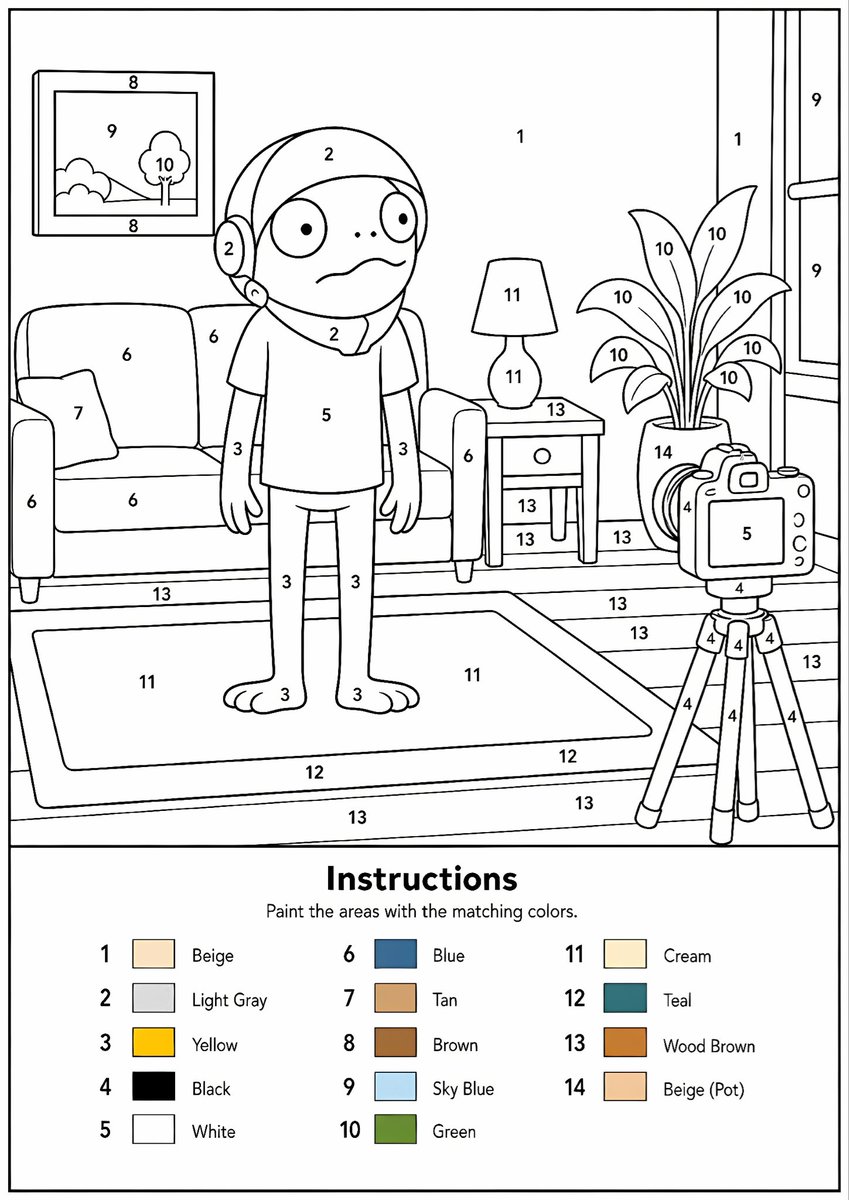
Sayılarla Boyama Salon Çalışma Sayfası
Numaralandırılmış çizgi film tarzı bir oturma odası sahnesi ve 14 renk açıklaması içeren, yazdırılabilir A4 boyutunda bir numaralandırmalı boyama çalışma sayfası oluşturur.
Bu İllüstrasyon ve Sanat için bir GPT Image 2 örnek senaryosudur. Benzer görseller oluşturmak için aşağıdaki hazır metni kullanın ve yeniden kullanmadan önce Awesome GPT Image 2 Prompts atıfını ve ticari kullanım haklarını inceleyin.
Tüm komut istemi setine mi ihtiyacınız var? Şunu kullanın: İllüstrasyon ve Sanat Daha fazla ilgili örnek için konu merkezini ziyaret edin veya açın. GPT Image 2 istem kataloğu Tam örnek dizin, yeniden kullanılabilir yapılar ve kaynak atfı için.
Free 1K preview
Generate one preview image instantly, no sign-up required.
3239/4000
İpucu
Kopyalamaya hazır istemi
Goal: Create a printable paint-by-numbers worksheet showing a cartoon living room scene with a child-like character standing in the center, designed as clean black-and-white line art with numbered regions and a color legend.

Canvas: A4 portrait page at 300 DPI, white background, thin black outer border, crisp vector-like outlines, no shading except the tiny color swatches in the legend. The main illustration fills the upper roughly 70% of the page, and the instruction/color-key panel fills the bottom roughly 30%.

Main illustration layout: Draw a cozy living room in simple rounded cartoon style. Center: one standing cartoon character with large round eyes, small dot nose, worried wavy mouth, hood or helmet-like hair/head covering, short-sleeve shirt, slim arms, long pants, and bare feet. Left: one sofa with two seat/back cushions, one armrest visible on each side, and one small throw pillow. Above the sofa: one framed wall picture containing a small landscape with hills, sky, and one tree. Right of the character: one side table with a lamp on top and one drawer; behind/right is one tall potted plant with exactly 10 visible leaves. Far right: one camera on a tripod aimed at the character, with a screen/body, lens/buttons, and exactly three tripod legs. Background includes a wall, a large window on the right with vertical panes, a floor with wood plank lines, and a large rectangular rug in the foreground.

Numbered paint areas: Place black numbers inside the line-art regions throughout the scene, using numbers 1 through 14. Use many repeated numbers on matching surfaces. Keep the numbers legible and centered in their shapes. Match the apparent assignments: 1 for beige wall areas, 2 for light gray head/hood areas, 3 for yellow skin/limbs, 4 for black camera/tripod details, 5 for white shirt and camera screen, 6 for blue sofa, 7 for tan pillow, 8 for brown picture frame, 9 for sky blue window/picture sky, 10 for green plant/tree leaves, 11 for cream lamp/rug interior, 12 for teal rug border, 13 for wood-brown floor/table/plank areas, and 14 for beige plant pot.

Bottom instruction panel: Add a horizontal divider line above the legend. Center a bold title reading {argument name="instruction title" default="Instructions"}. Under it, add smaller text reading {argument name="instruction subtitle" default="Paint the areas with the matching colors."}. Below, arrange exactly 14 color legend entries in three neat columns. Each entry has a number, a small filled color square, and an English color label. The 14 entries must be: 1 Beige, 2 Light Gray, 3 Yellow, 4 Black, 5 White, 6 Blue, 7 Tan, 8 Brown, 9 Sky Blue, 10 Green, 11 Cream, 12 Teal, 13 Wood Brown, 14 Beige (Pot).

Style constraints: Make it look like a polished printable worksheet for children, with smooth uniform black outlines, rounded friendly shapes, lots of enclosed regions suitable for coloring, no gradients, no realistic textures, no extra text, no watermark. Subject can be customized as {argument name="central character" default="a worried cartoon child-like figure"}, setting as {argument name="room setting" default="cozy living room"}, and palette as {argument name="color palette" default="14-color paint-by-numbers palette"}.
İstem değişkenleri
Komut isteminde bulunan, düzenlenebilir argüman yer tutucuları ve varsayılan değerleri.
Değişken
instruction title
Varsayılan
Instructions
Değişken
instruction subtitle
Varsayılan
Paint the areas with the matching colors.
Değişken
central character
Varsayılan
a worried cartoon child-like figure
Değişken
room setting
Varsayılan
cozy living room
Değişken
color palette
Varsayılan
14-color paint-by-numbers palette
Best for
- - İllüstrasyon ve Sanat visual exploration
- - Image generation and reference-image edits
- - Reusable briefs that keep source attribution visible
Change these parts
- - Subject, product, character, or scene
- - Aspect ratio, camera, lighting, and background
- - Brand, text, color, and output constraints
Recommended model and settings
- - Model: gpt-image-2
- - Input mode: Metinden görsele
- - Aspect ratio: source
- - Commercial status: review original source
How to use this prompt
- 1. Copy the prompt and preserve its structure for the first test.
- 2. Replace the subject, context, and publishing channel.
- 3. Change one camera, lighting, or style variable per iteration.
- 4. Inspect the output, source, text, and rights before reuse.
Limitations, source, and reuse cautions
- - Generated output is an editable draft, not factual, legal, or rights evidence.
- - Review the linked source, people, brands, logos, text, and third-party media before commercial use.
Awesome GPT Image 2 Prompts kaynağından içe aktarılmıştır. Kaynak belirtilmesi zorunludur. Ticari kullanım durumu allowed şeklindedir; ücretli kullanım öncesinde kaynak haklarını inceleyin.
Bu kategoride daha fazla vaka
Kategoriye, giriş modu uyumluluğuna, kaliteye ve düşük riske göre önceliklendirilmiştir.

Grumpy Rhino Storybook Illustration
Metinden görsele

Surreal 3D Chess Match Artwork
Metinden görsele

Martial Arts Legend Character Bible Sheet
Metinden görsele

Pink Hijab Mirror Selfie Portrait
Metinden görsele

Y2K Style Photo Booth Collage
Metinden görsele

Transparent Earbuds on Stone Pedestal
Metinden görsele
Yeniden kullanım ve kaynak notları
Vaka önizlemesini yaptıktan sonra bu istemi güvenle kullanın.
- 1.Komut istemini kopyalayın veya oluşturma düğmesini kullanarak doğrudan Dovoo'da açın.
- 2.Değişkenleri, en boy oranını ve referans görselleri kendi kullanım durumunuza göre ayarlayın.
- 3.Yayınlamadan veya ücretli kullanımdan önce, kaynak haklarını, atıf gerekliliklerini ve marka veya benzerlik risklerini doğrulayın.