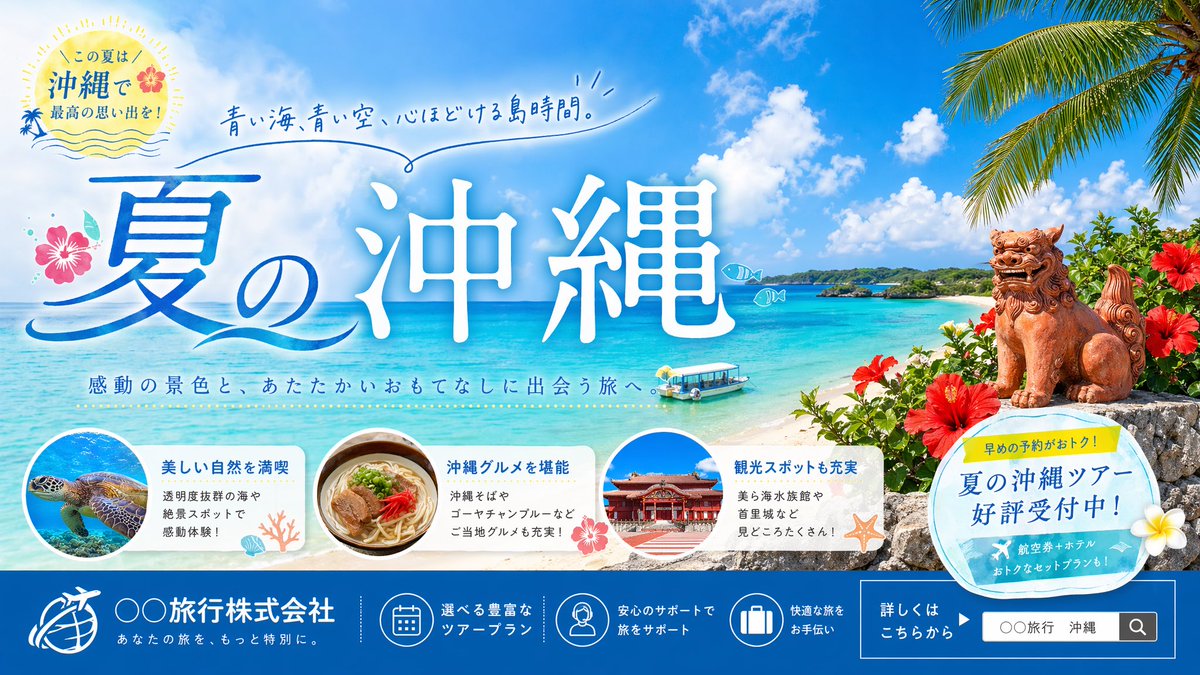
Okinawa Yaz Seyahat Afişi
Okinawa için tasarlanmış, yaz turu reklamları, web sitesi ana görselleri ve kampanya pazarlaması için uygun, parlak renkli bir Japon seyahat acentesi tanıtım afişi.
Bu Ürün ve Ticari için bir GPT Image 2 örnek senaryosudur. Benzer görseller oluşturmak için aşağıdaki hazır metni kullanın ve yeniden kullanmadan önce Awesome GPT Image 2 Prompts atıfını ve ticari kullanım haklarını inceleyin.
Tüm komut istemi setine mi ihtiyacınız var? Şunu kullanın: Ürün ve Ticari Daha fazla ilgili örnek için konu merkezini ziyaret edin veya açın. GPT Image 2 istem kataloğu Tam örnek dizin, yeniden kullanılabilir yapılar ve kaynak atfı için.
Free 1K preview
Generate one preview image instantly, no sign-up required.
3306/4000
İpucu
Kopyalamaya hazır istemi
Create a polished Japanese travel agency summer banner ad for Okinawa in a bright, inviting commercial style. Use a wide horizontal layout with a vivid tropical beach scene as the full background: crystal-clear turquoise ocean, white sand shoreline, small green island in the mid distance, deep blue sky with large fluffy white clouds, and palm leaves hanging in from the upper right corner. On the right foreground, place 1 traditional Okinawan shisa lion-dog statue sitting on a stone wall, surrounded by red hibiscus flowers and lush tropical greenery. Near the water, include 1 small glass-bottom sightseeing boat floating close to shore. Add 2 small simple fish doodle icons over the sea.

Make the typography the hero element. Across the left-center to center, place very large Japanese calligraphic headline text reading {argument name="headline text" default="夏の沖縄"}, with a blue gradient and white glow or soft outline, highly legible and elegant. Above it, add a handwritten-style Japanese catchphrase in blue reading {argument name="catchphrase" default="青い海、青い空、心ほどける島時間。"} with a loose underline flourish. Under the main headline, add a smaller Japanese subheading reading {argument name="subheading" default="感動の景色と、あたたかいおもてなしに出会う旅へ。"}.

In the upper left, add a circular summer badge with a sunburst feel, soft cream background, tiny wave lines, a small hibiscus accent, and Japanese text reading "この夏は 沖縄で 最高の思い出を!". Decorate the headline area with 1 pink hibiscus flower on the left and subtle ocean-wave graphic strokes.

Along the lower middle, place 3 rounded white feature cards in a row, partially overlapping the beach scene. Count and depict all 3 cards clearly: the first card shows a sea turtle swimming underwater in a circular photo, with Japanese heading "美しい自然を満喫" and smaller body text about transparent waters and scenic spots; the second card shows a bowl of Okinawa soba in a circular photo, with heading "沖縄グルメを堪能" and smaller body text mentioning 沖縄そば and ゴーヤチャンプルー; the third card shows Shuri Castle in a circular photo, with heading "観光スポットも充実" and smaller body text mentioning 美ら海水族館 and 首里城. Add small coral, shell, hibiscus, and starfish decorations around these cards.

On the right lower-middle, overlap the beach with 1 tilted circular promotional sticker in pale blue and cream, with a small yellow tab on top. The yellow tab says "早めの予約がおトク!" and the main circle says "夏の沖縄ツアー 好評受付中!". Add a white plumeria flower accent near the sticker.

Create a full-width dark blue footer bar across the bottom. On the left side of the footer, place a white travel company logo icon and company name text {argument name="company name" default="〇〇 Travel Co., Ltd."}, with a smaller Japanese tagline below. Across the center of the footer, place exactly 3 circular line-icons with short Japanese captions: 1 calendar icon for tour plans, 1 support staff icon for travel assistance, and 1 suitcase icon for comfortable travel help. On the right side of the footer, add a boxed CTA area with Japanese text "詳しくはこちらから" and a mock search field containing {argument name="search text" default="〇〇 Travel Okinawa"} plus a search icon. Overall design should feel premium, cheerful, summery, and highly marketable, like a professional Japanese web banner or travel campaign visual.
İstem değişkenleri
Komut isteminde bulunan, düzenlenebilir argüman yer tutucuları ve varsayılan değerleri.
Değişken
headline text
Varsayılan
夏の沖縄
Değişken
catchphrase
Varsayılan
青い海、青い空、心ほどける島時間。
Değişken
subheading
Varsayılan
感動の景色と、あたたかいおもてなしに出会う旅へ。
Değişken
company name
Varsayılan
〇〇 Travel Co., Ltd.
Değişken
search text
Varsayılan
〇〇 Travel Okinawa
Best for
- - Ürün ve Ticari visual exploration
- - Image generation and reference-image edits
- - Reusable briefs that keep source attribution visible
Change these parts
- - Subject, product, character, or scene
- - Aspect ratio, camera, lighting, and background
- - Brand, text, color, and output constraints
Recommended model and settings
- - Model: gpt-image-2
- - Input mode: Metinden görsele
- - Aspect ratio: source
- - Commercial status: review original source
How to use this prompt
- 1. Copy the prompt and preserve its structure for the first test.
- 2. Replace the subject, context, and publishing channel.
- 3. Change one camera, lighting, or style variable per iteration.
- 4. Inspect the output, source, text, and rights before reuse.
Limitations, source, and reuse cautions
- - Generated output is an editable draft, not factual, legal, or rights evidence.
- - Review the linked source, people, brands, logos, text, and third-party media before commercial use.
Awesome GPT Image 2 Prompts kaynağından içe aktarılmıştır. Kaynak belirtilmesi zorunludur. Ticari kullanım durumu allowed şeklindedir; ücretli kullanım öncesinde kaynak haklarını inceleyin.
Bu kategoride daha fazla vaka
Kategoriye, giriş modu uyumluluğuna, kaliteye ve düşük riske göre önceliklendirilmiştir.

Transparent Earbuds on Stone Pedestal
Metinden görsele

Overhead Pepperoni Pizza Photo
Metinden görsele

Wet Transparent Earbud Macro
Metinden görsele

Fashion Studio Portrait with Blue Rim Lighting
Metinden görsele

Spring Editorial Fashion Collage
Metinden görsele

Grumpy Rhino Storybook Illustration
Metinden görsele
Yeniden kullanım ve kaynak notları
Vaka önizlemesini yaptıktan sonra bu istemi güvenle kullanın.
- 1.Komut istemini kopyalayın veya oluşturma düğmesini kullanarak doğrudan Dovoo'da açın.
- 2.Değişkenleri, en boy oranını ve referans görselleri kendi kullanım durumunuza göre ayarlayın.
- 3.Yayınlamadan veya ücretli kullanımdan önce, kaynak haklarını, atıf gerekliliklerini ve marka veya benzerlik risklerini doğrulayın.