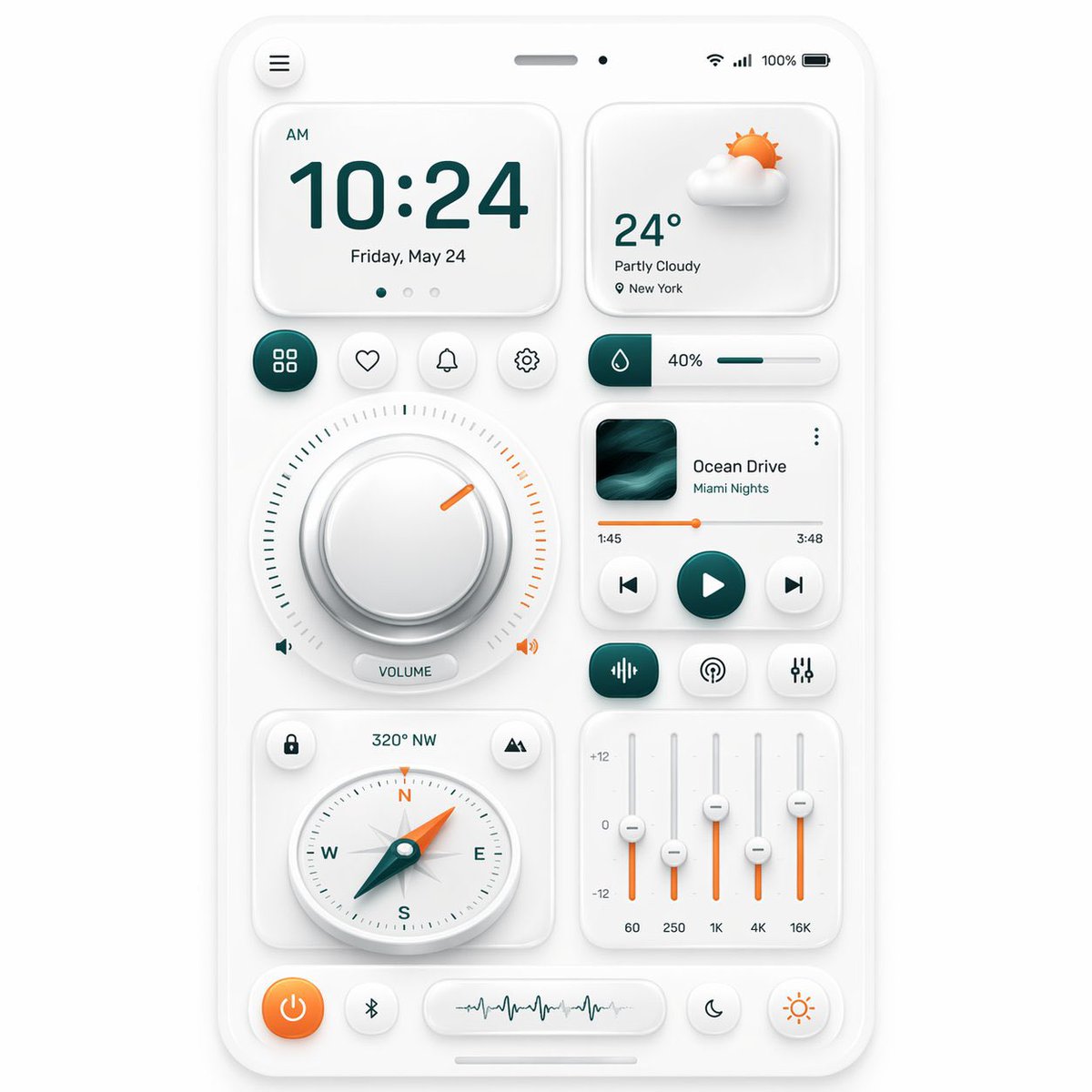
Neumorfik Mobil Kontrol Paneli Kullanıcı Arayüzü
Bu komut, kullanıcı arayüzü konsept çalışmaları, tasarım ilhamı ve uygulama prototip sunumları için ideal olan, çok sayıda bileşen içeren, akıllı telefon tarzı, şık bir neumorfik kontrol paneli oluşturur.
Bu Diğer İlham Kaynakları için bir GPT Image 2 örnek senaryosudur. Benzer görseller oluşturmak için aşağıdaki hazır metni kullanın ve yeniden kullanmadan önce Awesome GPT Image 2 Prompts atıfını ve ticari kullanım haklarını inceleyin.
Tüm komut istemi setine mi ihtiyacınız var? Şunu kullanın: Diğer İlham Kaynakları Daha fazla ilgili örnek için konu merkezini ziyaret edin veya açın. GPT Image 2 istem kataloğu Tam örnek dizin, yeniden kullanılabilir yapılar ve kaynak atfı için.
Free 1K preview
Generate one preview image instantly, no sign-up required.
3961/4000
İpucu
Kopyalamaya hazır istemi
{
  "type": "neumorphic mobile dashboard UI showcase",
  "style": {
    "theme": "clean soft neumorphism",
    "background": "light warm gray",
    "primary color": "deep teal",
    "accent color": "orange",
    "material": "matte white plastic cards with subtle inner and outer shadows, rounded corners, soft highlights",
    "rendering": "high-resolution polished 3D UI mockup, front view, centered composition"
  },
  "device": {
    "kind": "smartphone screen mockup",
    "frame": "thin white rounded bezel",
    "status bar": {
      "count": 5,
      "items": [
        "hamburger menu button at top left",
        "speaker slot at top center",
        "small front camera dot",
        "wireless signal icons at top right",
        "100% battery indicator"
      ]
    }
  },
  "layout": {
    "sections": [
      {
        "title": "clock card",
        "position": "top left",
        "count": 4,
        "labels": [
          "AM",
          "10:24",
          "Friday, May 24",
          "3 page indicator dots"
        ]
      },
      {
        "title": "weather card",
        "position": "top right",
        "count": 4,
        "labels": [
          "partly cloudy 3D sun-and-cloud icon",
          "24°",
          "Partly Cloudy",
          "New York"
        ]
      },
      {
        "title": "shortcut buttons row",
        "position": "upper middle left",
        "count": 4,
        "labels": [
          "grid/apps",
          "heart/favorite",
          "bell/notifications",
          "settings"
        ]
      },
      {
        "title": "humidity slider",
        "position": "upper middle right",
        "count": 3,
        "labels": [
          "droplet icon block",
          "40%",
          "horizontal progress bar"
        ]
      },
      {
        "title": "volume dial module",
        "position": "center left",
        "count": 5,
        "labels": [
          "large circular knob",
          "surrounding tick marks",
          "orange indicator notch",
          "left speaker icon",
          "VOLUME pill label and right speaker icon"
        ]
      },
      {
        "title": "music player card",
        "position": "center right",
        "count": 8,
        "labels": [
          "album artwork",
          "Ocean Drive",
          "Miami Nights",
          "three-dot menu",
          "1:45",
          "3:48",
          "orange progress bar",
          "previous play next controls"
        ]
      },
      {
        "title": "audio control row",
        "position": "below music player",
        "count": 3,
        "labels": [
          "equalizer/wave icon button",
          "broadcast/podcast icon button",
          "sliders/settings icon button"
        ]
      },
      {
        "title": "compass card",
        "position": "lower left",
        "count": 5,
        "labels": [
          "lock icon button",
          "320° NW",
          "mountain/location icon button",
          "round compass dial with N E S W",
          "teal needle with orange tip"
        ]
      },
      {
        "title": "equalizer card",
        "position": "lower right",
        "count": 8,
        "labels": [
          "+12",
          "0",
          "-12",
          "60",
          "250",
          "1K",
          "4K",
          "16K"
        ]
      },
      {
        "title": "bottom dock",
        "position": "bottom",
        "count": 4,
        "labels": [
          "orange power button",
          "Bluetooth button",
          "waveform display capsule",
          "two circular mode buttons: moon and sun"
        ]
      }
    ],
    "centerpiece": "a balanced grid of neumorphic widgets arranged on one smartphone dashboard"
  },
  "composition": {
    "spacing": "even margins and generous padding",
    "perspective": "straight-on",
    "shadow behavior": "very soft ambient shadows for a tactile embossed look",
    "iconography": "minimal line icons with teal and orange highlights"
  }
}
Best for
- - Diğer İlham Kaynakları visual exploration
- - Image generation and reference-image edits
- - Reusable briefs that keep source attribution visible
Change these parts
- - Subject, product, character, or scene
- - Aspect ratio, camera, lighting, and background
- - Brand, text, color, and output constraints
Recommended model and settings
- - Model: gpt-image-2
- - Input mode: Metinden görsele
- - Aspect ratio: source
- - Commercial status: review original source
How to use this prompt
- 1. Copy the prompt and preserve its structure for the first test.
- 2. Replace the subject, context, and publishing channel.
- 3. Change one camera, lighting, or style variable per iteration.
- 4. Inspect the output, source, text, and rights before reuse.
Limitations, source, and reuse cautions
- - Generated output is an editable draft, not factual, legal, or rights evidence.
- - Review the linked source, people, brands, logos, text, and third-party media before commercial use.
Awesome GPT Image 2 Prompts kaynağından içe aktarılmıştır. Kaynak belirtilmesi zorunludur. Ticari kullanım durumu allowed şeklindedir; ücretli kullanım öncesinde kaynak haklarını inceleyin.
Bu kategoride daha fazla vaka
Kategoriye, giriş modu uyumluluğuna, kaliteye ve düşük riske göre önceliklendirilmiştir.

Android Quantum Lab Workstation
Metinden görsele

Surreal 3D Chess Match Artwork
Metinden görsele

Manga Desert Radio Telescope Road Trip
Metinden görsele

Female Clown Cyborg Portrait
Metinden görsele

Imperial Research Bunker on Volcanic Planet
Metinden görsele

Greyscale Puzzle Portrait with Color Accent
Metinden görsele
Yeniden kullanım ve kaynak notları
Vaka önizlemesini yaptıktan sonra bu istemi güvenle kullanın.
- 1.Komut istemini kopyalayın veya oluşturma düğmesini kullanarak doğrudan Dovoo'da açın.
- 2.Değişkenleri, en boy oranını ve referans görselleri kendi kullanım durumunuza göre ayarlayın.
- 3.Yayınlamadan veya ücretli kullanımdan önce, kaynak haklarını, atıf gerekliliklerini ve marka veya benzerlik risklerini doğrulayın.